HD2 Series Inverter Basic Operation Guidelines
-47-
autotuning is succeeded, and then it will return to the main interface of stop. During autotuning, you
can press STOP/RST key to terminate autotuning; if any fault occurs during autotuning, the keypad
will display a fault interface.
Autotune steps:0
Autotuning parameters...
HD2
16:02:35
Forward
Local Run
Autotune steps:3
Parameters autotuned
HD2
16:02:35
Forward
Local Run
...
Back Home OK Back Home OK
Figure 5-23
Figure 5-24 Parameter autotuning
5.4.9 Backing up parameters
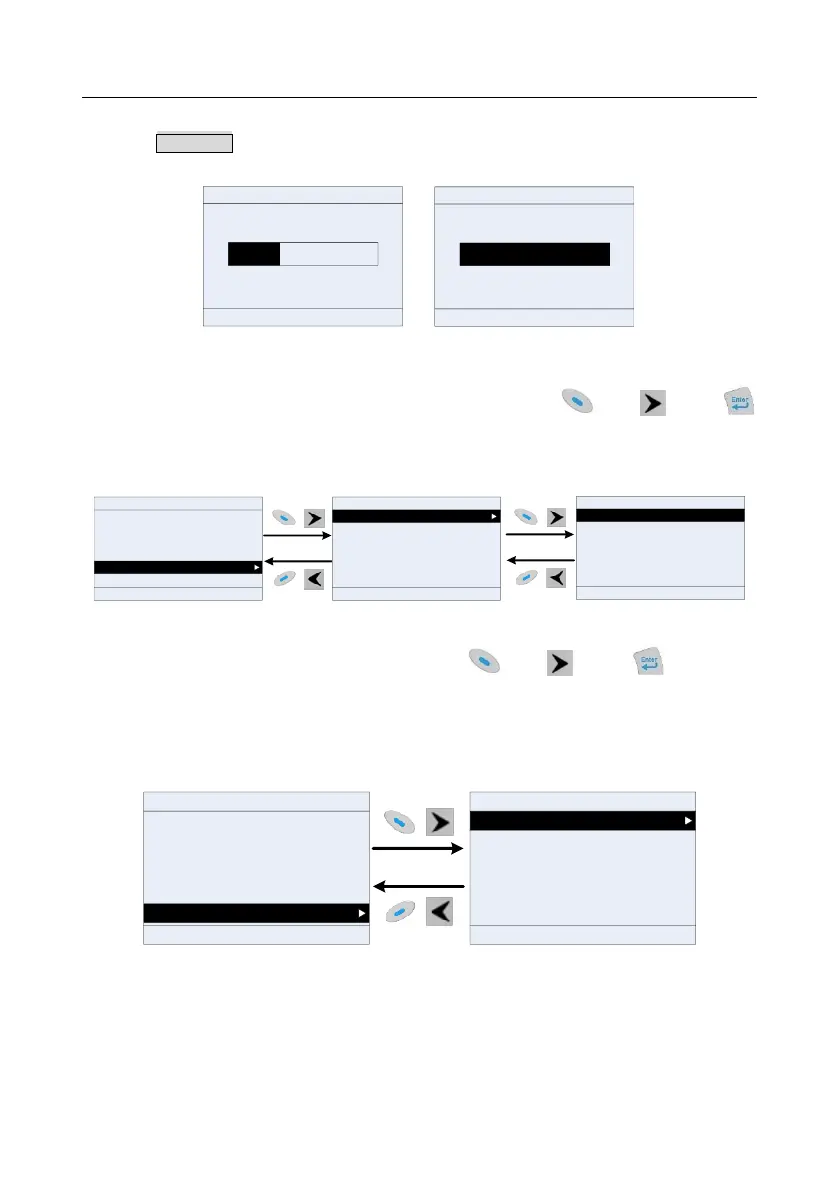
You can choose Menu > Copy parameter/Restore default, and press key, key or
key to enter the function parameter backup interface and function parameter restoration interface to
upload/download inverter parameters, or restore inverter parameters to default values. The keypad
has three different storage areas for parameter backup, and each storage area can save the
parameters of one inverter, which means the keyapd can save parameters of three inverters in total.
Upload local func para to keypad
Download all func para from keypad
Download NonMotor func para from keypad
Download motor func para from keypad
16:02:35
Fwd
Local
Ready
HD2
HD2
16:02:35
Parameter groups
User defined parameters
State monitoring
Motor parameter autotune
Copy parameter/Restore default
System settings
Fwd
Local Ready
HD2
16:02:35
MemArea 1: BACKUP01
MemArea2: BACKUP02
MemArea3: BACKUP03
Restore default (test mode)
Fwd
Local Ready
Restore default (incl motor para)
Restore default (excl motor para)
Back Home Sele Back Home OKBack Home Sele
Figure 5-25 Parameter backup
5.4.10 System settings
You can choose Menu > System settings, and press key, key or key to enter
system setting interface to
set the keypad language, time/date, backlight brightness, backlight time and restore parameters.
Note: Clock battery is not included, and the keypad time/date needs to be reset after power off. If
timekeeping after power off is needed, you should purchase the clock batteries separately.
16:02:35
Parameter groups
User defined parameters
State monitoring
Motor parameter autotune
Copy parameter/Restore default
System settings
Fwd
Local Ready
Back Home Sele
HD2
16:02:35
Language
Time/date
Backlight brightness
Backlight time
Fwd Local Ready
Enable power-on setup wizard
Power-on setup wizard
Back Home Sele
HD2
Figure 5-26 System setting diagram
5.4.11 Power-on setup wizard
The keypad supports the power-on setup wizard function, mainly for the first power-on situation,
instructing you to enter the setting menu, and gradually implementing basic functions such as basic
parameter setting, direction judgment, mode setting and autotuning.
For first power-on, the keypad automatically enters the setup wizard interface. See the following.



 To Next Page