HD2 Series Inverter Basic Operation Guidelines
-44-
HD2
16:02:35
Stopped-state parameters
Running-state parameters
HD2
16:02:35
Sure to add to Stopped-state
parameters?
Fwd
Local Ready
Fwd
Local Ready
16:02:35
P17.01:OutpFreq
P17.00:Set Freq
P17.11:DC Bus Volt
P17.03:Outp Volt
P17.04:Outp Cur
P17.05:Motor Speed
Fwd
Local
Ready
HD2
Back Add OK Back Home Sele Back Home OK
HD2
16:02:35
Stopped-state parameters
HD2
16:02:35
Sure to add to Running-state
parameters?
Fwd
Local Ready
Fwd
Local Ready
16:02:35
P17.01:OutpFreq
P17.00:Set Freq
P17.11:DC Bus Volt
P17.03:Outp Volt
P17.04:Outp Cur
P17.05:Motor Speed
Fwd
Local
Ready
HD2
Back Add OK Back Home Sele Back Home OK
Running-state parameters
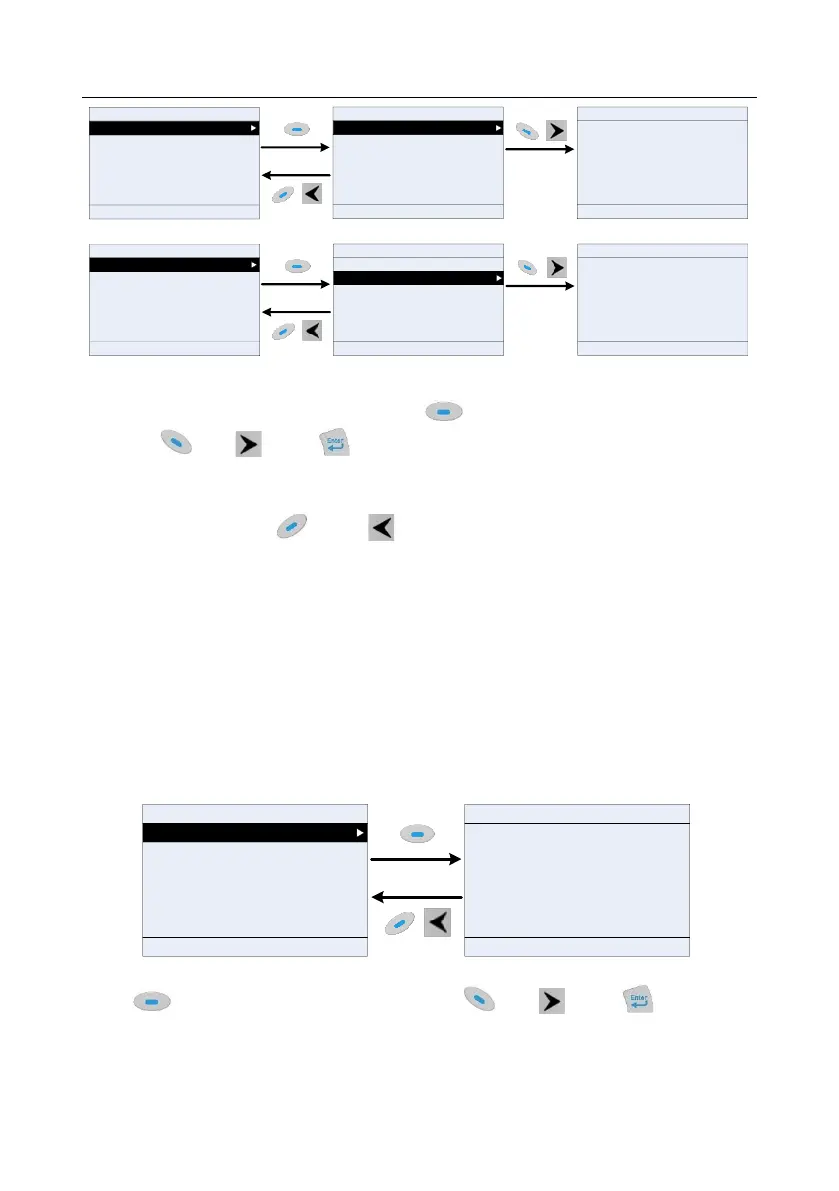
Figure 5-17 Adding parameter diagram 1
Aftering selecting a specific function code, press key to enter parameter addition interface,
and press key, key or key to confirm the addition operation. If this parameter is not
included in the list of parameters displayed in stopped state or list of parameters displayed in running
state, the parameter added will be at the end of the list; if the parameter is already in the list of
parameters displayed in stopped state or list of parameters displayed in running state, the addition
operation will be invalid. If key or key is pressed without selecting addition operation in
"Addition" interface, it will return to monitoring parameter list menu.
Part of the monitoring parameters in P07 HMI group can be added to the "parameter displayed in stop
state" list or "parameter displayed in running state" list; All the parameters in P17, P18 and P19 group
can be added to the "parameter displayed in stop state" list or "parameter displayed in running state"
list.
Up to 16 monitoring parameters can be added to the list of parameters displayed in stopped state;
and up to 32 monitoring parameters can be added to the list of parameters displayed in running state.
5.4.4 Adding parameters to the user defined parameter list
You can choose Menu > Parameter groups, choose a submenu, and enter a specific function group
and then a specific function code to add the parameter to the user defined parameter list.
16:02:35
Forward
Local
Ready HD2
P01.00:StartRun Mode
P01.01:DirectStart Freq
P01.02:StartFreq HoldTime
P01.03:Prestart BrakeCur
P01.04:Prestart BrakeTime
P01.05:Acc/Dec Mode
HD2
16:02:35
Sure to add to user defined
parameters?
Forward Local Ready
Back Add Sele Back Home OK
Figure 5-18 Add parameter diagram 2
Press key to enter addition interface, and press key, key or key to confirm
the addition operation. If this parameter is not included in the original user defined parameter list, the
newly added parameter will be at the end of the list; if this parameter is already in the user defined



 To Next Page