Chapter 6 FBD Block Diagram Programming 150
Logic Block Instructions
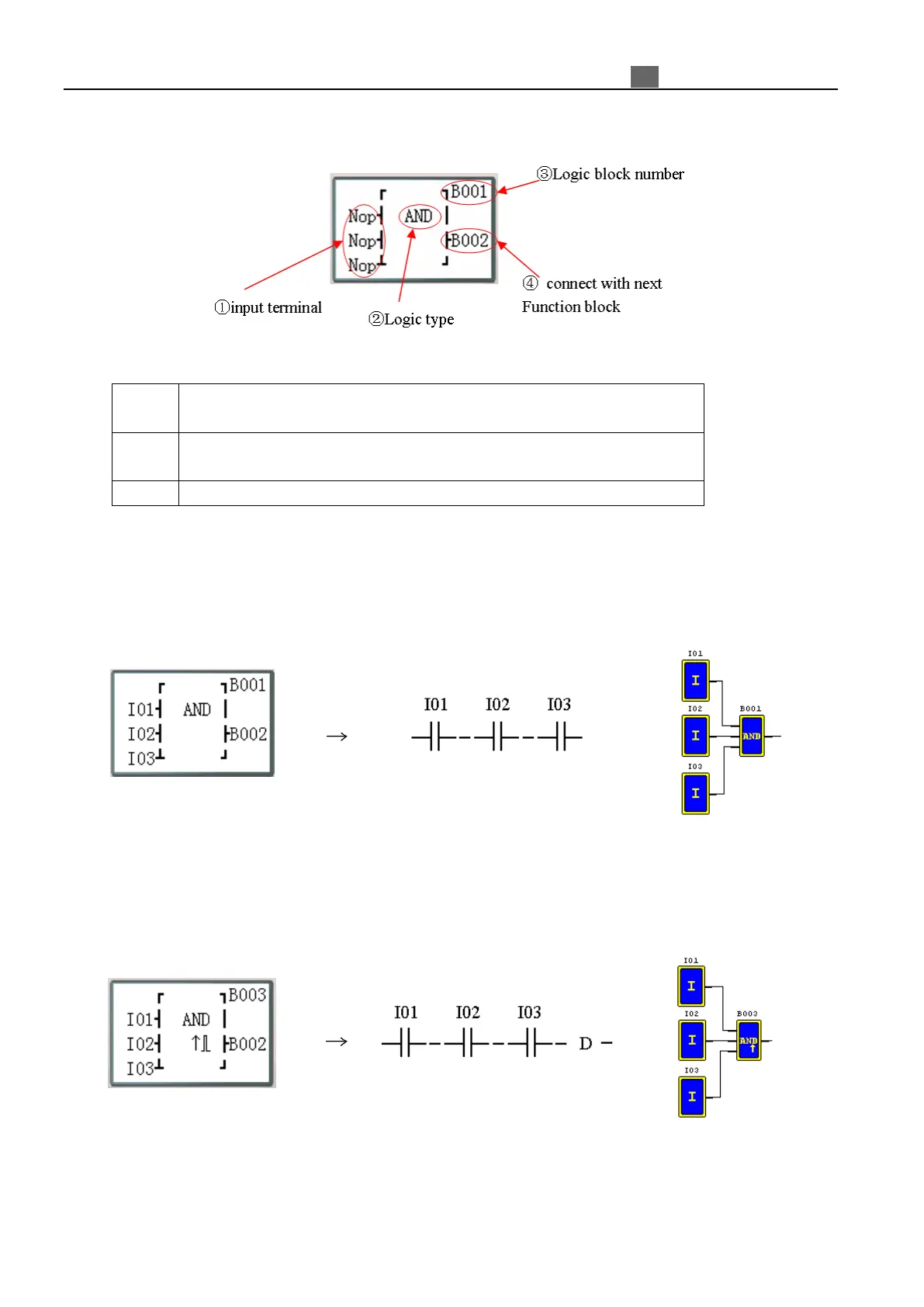
Logic blocks display in FBD:
Press the button:
Move cursor: input terminals
①
③
connected block or coil
Move cursor: Logic block number
③
①
Logic/Function display (input terminal is block)
Move cursor up or down (when multiple input terminals)
※ Logic Block include: AND, AND EDGE, NAND, NAND EDGE, OR, NOR, XOR, NOT, RS, PULSE,
BOOLEAN.
AND Logic Diagram
=
Note: The input terminal is NOP which is equivalent to ‘‘Hi”;
The B output ON when all input terminals status are ON;
AND (EDGE) Logic Diagram
=
I01 And I02 And I03 And D
Note: The input terminal is NOP which is equivalent to ‘‘Hi”;
The B output ON a scan cycle time when all input terminals status are ON;



 To Next Page