Chapter 3 Program Tools 35
Line Comments
T
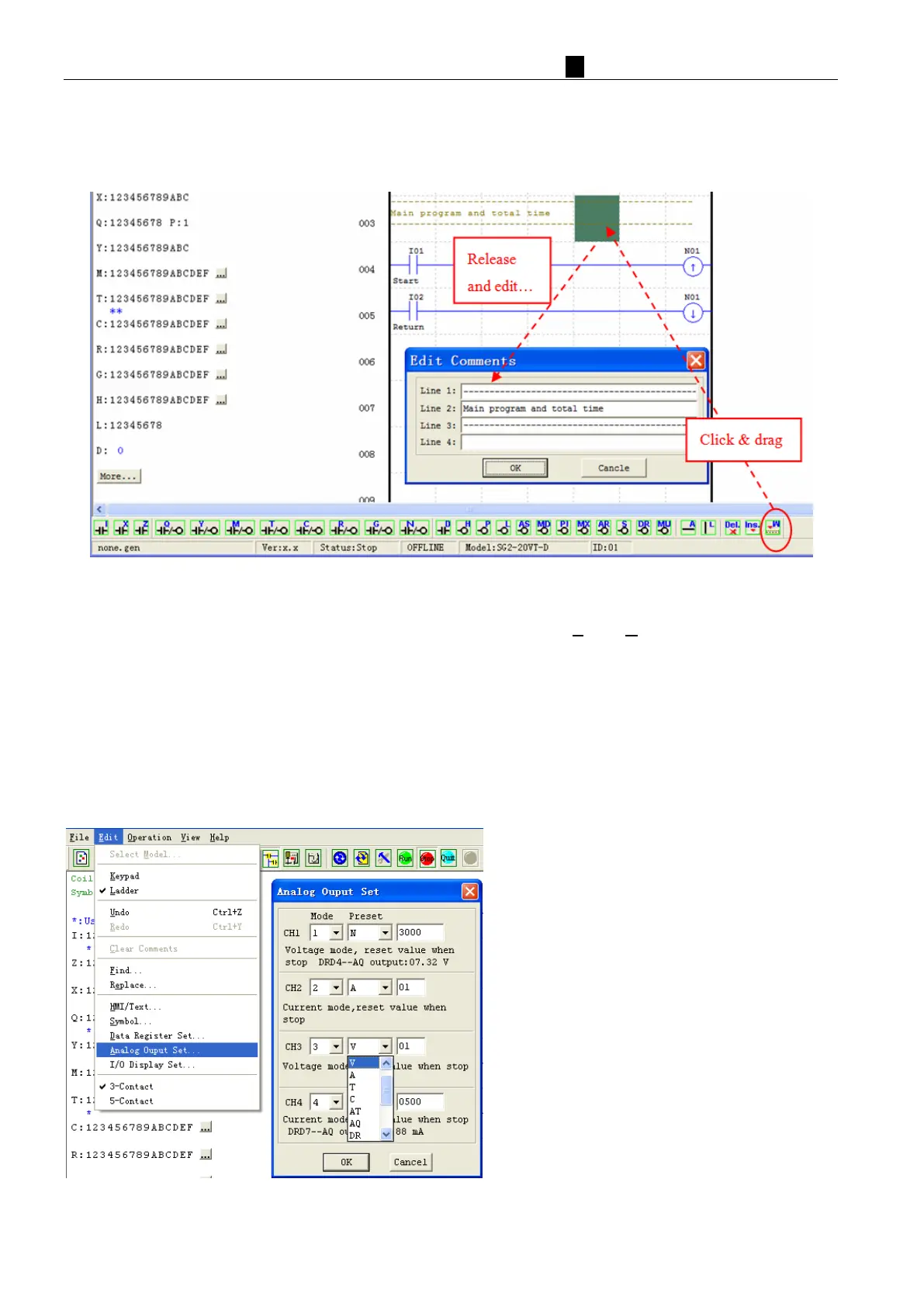
he Line Comment editor is accessed by clicking the “W” icon on the Ladder Toolbar. After clicking on the “W”
icon, to drag the line number you want to comment and release, and then type the desired comments and press OK.
Analog Output Set…
The AQ editing environment can be access through the menu using the Edit>> Analog Output Set… selection
shown below. CH1~CH4 correspond to analog output AQ01~AQ04.
The range is 0~4095 if the output mode is voltage mode.
The range is 0~2047 if the output mode is current mode.
The preset value of AQ can be set as either a constant or a code of other data. The output mode of AQ and preset
value are set as below. More information about output mode and displaying to see: Chapter 4: Relay Ladder Logic
Programming-AQ (Analog Output).
AQ output mode (current or voltage) depends on the current value of DRD0~DRD3 register. The current value
of DRD4~DRD7 decides the AQ output value!



 To Next Page