Chapter 3 Program Tools 23
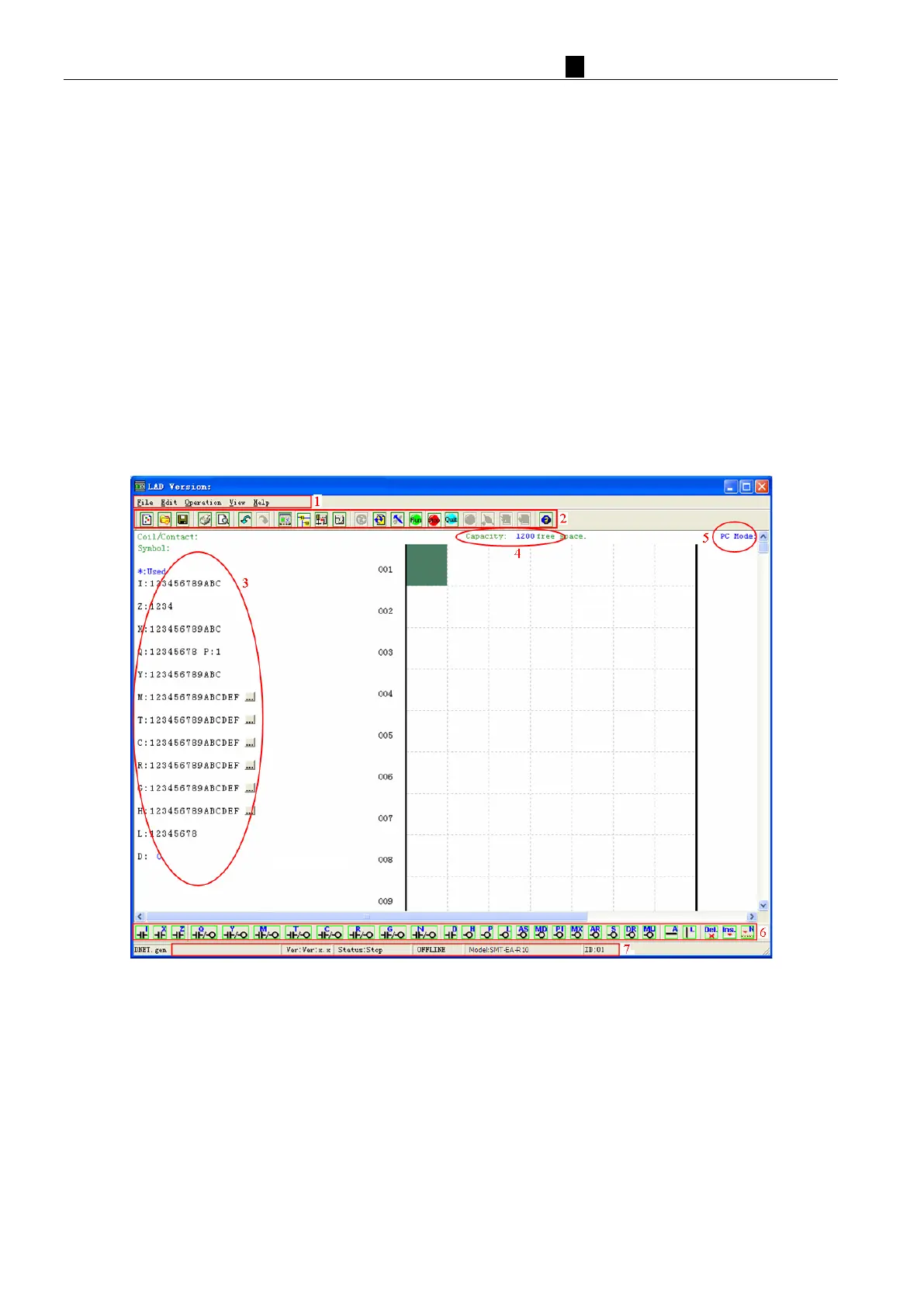
Menus, Icons and Status Bar
The
Ladder programming environment includes the following Menus, Icons and Status Displays
1. Menu bar – Five menu selections for program development and retrieval, editing, communication to connected
controllers, configuration of special functions and viewing preference selections.
2. Main Toolbar – (From Left to Right)
Icons for create a new program, open a program, save a program and print a program.
Icons for Keypad, Ladder view, HMI/Text edit and Symbol (comments) edit.
Icons for Monitor, Simulator, Simulator Controller, Controller Mode changes (Run, Stop, and Quit), and
Read/Write programs from/to the iSmart smart relay.
3. Usage List – List for all memory types and addresses used with the current open program. Used addresses are
designated by a “*” symbol below each address.
4. Amount of free programming memory available.
5. Current Mode – Program mode, Simulator mode, Monitor mode.
6. Ladder Toolbar – Icons for selecting and entering all available Ladder Logic instructions.
7. Status Bar – Status of current open project and connect iSmart smart relay.



 To Next Page