Chapter 8 20 Points RS485 type Models Instruction 204
Only SMT-CD-R20-V4, SMT-CD-T20-V4 -do have RS485 communication function.
Communication function
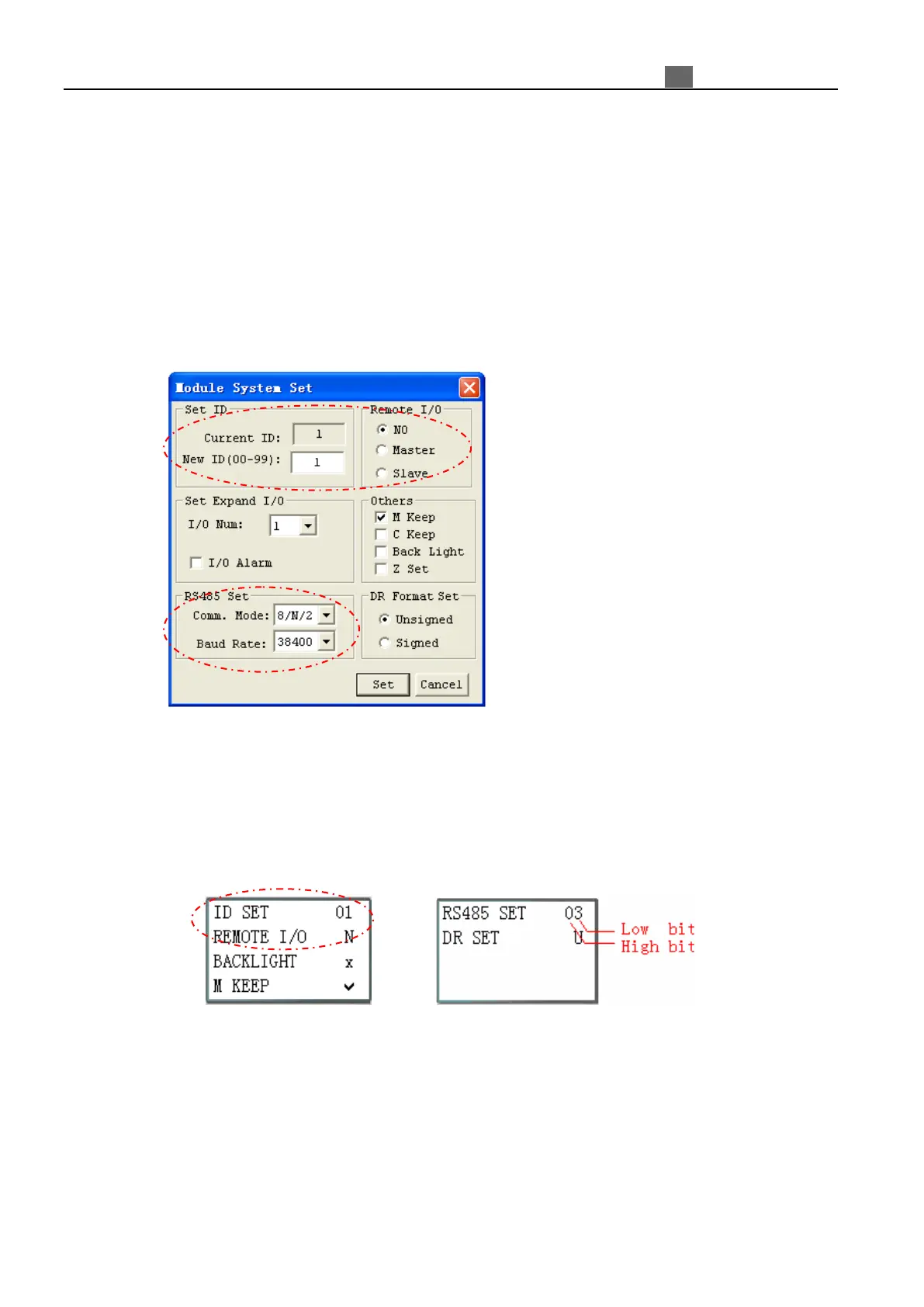
There are many parameters needed to be set before user uses the RS485 communication function. And there are
two ways to set that parameter.
●. Setting parameters via SMT Client software:
1. In SMT Client Soft Select Operation>>Module System Set;
2. Open the dialog box as show below, setting parameters SET ID, Remote I/O and RS485 Set.
●. Setting parameters via keypad button on iSmart.
1. Press button to enter main menu.
2. Press UP/DOWN to choose SET menu and press OK to enter it.
3. Press UP/DOWN makes the LCD to display the options as show below, setting parameters ID SET, REMOTE
I/O and RS485 SET.
4. Parameter RS485 SET, high bit means communication format and low bit means Baud Rate.
5. Press OK button to save setting.



 To Next Page