Chapter 3 Program Tools 30
HM
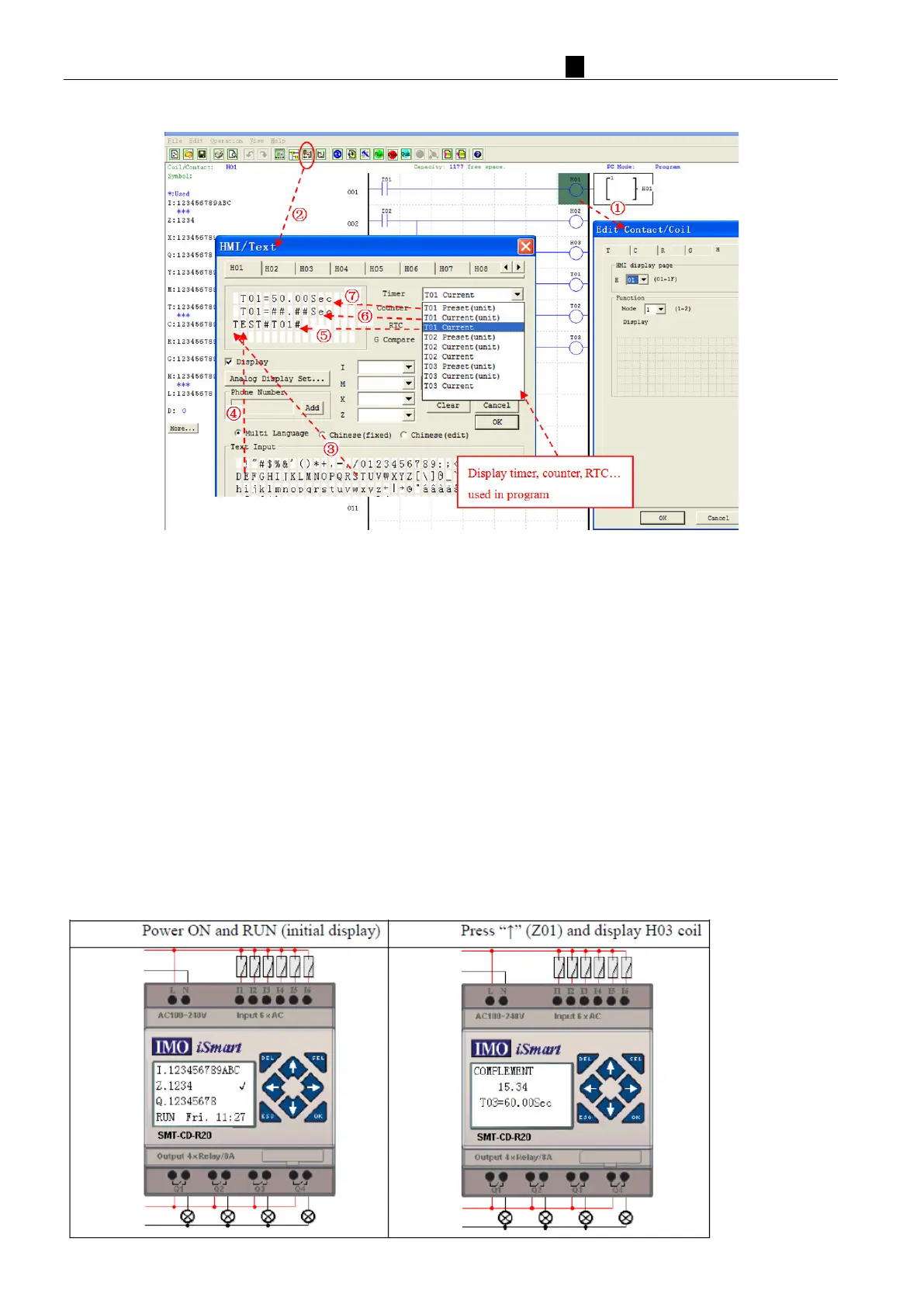
I/TEXT setting (step 1~7):
① En
ter H01 coil
② Into HMI/TEXT edit frame
③ Choice the “T”
④ Choice the “E”
⑤ Choice T01 current
⑥ Choice T01 current (unit)
⑦ Choice T01 present (unit), user can modify T01 preset value when H coil enable and display on LCD.
Download to iSmart, and I01 turn ON, or press “SEL” if the H coils is set to mode 1, then the iSmart LCD w
ill
di
splay the first H text as shown below.
Ⅰ , Press “Ⅰ ” or “Ⅰ ” t o choos e t he near es t H coi l
Ⅱ
, Press “SEL”+“↑” or “↓”and “OK” update T01 preset value (In this example, 050.0 can update, T01
preset value depends on HMI/TEXT edit frame setting.)
HMI/TEXT Example:



 To Next Page