iPECS UCP
Hardware Description and Installation Manual Issue 1.3
107
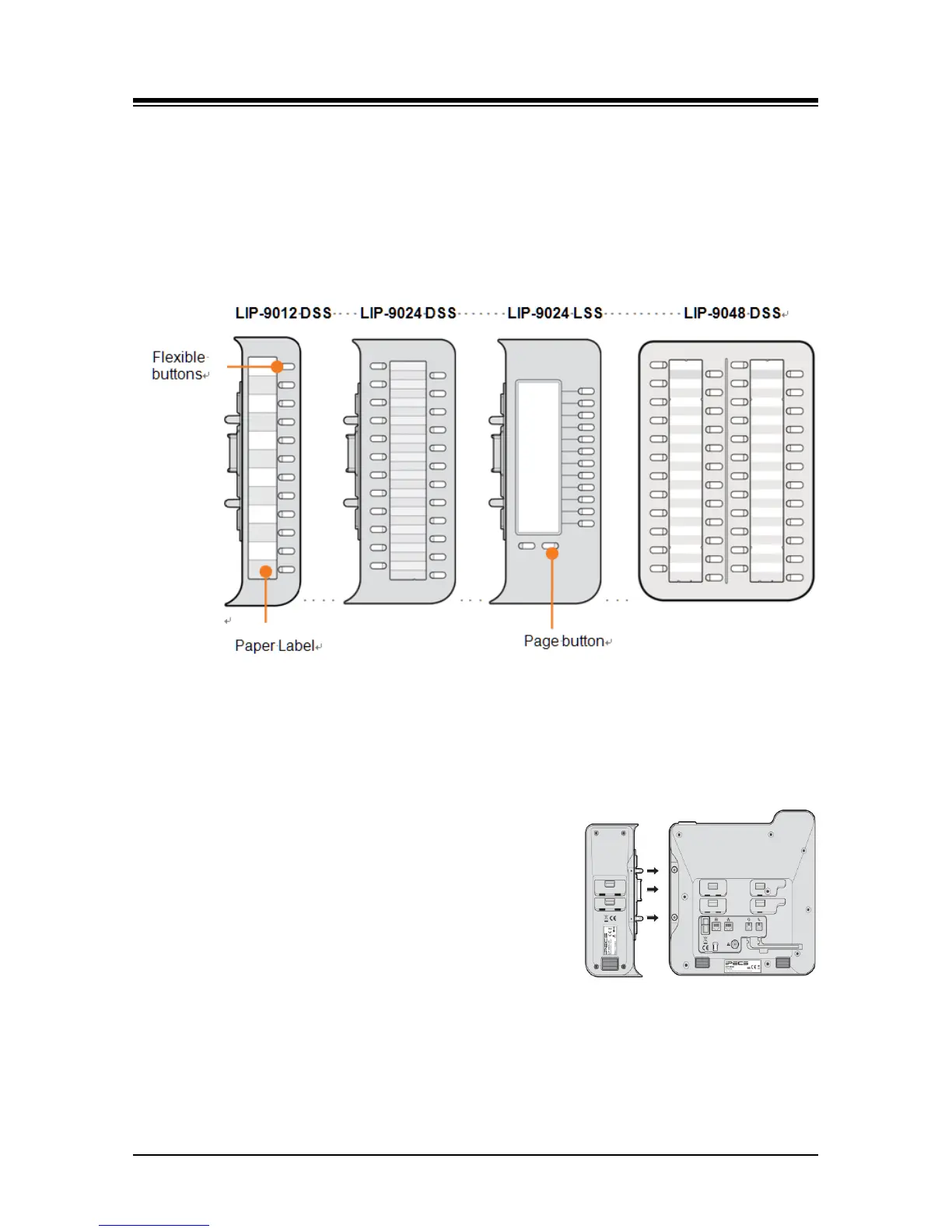
an LCD for the button labels and has two flexible button pages to represent 24
total flexible buttons. The two lower buttons control the page view. The page
button LED will flash when there is new activity under a button on the page. You
can press the page button at any time to change the flexible button page view.
LIP-9048 DSS has 48 flexible buttons with tri-color LED. The DSS uses a paper
label for the button designations.
Figure 7.1.4-1 LIP-9000 DSS and LSS
The Button kit should be installed on the phone prior to making any connections to the phone.
This simplifies the installation.
To install the button kit for the LIP-9012 DSS, LIP-9024 DSS and LIP-9024 LSS
1. First, assure the phone is NOT connected to power.
For convenience, you may wish to remove the
handset and foot-stand; this simplifies the Button kit
installation.
2. On the right side of the phone, remove the Button kit
cover.
3. Align the Button kit and phone as shown in the
drawing.
4. Push the Button kit into the phone until the button kit is
fully engaged.
5. Insert the screws provided through the screw tabs in the Button kit and tighten the
screws into the phone. Do not over-tighten.



 To Next Page