iPECS UCP
Hardware Description and Installation Manual Issue 1.3
109
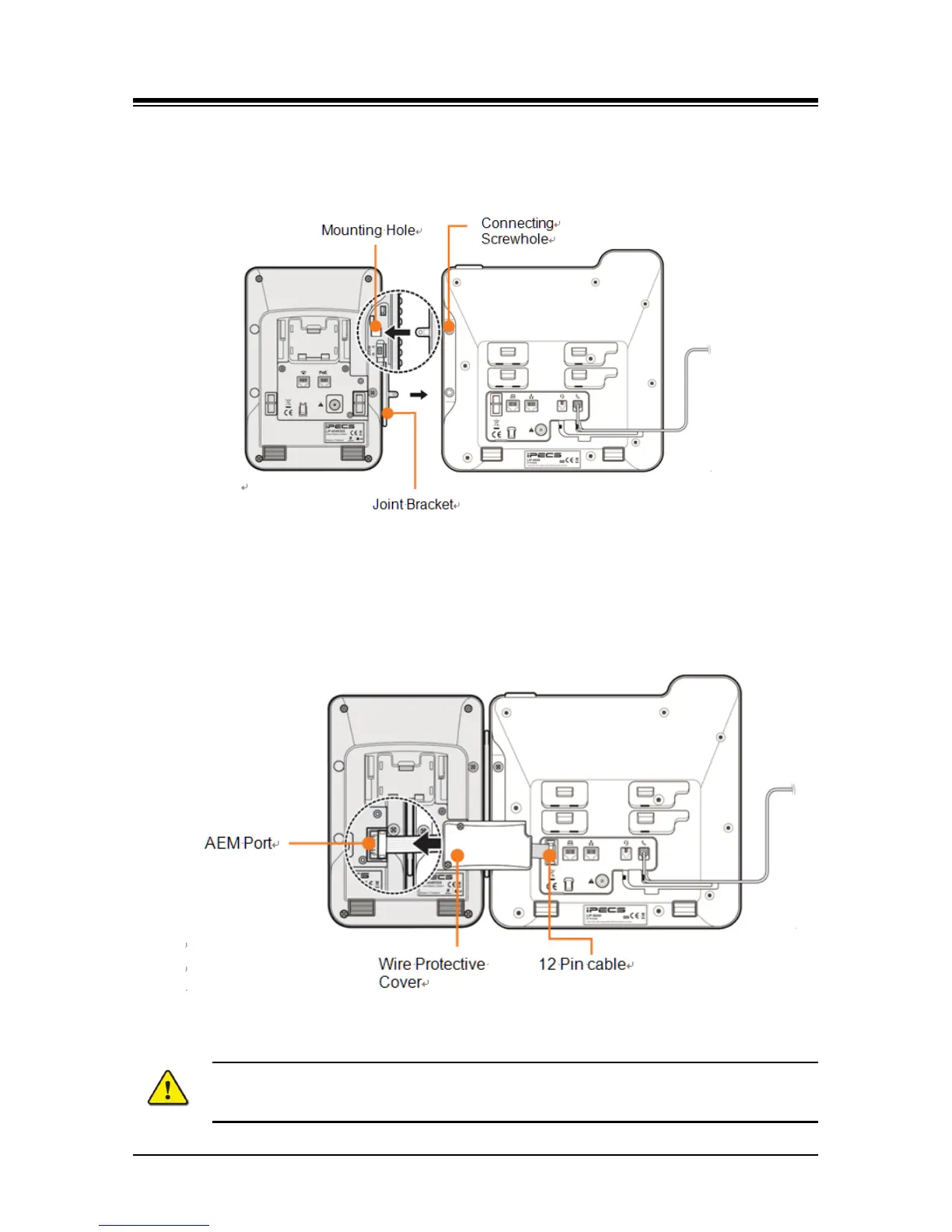
3 And insert the other side of the Joint Bracket into the mounting holes on the side of your
phone.
4 Use the provided screws to connect the LIP-9048 DSS and phone firmly together.
5 At the back of LIP-9048 DSS and phone, remove the rubber plug from the Accessory
Expansion Module (AEM) port.
6 Plug the 12-Pin cable into the AEM port on LIP-9048 DSS and phone.
7 Place the Wire Protective Cover behind the LIP-9048 DSS and align the screw holes with
the Wire Protective Cover screw holes on LIP-9048 DSS.
8 Tighten the screw to secure the Wire Protective Cover.
See Button kit for the LIP-9000 Series or LIP-9048DSS Quick Installation Guide for more detailed
instruction.
Caution!
To avoid damaging the Phone or Button kit, remove power from the phone before
installing a Button kit.



 To Next Page