iPECS UCP
Hardware Description and Installation Manual Issue 1.3
57
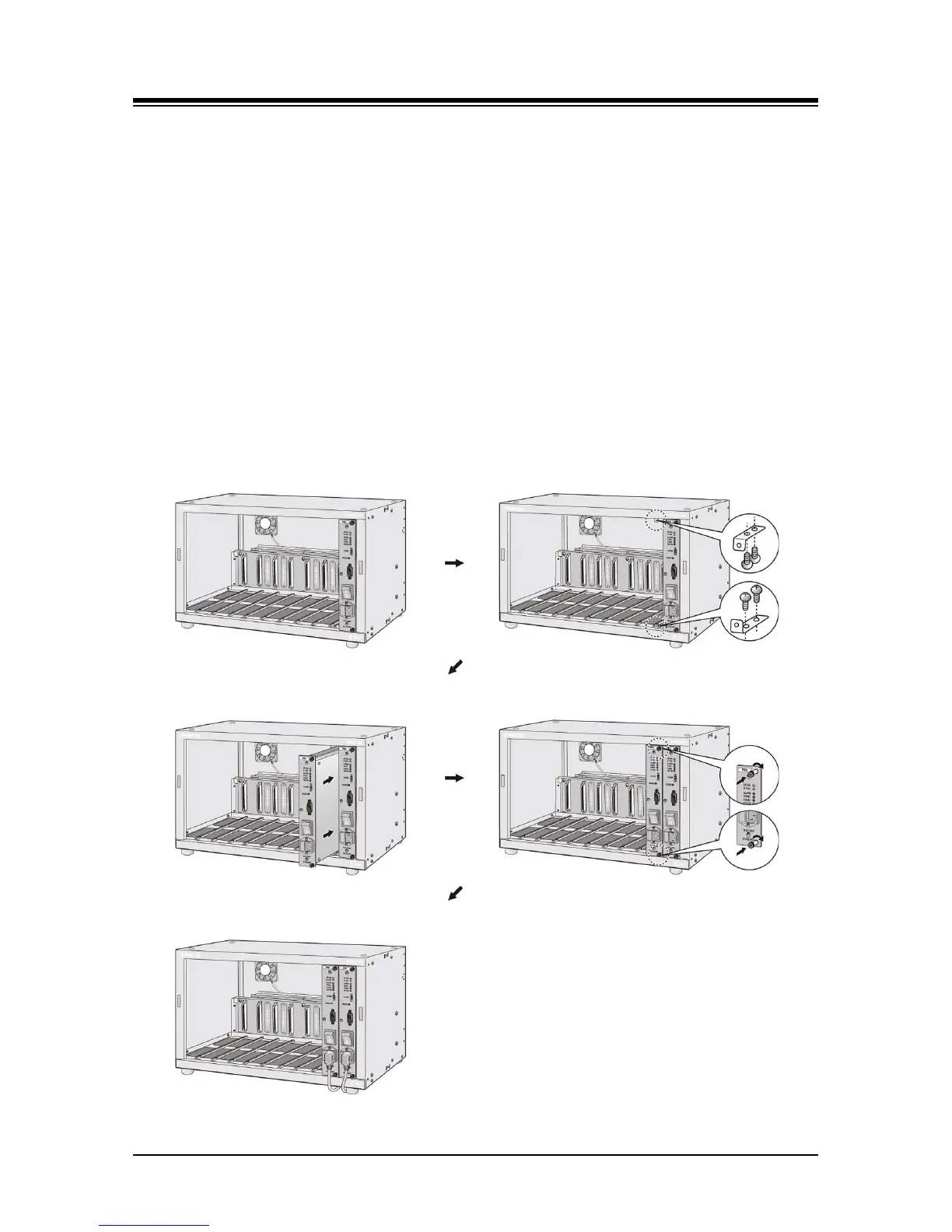
The back-up PSU for power redundancy is installed as described below and shown in Figure 5.3-
2.
1. Complete installation of the Main PSU as described above.
2. Using the screws provided, install the upper and lower PSU thumbscrew brackets to the
right of the slot 9 slides as shown in Figure 5.3-2.
3. Slide the back-up PSU into slot 9 of cabinet fully engaging the back-panel connector.
4. Fasten the PSU by tightening the upper and lower thumbscrews on the front of PSU into
the installed brackets.
5. Plug the power cord into AC power input on the front of PSU.
6. To activate monitoring of the PSU and Main Cabinet fans, connect the supplied serial
cable from the DB9 connector of the PSU to the monitoring gateway Module defined in
the System Data Cabinet Attributes. Refer to Figure 5.3-3. When a back-up PSU is
installed, the serial cable is connected to the back-up PSU only. Note that when
employing a WTIM as the notifying gateway Module, Dipswitch 3 of the WTIM, the Serial
Mode switch, must be set to OFF.
Figure 5.3-2 Back-up PSUs Installation



 To Next Page