Section 3 - Maintenance
Routine Maintenance
Engine
3 - 37 3 - 37
9803/9450-1
Changing the Coolant
1 Park the machine on level ground. Stop the engine
and let it cool down. Open the engine compartment
top cover.
Fig 21.
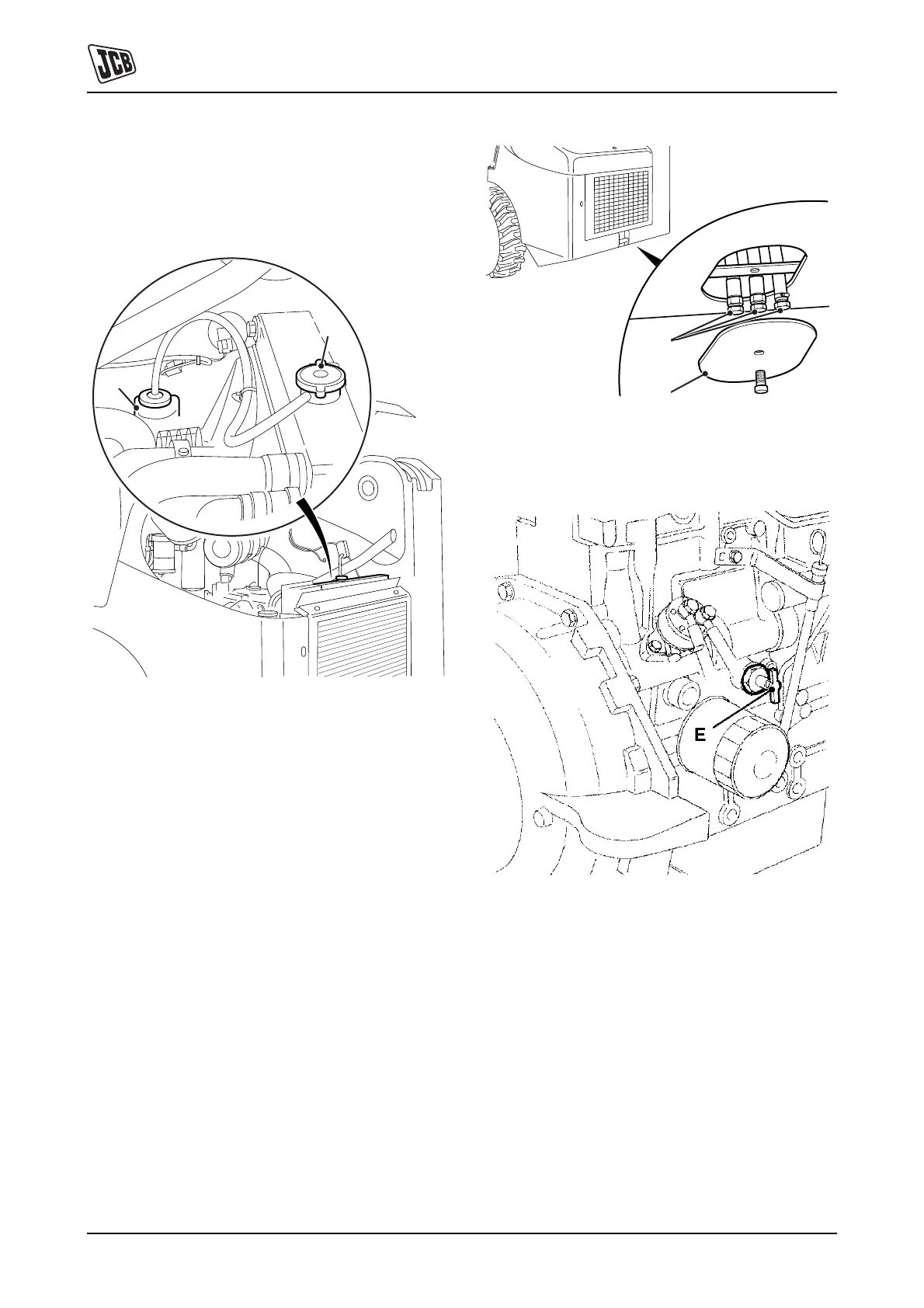
2 Carefully loosen the radiator filler cap B just enough
to let any pressure escape. Remove the cap when all
pressure is released.
3 Remove the access plate C at the back of the
machine to expose the drain plug.
Note: There are three drain plugs D located behind the
access plate. The engine coolant oil drain is the one which
is coloured BLUE.
4 Taking care to select the correct one of the three drain
plugs D, remove the plug to allow coolant to flow into
the container.
Fig 22.
5 Unscrew the cylinder block drain tap E.
Fig 23.
6 Flush the system by pouring in clean water at the
radiator filler cap.
7 Clean and refit drain plug D and tighten cylinder block
drain tap E.
A
B
C
D



 To Next Page