EasyManua.ls Logo

Kyocera TASKalfa 255 - Page 136

Kyocera TASKalfa 255
360 pages
Print Icon
To Next Page IconTo Next Page
To Previous Page IconTo Previous Page
Loading...
Copying > Copying Functions
4-10
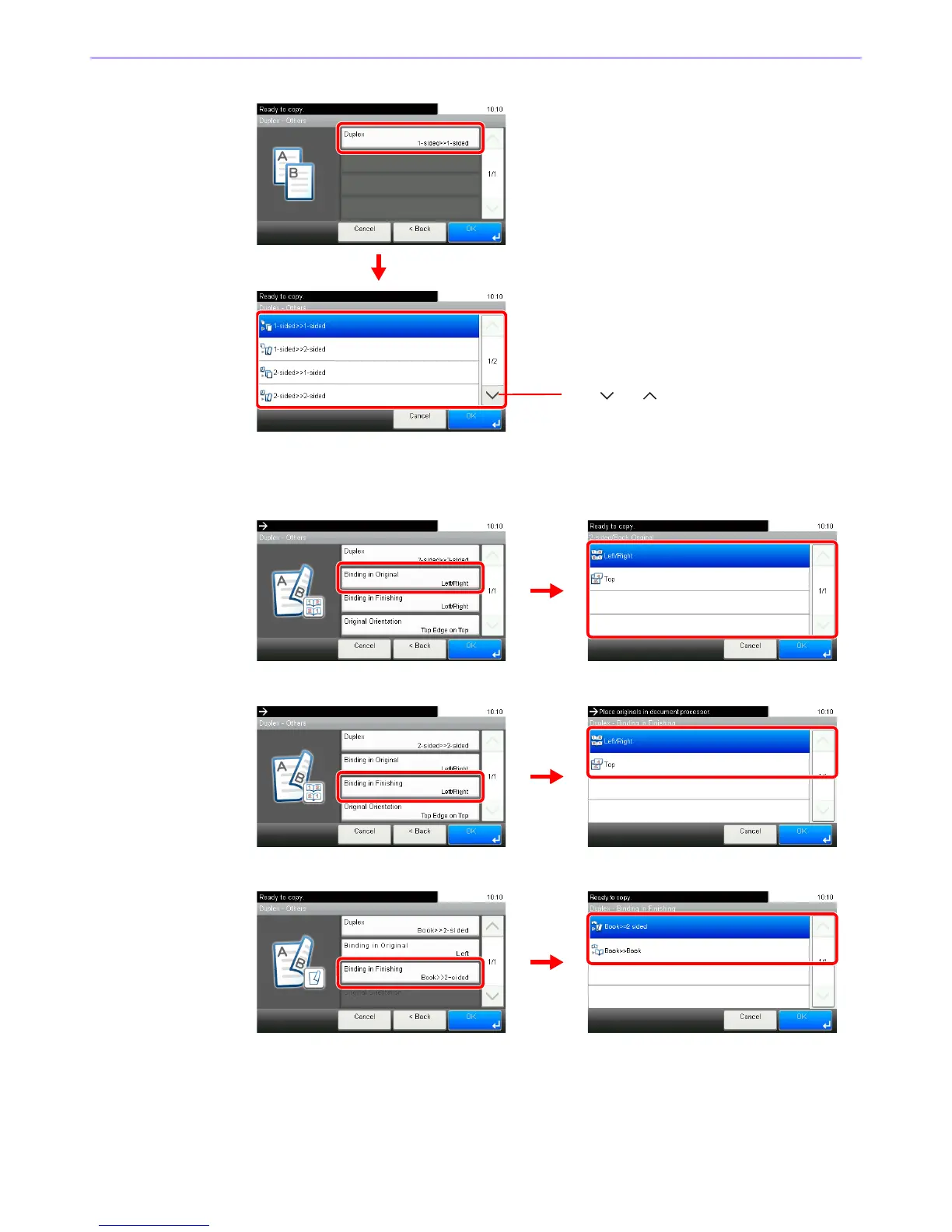
2 Select the desired Duplex option.
If you choose a 2-sided sheet or book, proceed to Step 3. If you choose duplex, proceed to
Step 4. If you choose [Book >> 2-sided], proceed to Step 5.
3 Select the binding edge of the originals.
4 Select the binding edge of the finished copies.
5 Select the binding edge of the finished copies.

GB0010_00
GB0024_00
1
2
Use [ ] or [ ] to scroll up and down.
GB0010_01
GB0181_00
1
2
GB0010_01
GB0012_00
1
2
GB0010_02
GB0012_01
1
2

Table of Contents

Other manuals for Kyocera TASKalfa 255

Related product manuals