C
HAPTER
4
| Configuring the Switch
Quality of Service
– 200 –
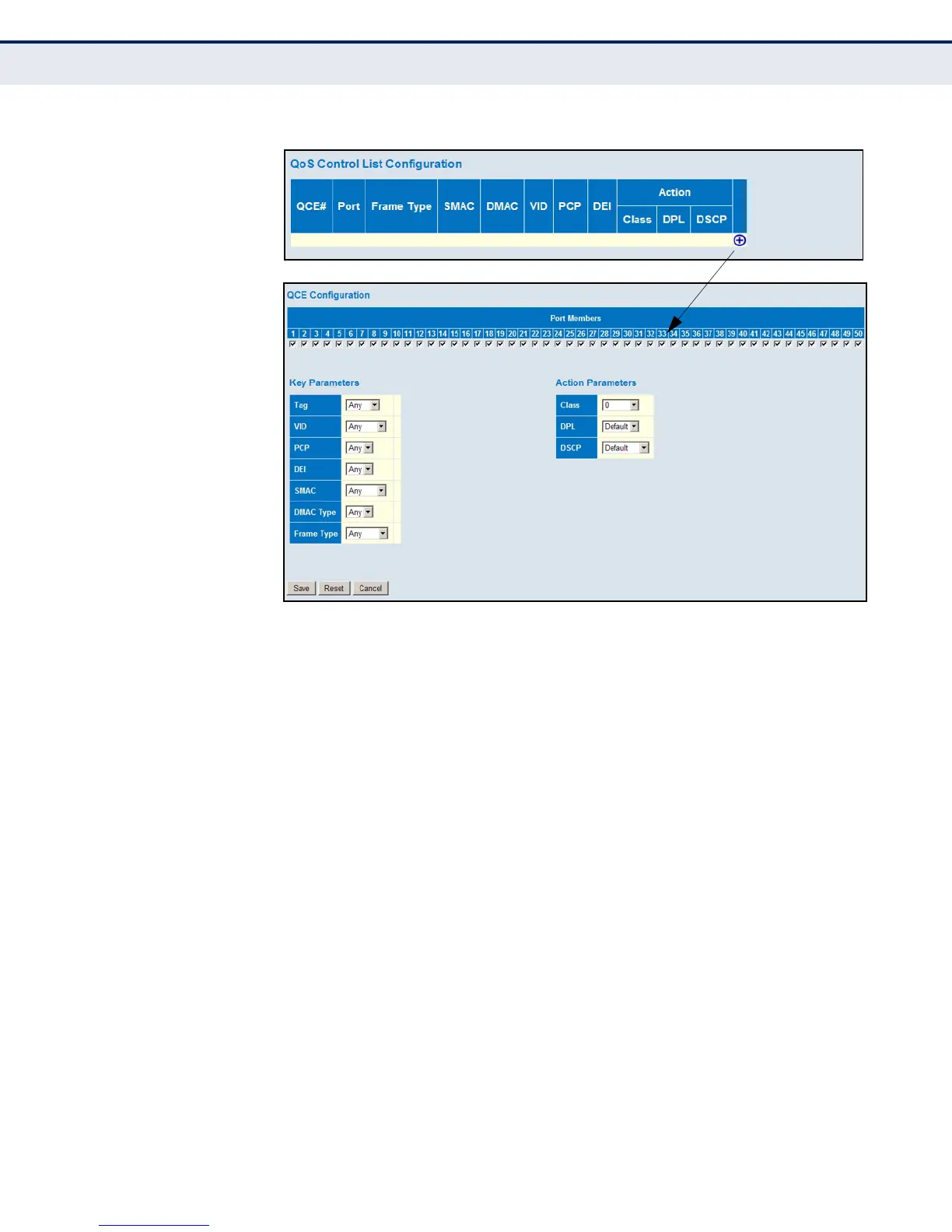
Figure 84: QoS Control List Configuration
CONFIGURING STORM
CONTROL
Use the Storm Control Configuration page to set limits on broadcast,
multicast and unknown unicast traffic to control traffic storms which may
occur when a network device is malfunctioning, the network is not properly
configured, or application programs are not well designed or properly
configured. Traffic storms caused by any of these problems can severely
degrade performance or bring your network to a complete halt.
You can protect your network from traffic storms by setting a threshold for
broadcast, multicast, or unknown unicast traffic. Any packets exceeding
the specified threshold will then be dropped.
PATH
Configuration, QoS, Storm Control
PARAMETERS
These parameters are displayed:
◆ Frame Type - Specifies unicast, broadcast, or unknown (flooded) traffic.
◆ Enable - Enables or disables storm control. (Default: Disabled)
◆ Rate - The threshold above which packets are dropped.
(Range: 100-1000000 kbps or fps, 1-13200 Mbps or kfps;
Default: 500)













 To Next Page