C
HAPTER
5
| Monitoring the Switch
Displaying Information on RMON
– 246 –
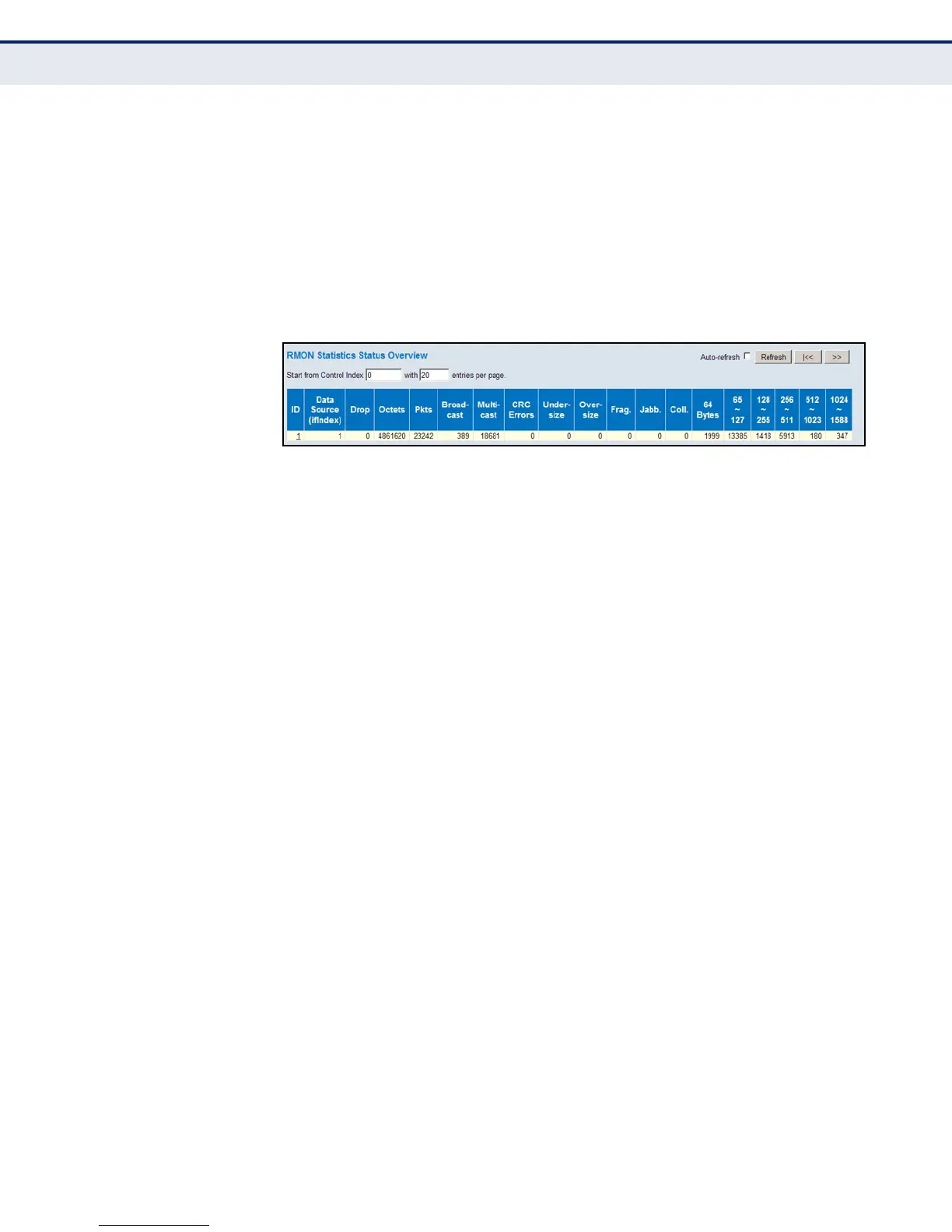
◆ 64 Bytes – The total number of packets (including bad packets)
received that were 64 octets in length.
◆ x ~ y – The total number of packets (including bad packets) received
that were between x to y octets in length.
WEB INTERFACE
To display RMON statistics, click Monitor, Security, Switch, RMON,
Statistics.
Figure 117: RMON Statistics
DISPLAYING RMON
HISTORICAL SAMPLES
Use the RMON History Overview page to view statistics on a physical
interface, including network utilization, packet types, and errors.
PATH
Monitor, Security, Switch, RMON, History
PARAMETERS
These parameters are displayed:
◆ History Index – Index of History control entry.
◆ Sample Index – Index of the data entry associated with the control
entry.
◆ Sample Start – The time at which this sample started, expressed in
seconds since the switch booted up.
◆ Utilization – The best estimate of the mean physical layer network
utilization on this interface during this sampling interval, in hundredths
of a percent.
For a description of the other statistical parameters not included in this list,
see "Displaying RMON Statistics" on page 245.













 To Next Page