3-93
2.14 CAP WITH LOCK
• Use the starter switch key to open and close the locks on the
caps and covers.
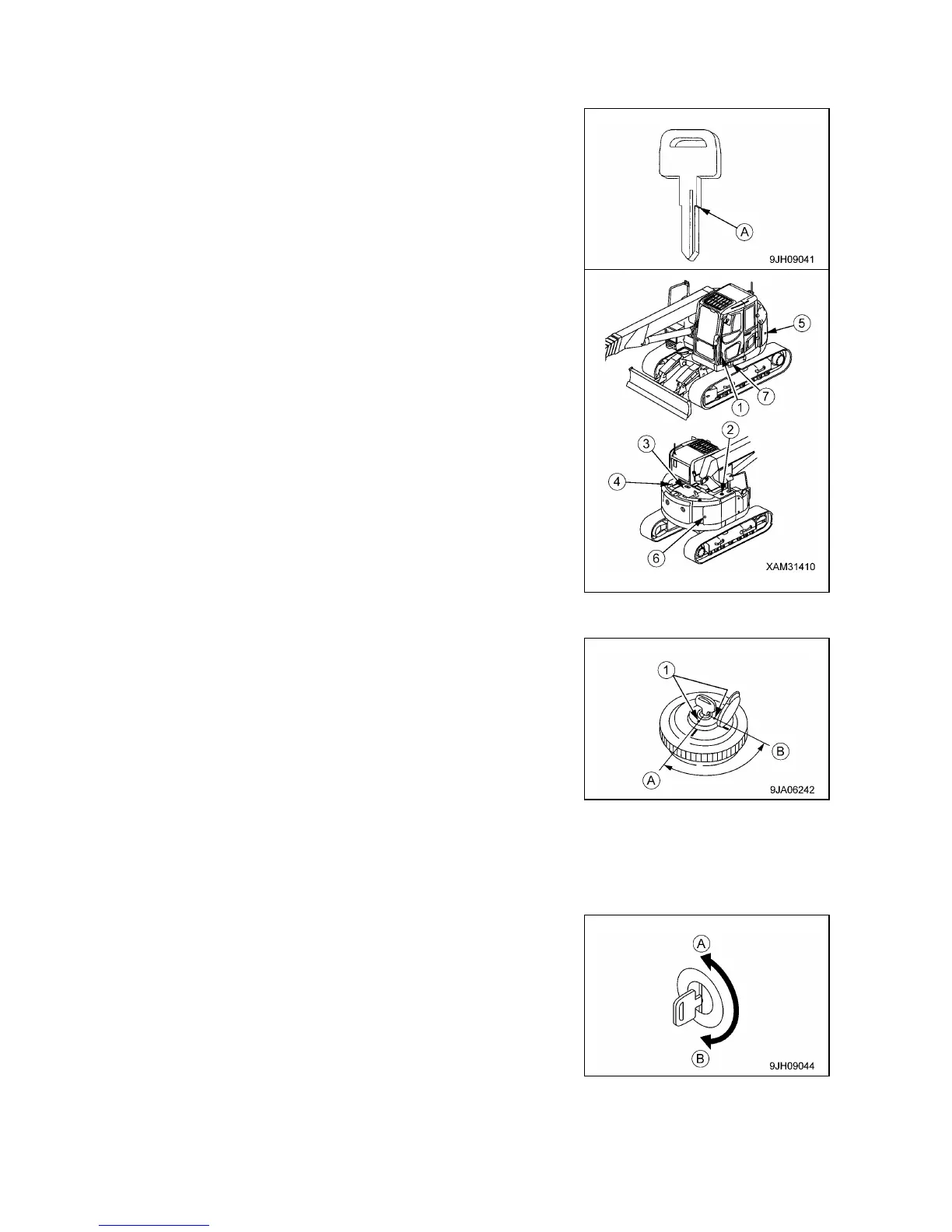
• Insert the key as far as it will go to the shoulder (A). If the key is
turned before it is inserted all the way, it may break.
• Locations of the caps and covers with lock, shown in the diagram
on the right.
(1) Door of operator‟s cab
(2) Fuel tank filler port
(3) Engine hood
(4) Cover at rear of cab
(5) Battery room door
(6) Pump room door
(7) Door at front of tool box
[1] OPENING AND CLOSING CAPS WITH LOCK (For fuel tank filler port)
[Opening the Cap]
1. Insert the starter switch key into the key slot.
2. Turn the key clockwise, align the key groove with mark (1) on
the cap, then open the cap.
Position (A): OPEN
Position (B): LOCK
[Locking the Cap]
1. Turn the cap until tight, and then insert the starter switch key into
the key slot.
2. Turn the key to LOCK position (B), and then remove the key.
[2] OPENING AND CLOSING COVERS WITH LOCK
[Opening the Cover]
1. Insert the starter switch key into the key slot.
2. Turn the key counterclockwise and open the cover by pulling the
cover grip.
Position (A): OPEN
Position (B): LOCK
[Locking the Cover]
1. Close the cover and insert the starter switch key into the key
slot.
2. Turn the key clockwise and take the key out.



 To Next Page