3-145
3.14 WORKING MODE OPERATION
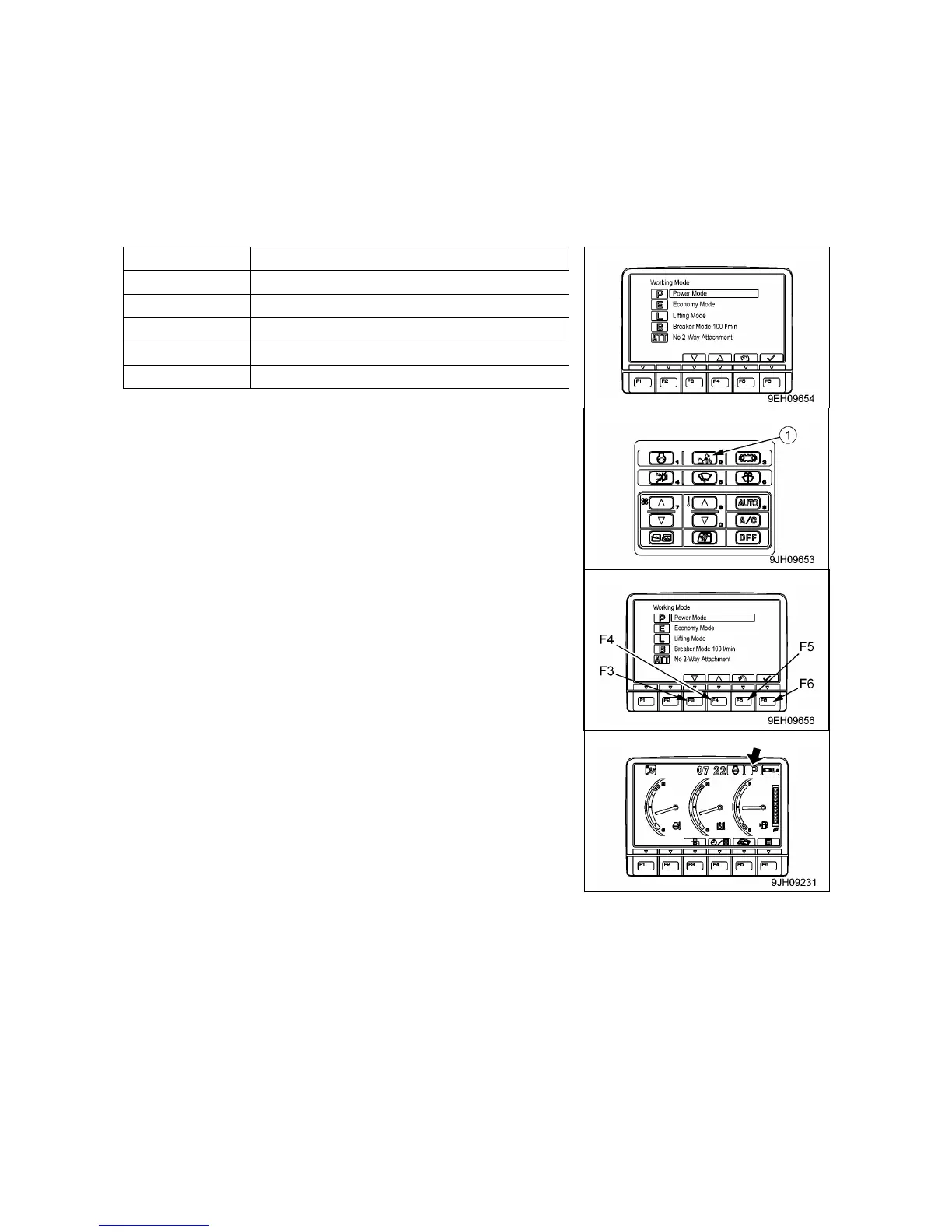
Use working mode selector switch (1) to select the working mode that matches the operating conditions or
purpose. This will make it possible to carry out operations efficiently.
Use the following procedure to select the most efficient working mode.
When the starter switch is turned ON, the working mode is set to the mode that was in operation when the
starter switch was last turned OFF.
Use the working mode switch to set the mode to the most efficient mode to match the type of work.
1. If working mode selector switch (1) is pressed, the working
mode selection screen is displayed on the monitor.
2. Press switches F3 of F4 at the bottom of the screen or the
working mode selector switch to select the appropriate mode.
3. After selecting the desired mode, press switch F6 to accept the
change. The screen return to the standard screen.
If switch F5 is pressed, the screen returns to the standard
screen without changing the mode.
• If a working mode is selected, and nothing is done for 5
seconds, the selected working mode is automatically accepted
and the screen returns to the standard screen.
• If a working mode is selected and working mode switch (1) is
kept pressed, the selected mode is accepted and the screen
returns to the standard screen.



 To Next Page