3-22
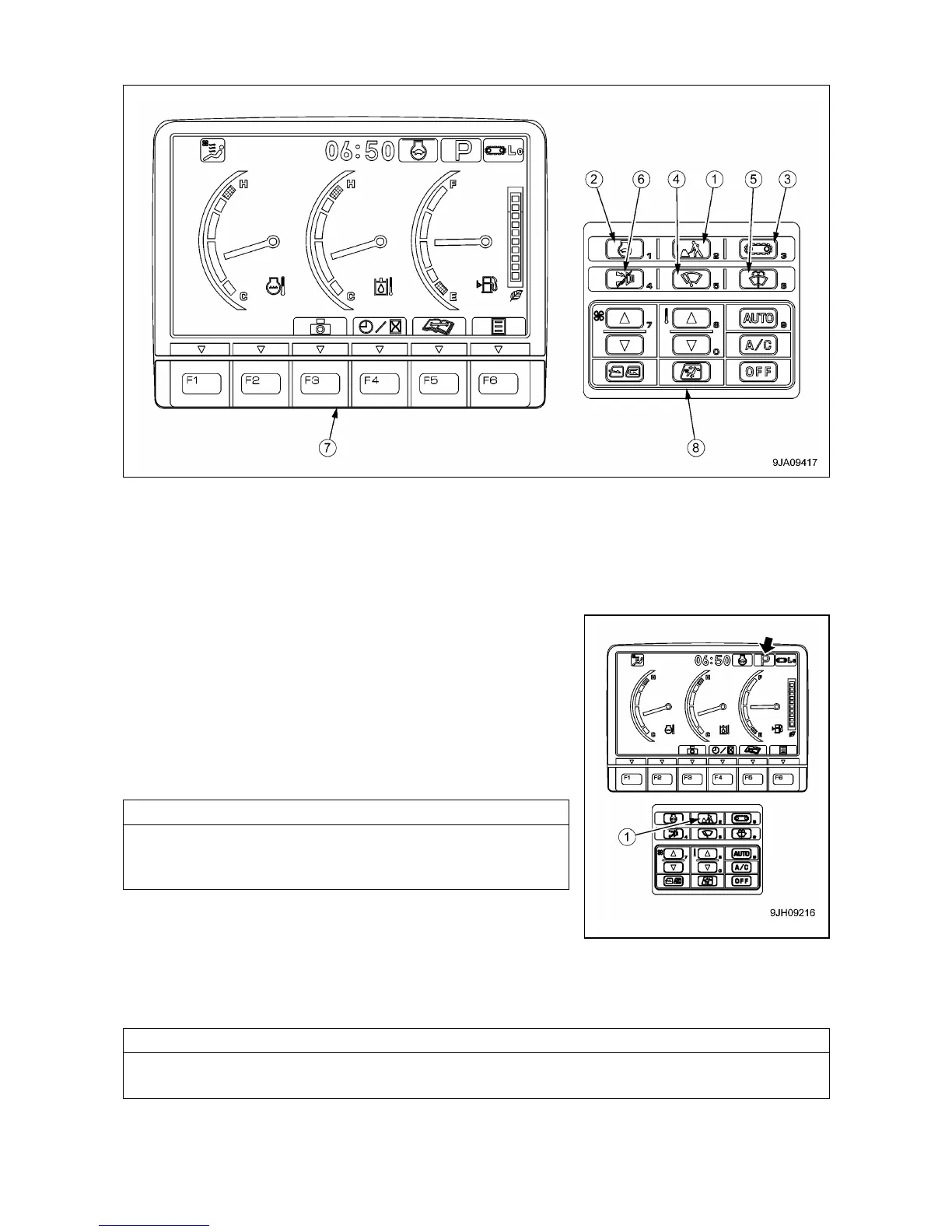
2.1.6 MONITOR SWITCHES PORTION
(1) Working mode selector switch
(2) Auto-deceleration switch
(3) Travel speed selector switch
(4) Wiper switch
(5) Window washer switch
(6) Buzzer cancel switch
(7) Function switch
(8) Air conditioner switch
[1] WORK MODE SELECTOR SWITCH
Use this switch (1) to set the movement or power of the crane.
The operation becomes easier if the mode is selected to match the
content of the operation.
• P mode: For heavy-load operations
• E mode: For operations with emphasis on fuel consumption
• L mode: For fine control operations
• B mode: Not available for this machine
• ATT mode: Not available for this machine
B mode (Breaker operation) and ATT mode (Crusher operation)
of this work mode selector switch are not availble for this
machine.
• When the monitor first appears, it is automatically set to the mode
in use when it was started the previous time.
• Press switch (1) to display the working mode selection screen.
For each set mode, the pilot monitor at the top right of the monitor
display shows P, E, L, B, ATT.
If you want to have automatic setting of the P, E or L mode when starting, please contact us or our sales
service agency to change the setting.



 To Next Page