3-23
[PROCEDURE FOR OPERATION]
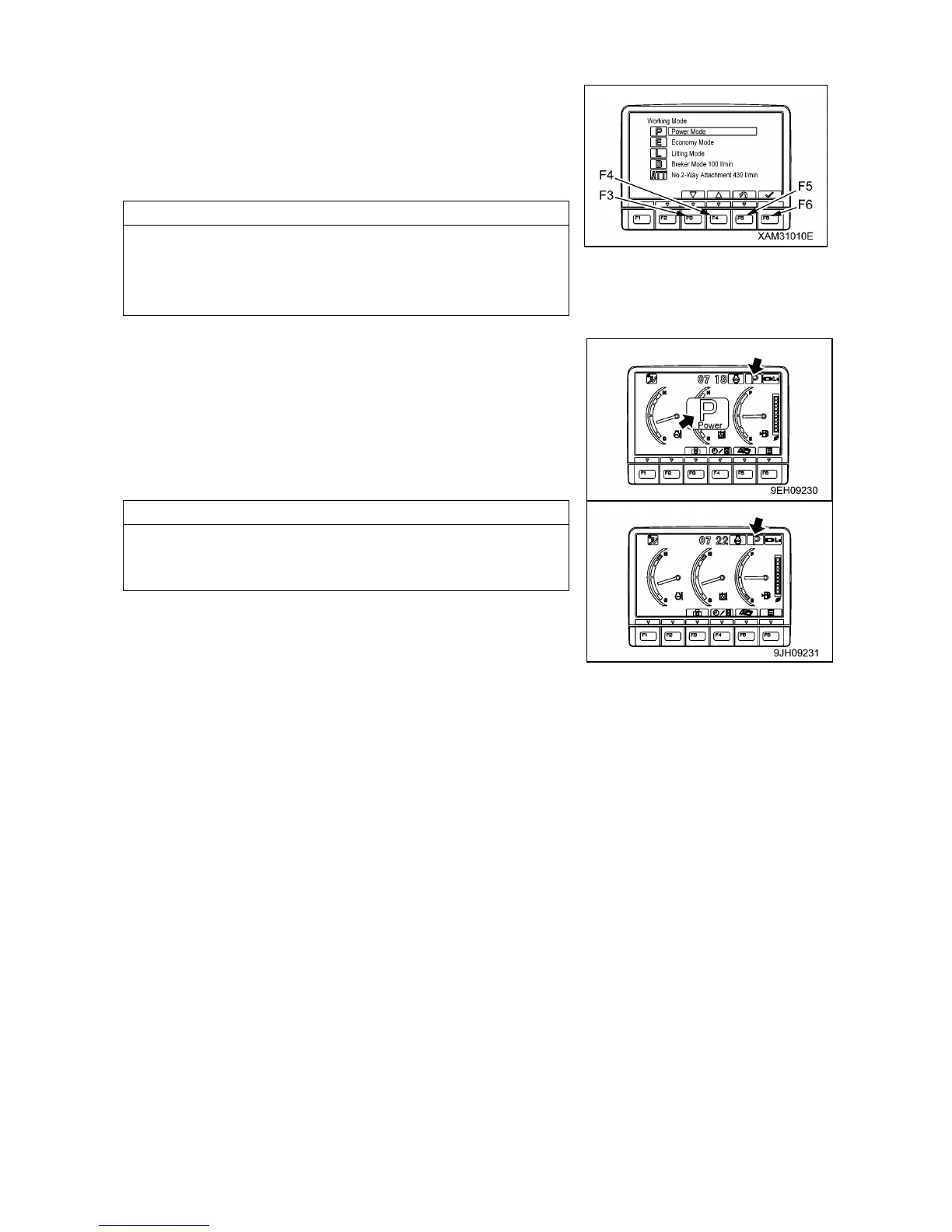
1. If working mode selector switch (1) is pressed, the working
mode screen is displayed on the monitor.
2. Press function switches (F3) or (F4) at the bottom of the screen
or working mode selector switch (1) to change the mode
selection one at a time.
• If no switch is touched for more than 5 seconds, the selected
work mode is automatically set as the working mode and the
screen changes to Steps 3 and Steps 4.
• To return to the standard screen without changing the working
mode, press function switch (F5).
3. After selecting the desired mode, press function switch (F6) and
the mode is displayed in the center of the monitor display.
(Example: If power mode is selected: P)
4. After 2 seconds, the pilot monitor display at the top right of the
screen is highlight in orange.
After 2 seconds, the screen return to the standard screen.
The monitor display highlighted in orange in steps 4 return to
blue.



 To Next Page