ON-BOARD DIAGNOSTIC
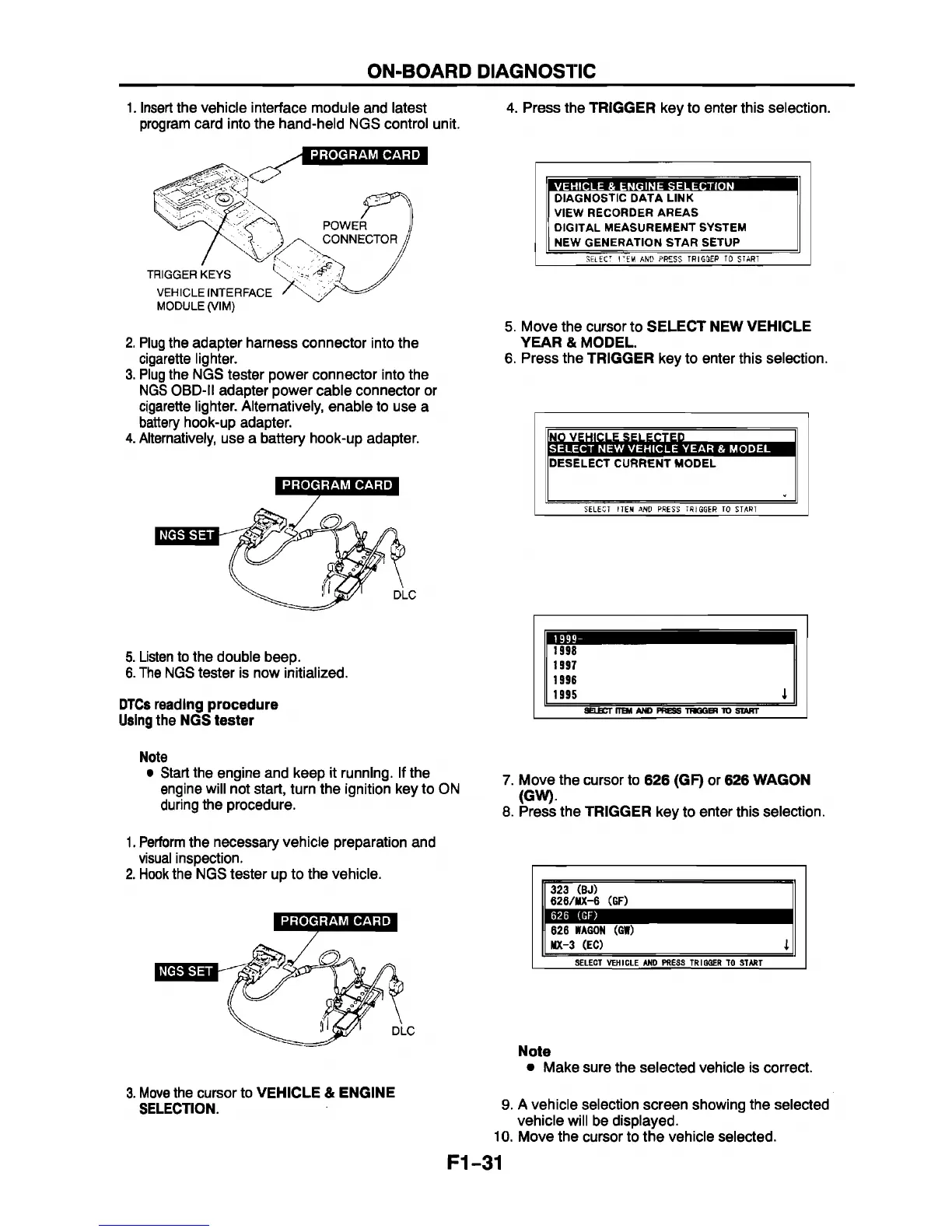
1. Insert the vehicle interface module and latest
program card into the hand-held NGS control unit.
2. Plug the adapter harness connector into the
cigarette lighter.
3. Plug the NGS tester power connector into the
NGS OBD-II adapter power cable connector or
cigarette lighter. Alternatively, enable to use a
battery hook-up adapter.
4. Alternatively, use a battery hook-up adapter.
PROGRAM CARD
5. Listen to the double beep.
6. The NGS tester is now initialized.
DTCs reading procedure
Using the NGS tester
Note
• Start the engine and keep it running. If the
engine will not start, turn the ignition key to ON
during the procedure.
1. Perform the necessary vehicle preparation and
visual inspection.
2. Hook the NGS tester up to the vehicle.
PROGRAM CARD
3. Move the cursor to VEHICLE & ENGINE
SELECTION.
4. Press the TRIGGER key to enter this selection.
DIAGNOSTIC DATA LINK
VIEW RECORDER AREAS
DIGITAL MEASUREMENT SYSTEM
NEW GENERATION STAR SETUP
SELECT I TEM AND P RE S S TRIGGER TO START
5. Move the cursor to SELECT NEW VEHICLE
YEAR & MODEL.
6. Press the TRIGGER key to enter this selection.
In o v e h ic l e s e l e c t e d I
SELECT NEW VEHICLE YEAR & MODEL
DESELECT CURRENT MODEL
SELECT ITEM AND PRESS TRIGGER TO START
1 999-
1998
1997
1996
1995
I
SELECT rTBH AND PRESS T HG GB) TO START
7. Move the cursor to 626 (GF) or 626 WAGON
(GW).
8. Press the TRIGGER key to enter this selection.
Í323 (BJ)
Il 626/HX-6 (GF)
626
(GF)
co
CM
CO
WAGON (GW)
MX-3 (EC)
1
SELECT VEH ICLE AND PRESS TRIGGER TO START
Note
• Make sure the selected vehicle is correct.
9. A vehicle selection screen showing the selected
vehicle will be displayed.
10. Move the cursor to the vehicle selected.
F1-31



 To Next Page