www.mdcusa.com
Ph: 1-833-632-8721
©Copyri ght
Battery Activation & Initial Use
Upon delivery of your trailer, the lithium battery in the XT12HR OGE may be turned off and in a low-power state designed to
preserve charge during storage. Before first use, follow the steps below to properly
turn on and activate the battery.
Turning the Battery On for Use
1. Confirm that all electrical connections are secure and that no system faults are present.
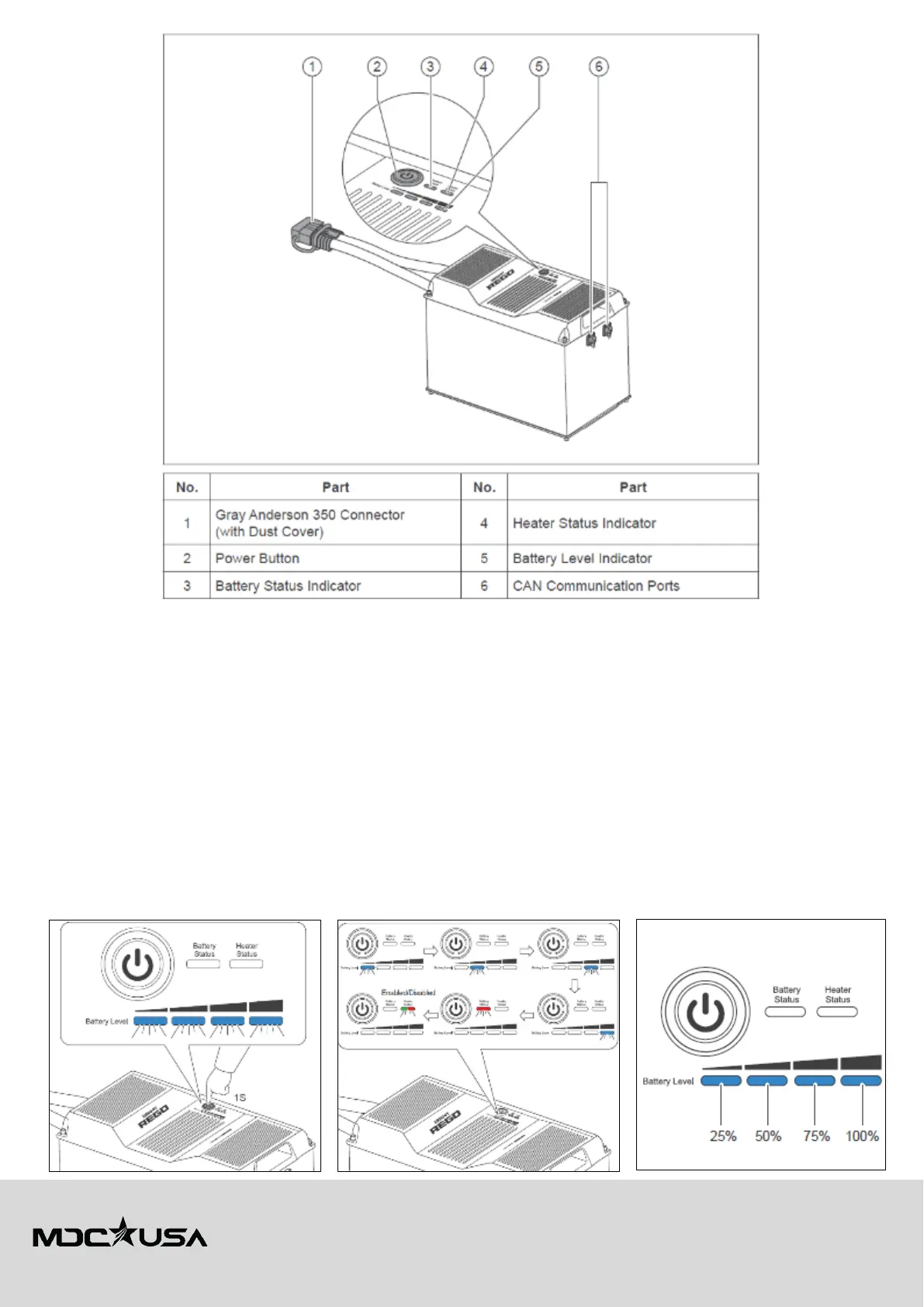
2. Long press the power button for 1 second on each battery to turn them on.
3. Observe the battery level indicators. The Battery Level Indicators, Battery Status Indicator, and Heater Status Indicator
flash in sequence once to indicate that the battery has been turned on. The color of the flashing Heater Status Indicator
indicates the current heater setting.
4. The Battery Level Indicators will light up blue to indicate the current battery charge level.
5. Ensure the battery disconnect is switched to ON (green position). This enables power to flow from the battery and allows
system voltage to be read via the displays or app.
6. Verify system voltage and capacity through the monitoring system or Renogy DC Home App.
7. Allow battery to reach full charge before significant use to ensure balance between both units.















 To Next Page