www.mdcusa.com
Ph: 1-833-632-8721
©Copyri ght
Changing Battery Heater Settings
Your battery leave the factory with the heater enabled by default. The heater can be manually enabled or disabled using the
Power Button.
Enabling or Disabling the Heater
• Enter Heater Setting Mode
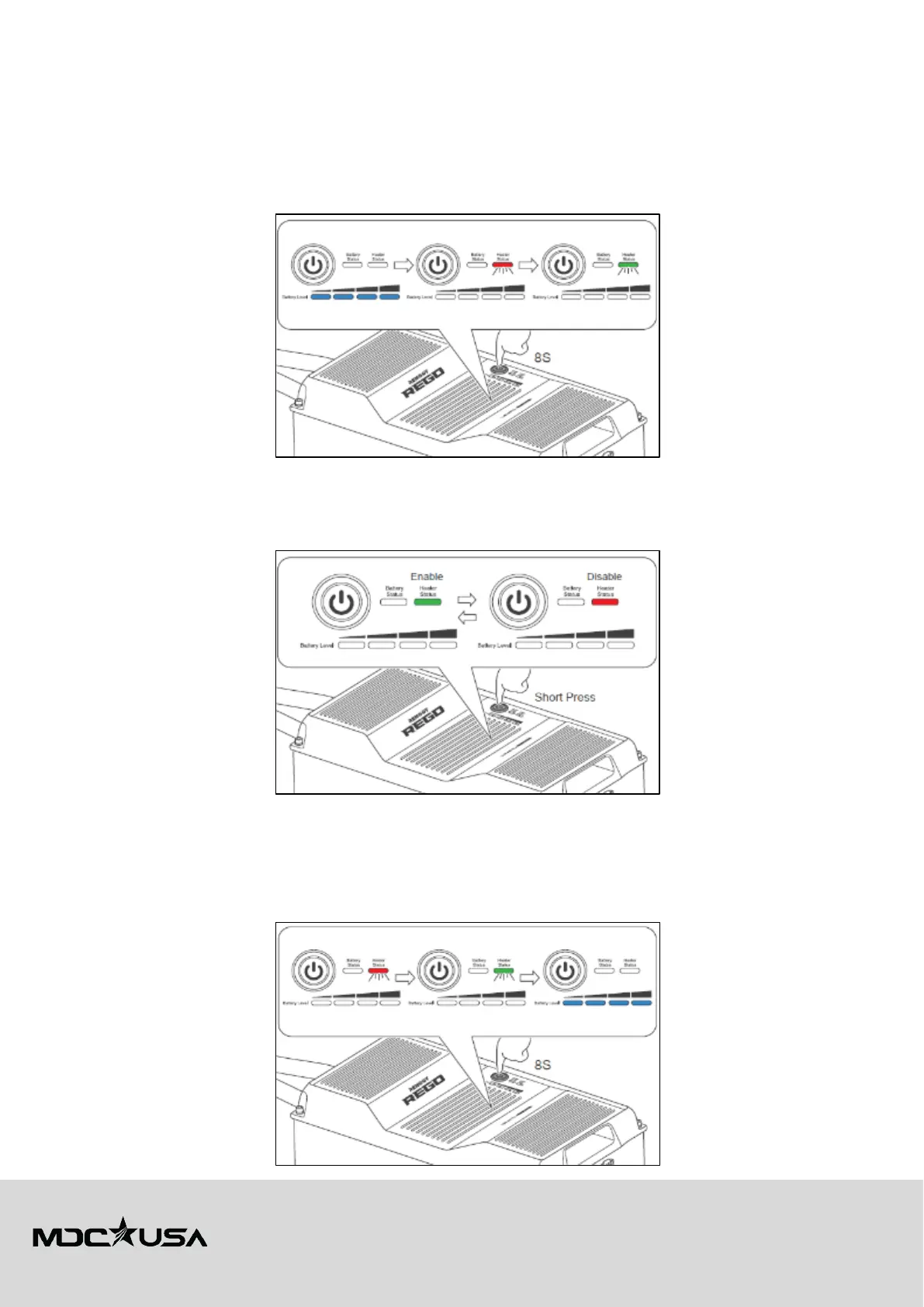
1. Press and hold the Power Button for 8 seconds to enter the heater setting mode.
2. The Heater Status Indicator will flash red and green once to confirm entry into the setting mode.
• Toggle Heater Function
1. Short press the Power Button to toggle the heater function.
2. The Heater Status Indicator turns green when the heater is enabled.
3. The Heater Status Indicator turns red when the heater is disabled.
• Save Heater Setting & Exit
1. Press and hold the Power Button for 8 seconds to exit the heater setting mode and save the current setting.
2. The Heater Status Indicator will flash red and green once to confirm the setting is saved.
3. If no action is taken, the battery automatically exits the heater setting mode after 10 minutes and saves the current
setting.















 To Next Page