www.mdcusa.com
Ph: 1-833-632-8721
©Copyri ght
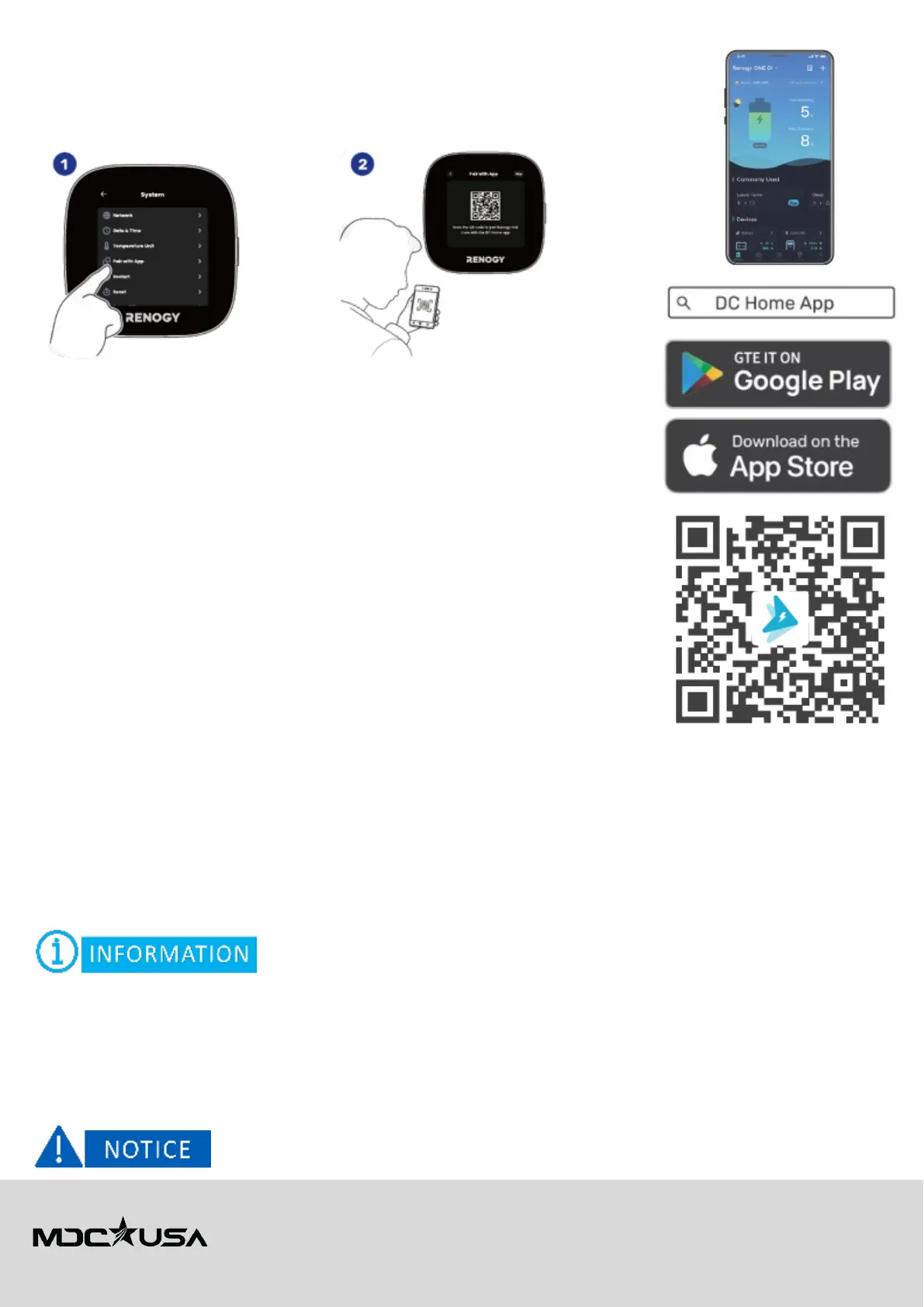
Pairing with the Renogy DC Home App
For remote monitoring and smart control, connect Renogy ONE Core to the DC Home App.
1. On the Renogy ONE Core touchscreen go to Settings > Pair with App.
2. Follow the on-screen instructions
Option 1: Standard Wi-Fi Connection
1. Download the App
• Search for "Renogy DC Home" in the Apple App Store or Google Play Store.
• Install and open the app.
2. Connect Renogy ONE Core to Wi-Fi
• On the Renogy ONE Core touchscreen, go to Settings > Network.
• Select your 2.4 GHz or 5 GHz Wi-Fi network.
• Enter your Wi-Fi password and confirm.
3. Pair with the DC Home App
• Open DC Home App and follow the on-screen instructions.
• When prompted, scan the QR code displayed on the Renogy ONE Core screen or
manually enter the device serial number.
• The XT12HR OGE energy system will now appear in the app, showing live data.
Option 2: AP Mode (Access Point Function)
If a Wi-Fi network is unavailable, you can connect directly using AP Mode.
1. Enable AP Mode on Renogy ONE Core
• Go to Settings > Network > AP Mode.
• Select Enable AP Mode.
• The system will generate a temporary Wi-Fi hotspot (e.g., "Renogy_XXXX").
2. Connect Your Phone to the Renogy AP
• Open your phone’s Wi-Fi settings.
• Select the Renogy_XXXX network.
• Enter the default password displayed on the Renogy ONE Core screen.
3. Pair the DC Home App
• Open DC Home App and follow the Pairing Wizard.
• Once connected, you can monitor system status without an external Wi-Fi network.
AP Mode allows
local access only
. For
full remote control
, connect to a
Wi-Fi network
.
Managing Renogy Devices
The XT12HR OGE's Renogy ONE Core is factory-wired via CAN bus and automatically detects Renogy devices, including:
• Renogy 12V 400Ah LiFePO4 Battery (CAN) – Displays state of charge (SOC) and charge/discharge rates.
• Renogy REGO 60A MPPT Solar Charge Controller – Tracks solar input and panel efficiency.
• Renogy REGO 50A DC-DC Charger – Monitors alternator-based charging while towing.
• Renogy REGO 3000W HF Inverter-Charger – Shows AC output, grid status, and battery use.
The CAN bus connection is
pre-configured
. Users
should not modify
CAN wiring unless instructed by a
qualified technician
.



 To Next Page