10
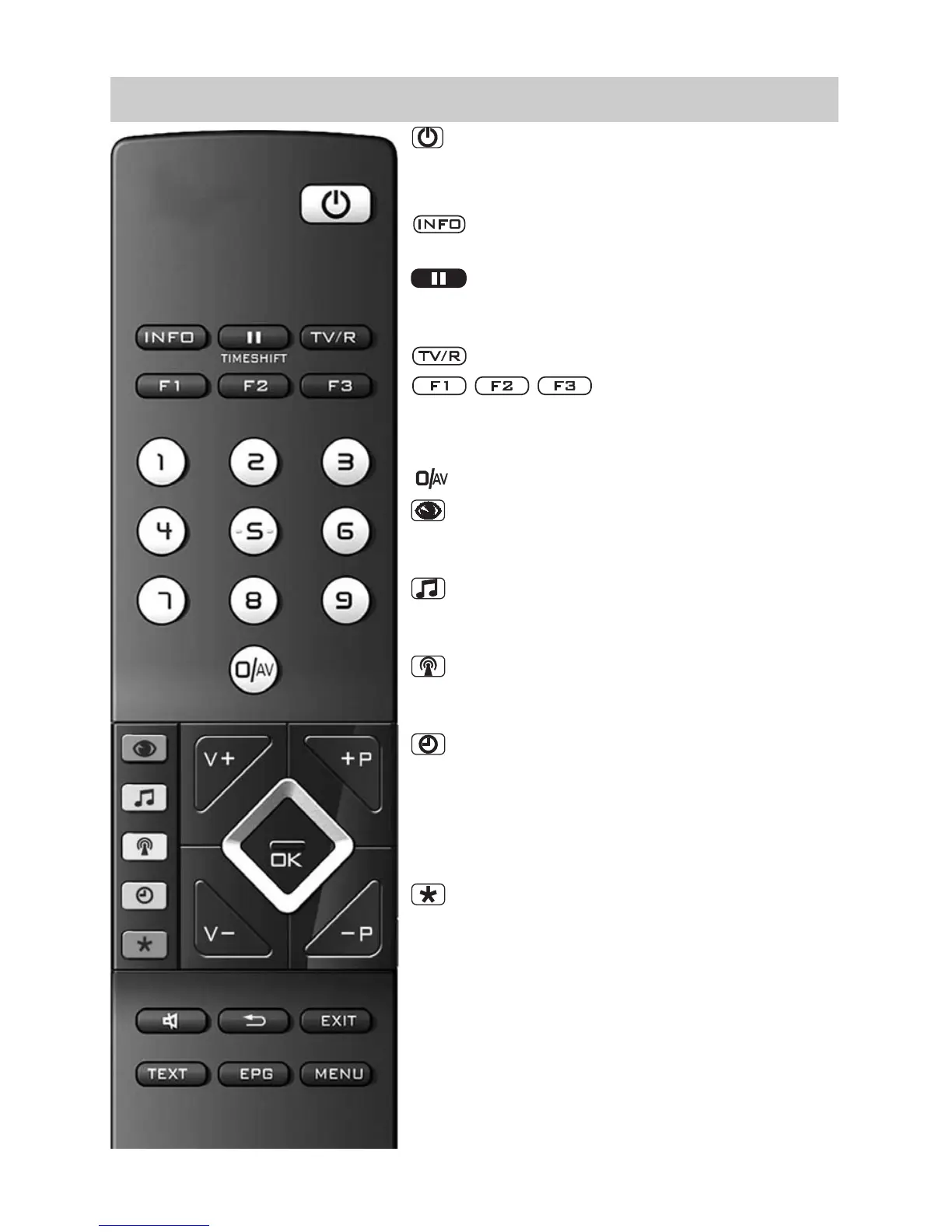
3.1 The Remote Control (RM 16)
ON at program position 1 or at the pro-
grammed start program position.
OFF, enter stand-by setting.
Call “Information“.
Back to table of contents in “Information“.
In TV mode: Start time shift
When set to Play: Still picture/Pause
Hold down when set to Play: Slow motion
Switch to TV -> Radio
1)
/ Radio
1)
-> TV
Function keys
Press briefly: for factory programming
Hold down: display of the special functions selection
Select AV device
Select picture settings
In TV menu: Adjust the settings for “pictu-
re and sound”
Select sound settings
In TV menu: Adjust the settings “AV devi-
ces”
Select program table,
In the TV menu: Adjust the settings “Pro-
gram table” or station features
Display date, time info on program
In the TV menu: Adjust the settings “Time
settings”
In video text: Scroll by markers
When set to time shift: Display playback
position
In the TV menu: Adjust the settings “Con-
figuration“
In video text: Set or delete marker
Mark TV program for recording in EPG
V+ volume + / In the menu: Change value
+P Progr. + / In the menu: Change value
V– volume – / In the menu: Change value
–P Progr. – / In the menu: Change value
TIMESHIFT



 To Next Page