MOTALA MC2000 – Mechanical blocking device
Instruction
© 2012 Motalahissar AB 10 (12) IQ56-03 Rev: B
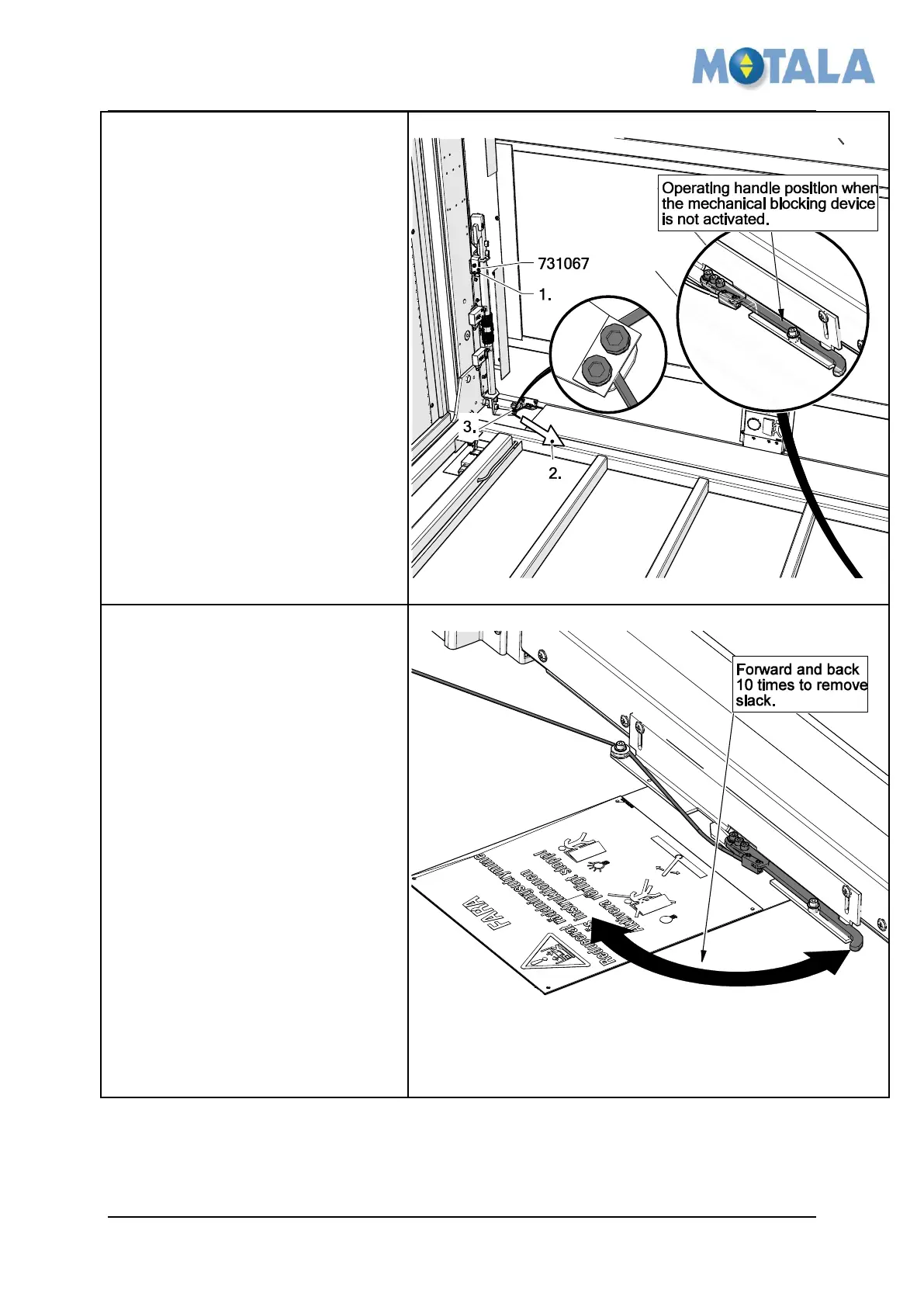
Adjustment of the wire
1. Make sure the red device
731067 is in its position. And
the operating handle is in its
inactivated position.
2. Stretch the wire.
3. Tighten the two screws to lock
the wire.
4. Remove the red device
731067 and check that the
mechanical blocking device is
still in its inactivated position.
5. Test that the wire, stop and
handle function works
properly. (See - 4. Overview)
Remove slack in the operating
handle and wire.
1. To make the mechanical stop
work properly over time the
slack in the operating handle
and the wire must be
eliminated.
2. Turn the handle forward and
back 10 times.
3. Test that the wire, stop and
handle function works
properly. (See - 4. Overview),
if not repeat (adjustment of the
wire 1-5)



 To Next Page