41
MC2000 – Assembly Instruction Manual
Cancelling drive command box
Ceiling
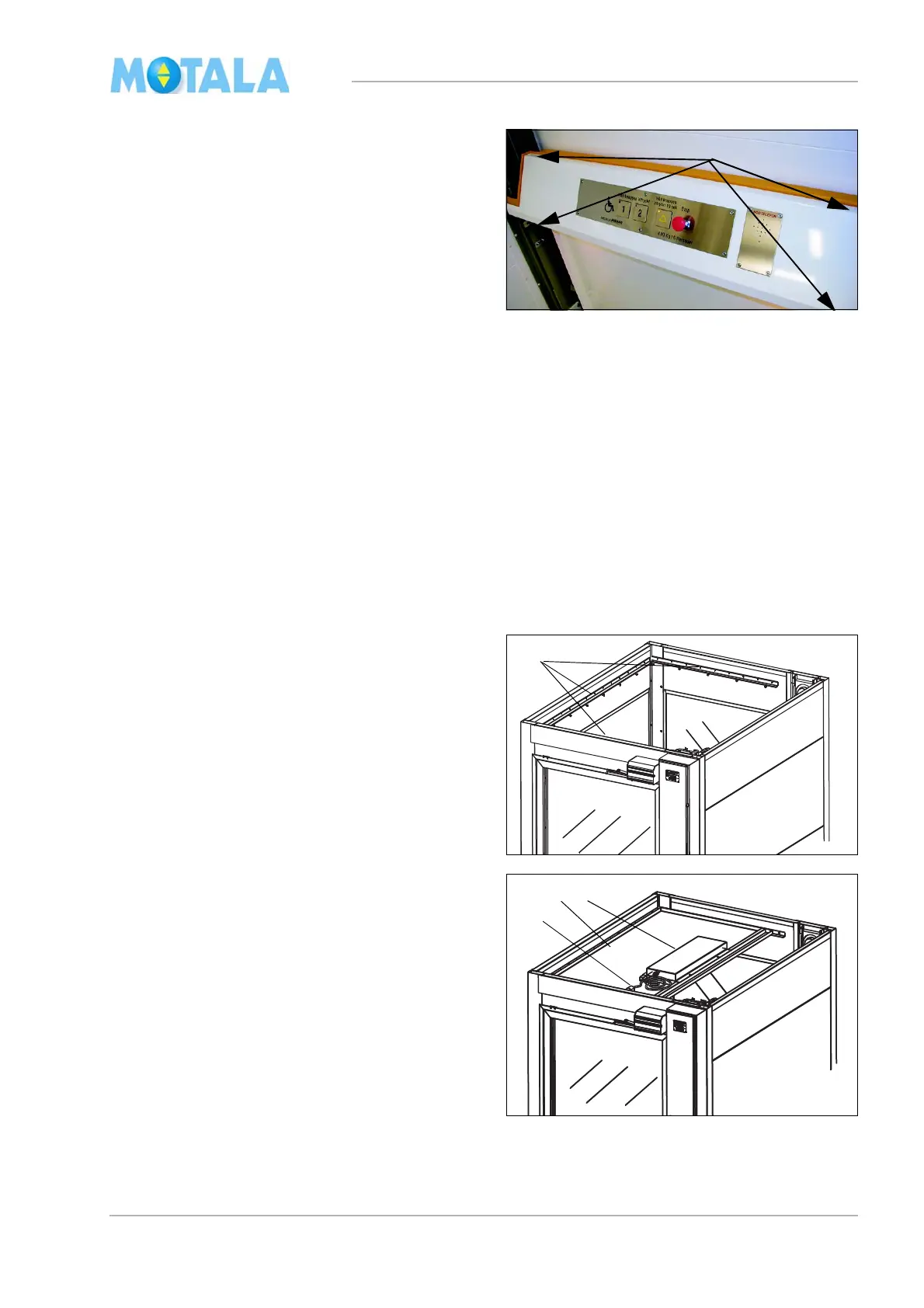
9. Fasten the platform panel with four screws
(1). Place the cables so that they cannot be
damaged.
1. Push the stop button on platform panel.
Warning! In this position, the button is con-
nected in parallel with the emergency stop
of
the drive command box.
2. Disconnect the command box from the
cont
rol panel.
3. Reset the stop button on the platform
pa
nel.
The ceiling should be placed at a height of 2100
m
m above the floor of the topmost landing.
1. Fasten three L-shaped mouldings on all
wal
ls except the wall of the drive side. Turn
the side with the pre-drilled screw holes up-
wards.
2. Install the ceiling (4). The electric fittings (2)
shoul
d be centred in the lift well.
3. Route and the light cable 18 to the control
p
anel. Secure the cable on the safety gear
cover plate to prevent it from getting dam-
miged.
4. W
arning! There is power on the terminal
LJ for the light even if the main switch is
set to OFF! Connect if the power is com-
pletely OFF from the main central and also
th
e F8 fused shall be removed in the con-
trol panel.



 To Next Page