Before using VJ-1628X OPERATION MANUAL
76 3.4 Filling ink
11. Remove Cleaning fluid pack and IC chip card from High-capacity ink pack adapter.
• When there is remaining Cleaning fluid pack and IC chip card, clarify the corresponding pack and
card, and store it as a set.
12. Install Ink pack and IC chip card to High-capacity ink pack adapter.
3.4.1.2 Ink cartridge color and number of cartridge to be used
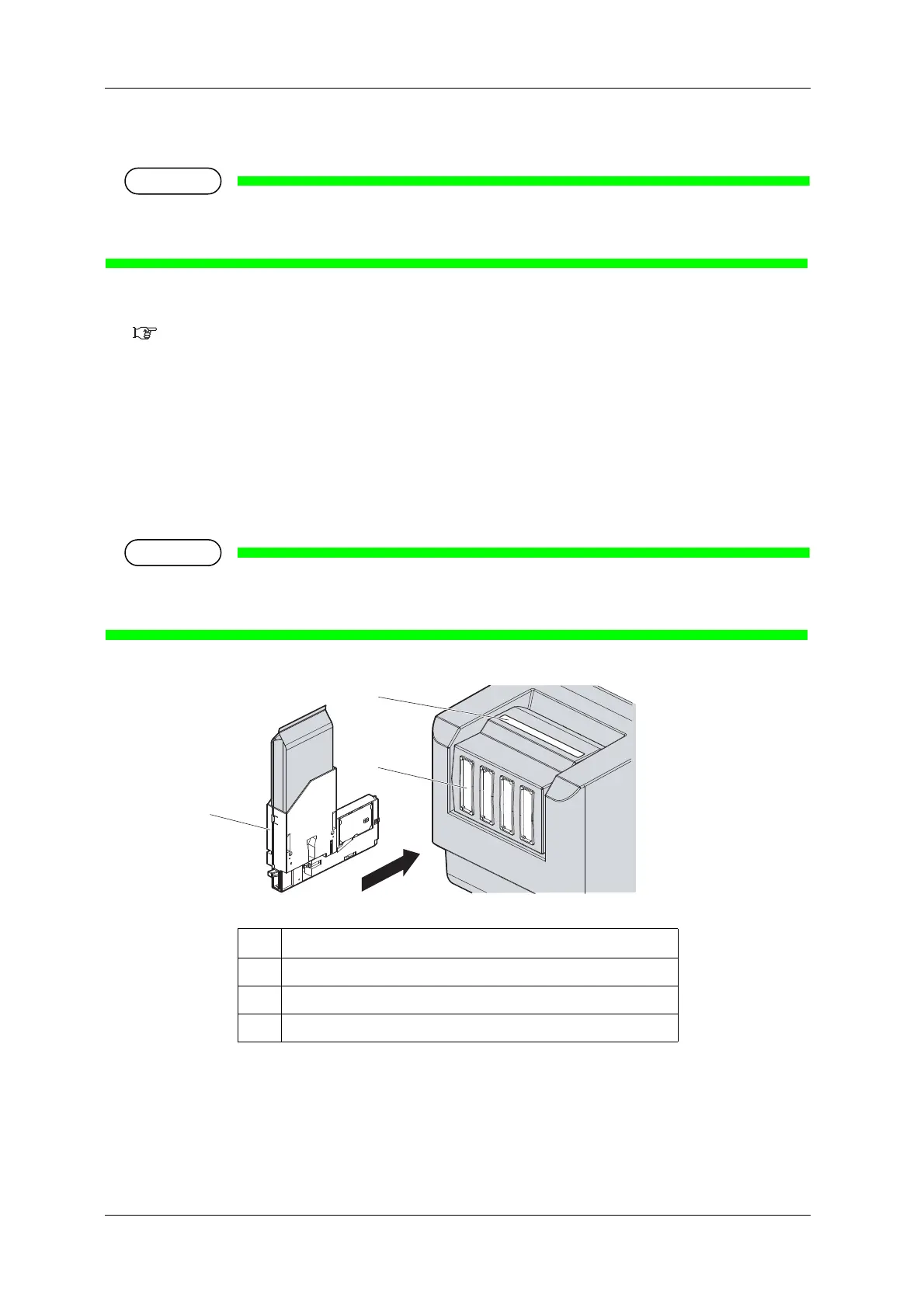
13. Install all ink cartridges into the ink cartridge slots on the rear side of the printer.
• Shake High-capacity ink pack adapter 2 to 3 times lightly before installing it in Ink cartridge slot.
• Each ink cartridge must be installed into an ink cartridge slot specific to it.
Refer to
3.4.1.3 Color mode and slot number and install the ink cartridges so that the ink
colors are properly associated with the slot number indication labels.
• Insert High-capacity ink pack adapters all the way in Ink cartridge slots.
• Do not insert High-capacity ink pack adapter into Ink cartridge slot without attaching Ink pack.
The information of the remaining IC chip card will be rewritten and Ink pack will not be usable.
No. Name
1 High-capacity ink pack adapter
2 Ink cartridge slots
3 Slot number indication label















 To Next Page