- 86 -
Maintenance
B
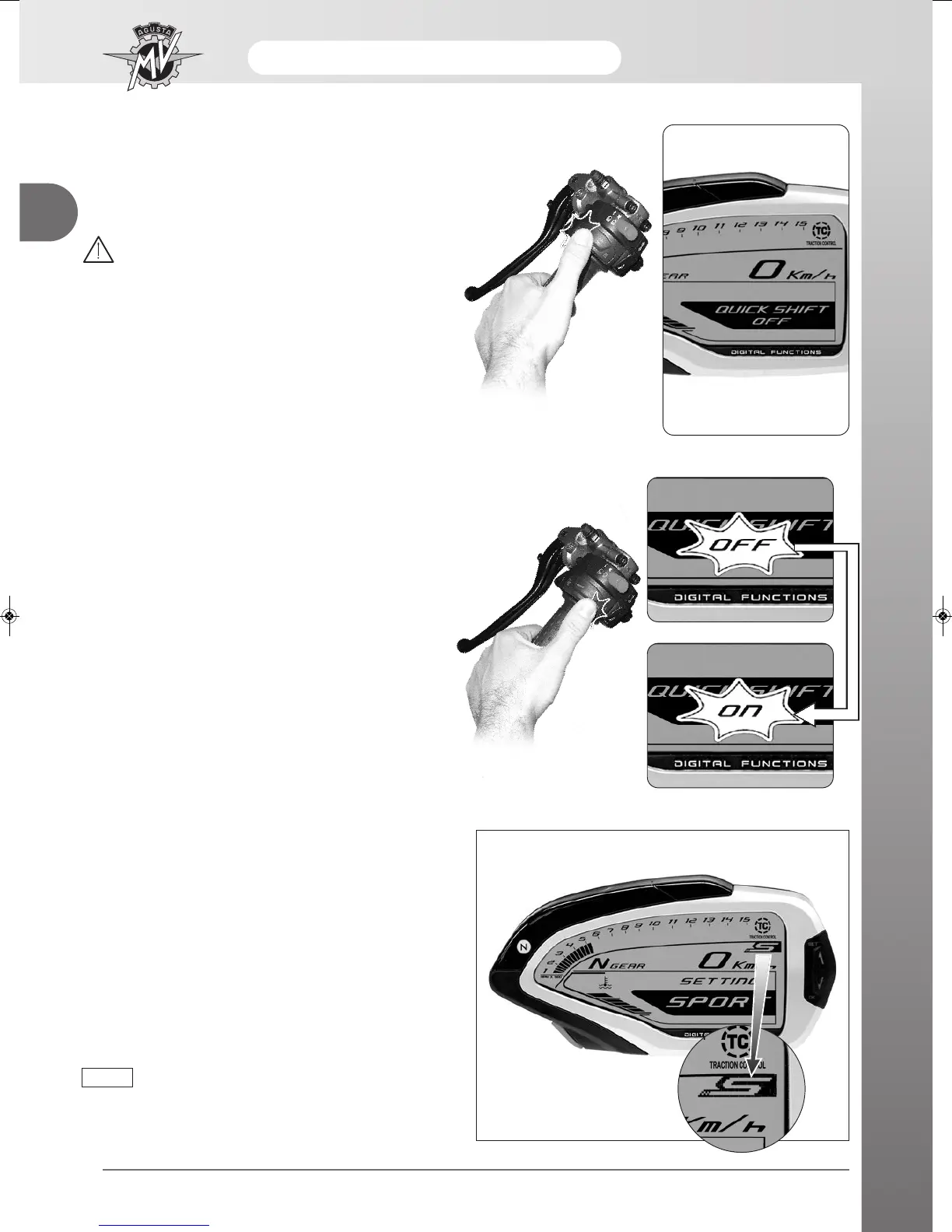
“QUICKSHIFT” Mode (MY13)
- Press “SET” in order to access to “QUICK SHIFT”
mode. The display shows the current activation state
of the “quick shift” function of the gear change.
WARNING
The display modes may be changed or set
when the engine is off, the gear in neutral,
the motorbike stationary with your feet on
the ground. Do not change the display while
driving.
- Press the "OK" button for less than three seconds; the
activation caption of the “quick shift” function begins
to flash.
- By pressing the "OK" button for less than three
seconds, the caption toggles from “OFF” to “ON” and
inversely.
- After some seconds, the selected “quick shift” activa-
tion state is automatically confirmed.
How to select the mapping of the control unit
(MY10 -> MY12)
It is possible to select special mapping on the control
unit of the F4 model which allows you to obtain higher
power and performance characteristics for decidedly
sporty use of the vehicle.
The mapping of the control unit can be selected by
pressing the start button when the engine is switched
on. “SPORT” appears on the dashboard display to
show the mapping has been selected.
The mapping selection may be performed
even during the use of the vehicle.
NOTE





 To Next Page