47
2-1-1 Preparation of Laser Marker Operation
Check the package.
Check the package referring to “1-1 Package Check” (P.32).
If something is lack, as for the nearest sales office.
Install the laser marker.
Install the laser marker referring to “1-3 Installation” (P.36).
Install “LP-300 series PC Setting Software” stored in the attached CD-ROM to the
PC.
Refer to the “Installation Manual” for the procedures.
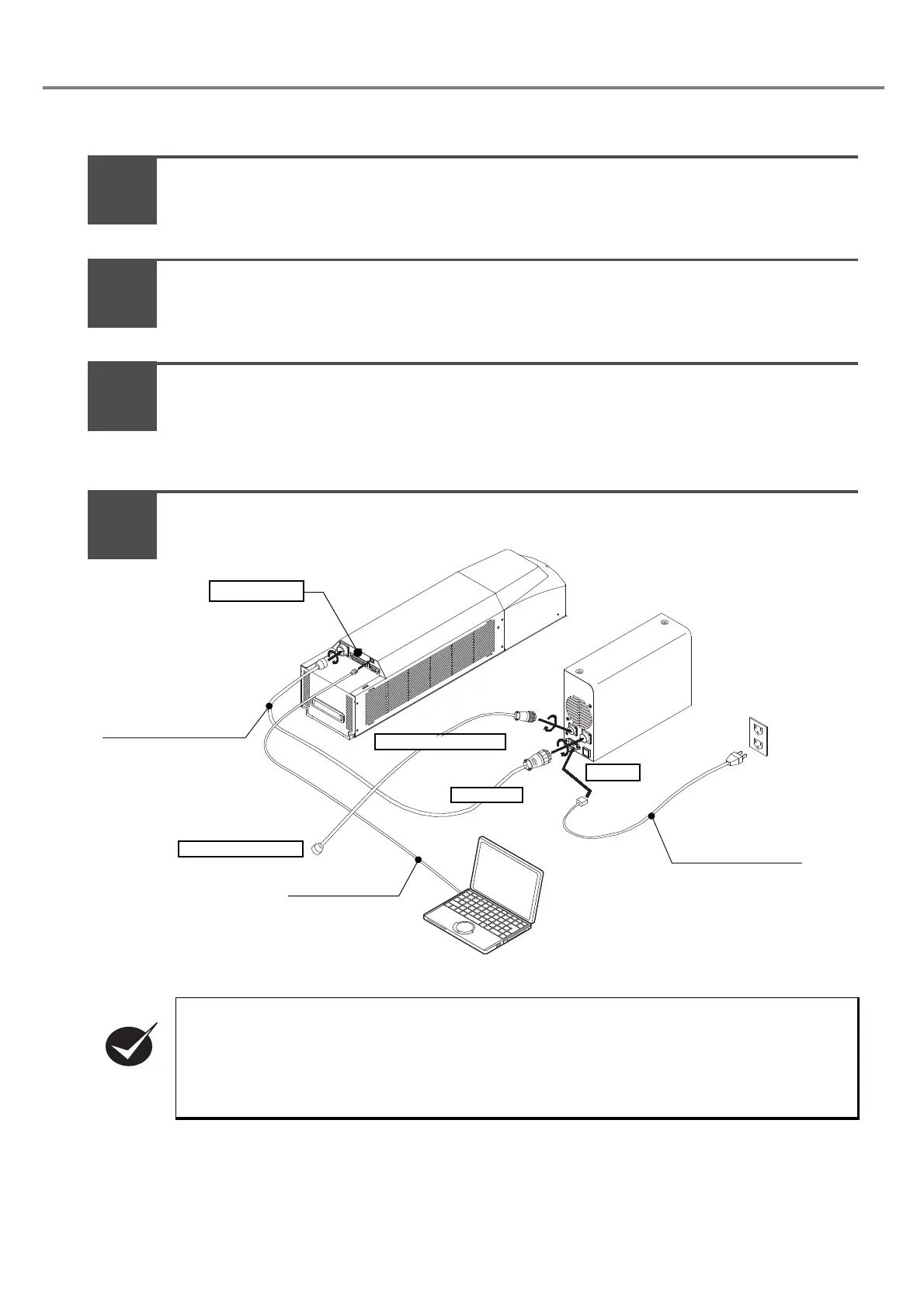
Connect the laser marker.
Connect the laser marker referring to “1-4 Connecting Laser Marker” (P.40).
To operate this laser marker, connect the following signals on I/O connector. For the details, refer to
“4-1-2 I/O Connector” (P.157).
• Connect the power supply to [IN COM.] (pin No.14) and to [OUT COM.] (pin No.15) respec-
tively.
• Connect [LASER STOP] (pin No.4) and [OUT COM.] (pin No.15) to release the erroneous irra-
diation prevention function for the laser.
Head
Power Supply BOX
Head Power Cable (5m)
AC Power Cable (3m)
To P OW ER
To Inlet
To Interlock System
USB Cable (5m)
To Interlock Connector
Wiring of I/O
2
3
1
4



 To Next Page