180
4-2-10
Communication Command and Function
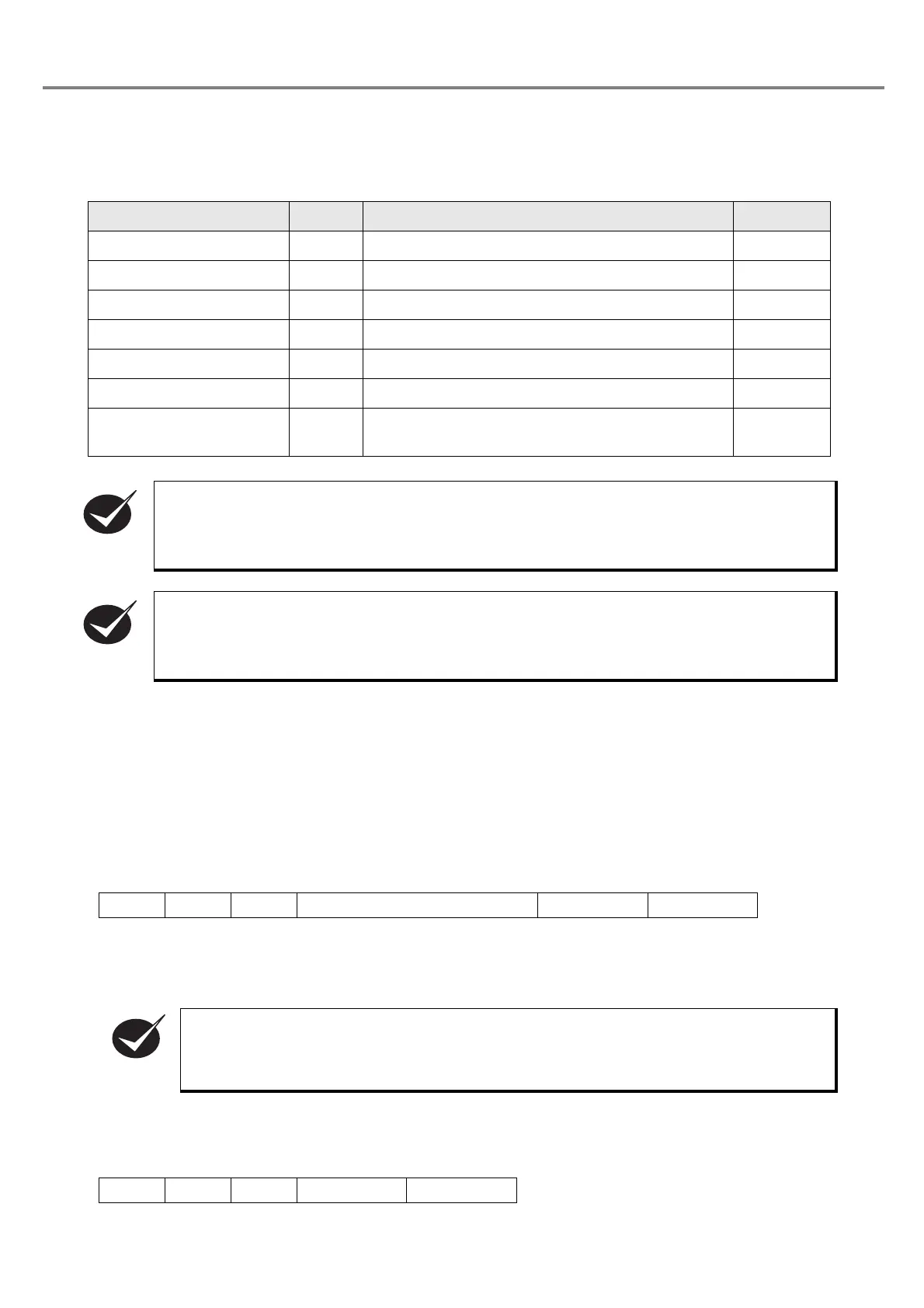
■ List of Commands
■ Details of Commands
1. File number change (code: FNO)
(1) File number change
This command changes the file number to the specified file number.
When receiving the file number change command from the RS-232C, only RS-232C is effective for the fol-
lowing file number switching. Besides, after turning OFF the power supply, the control is returned to the
control from the I/O connector.
As for the response data, either normal reception response data or abnormal reception response data is
returned.
Refer to “Response Data” (P.174) for details of both normal reception response data and abnormal reception
response data.
(2) File number readout
This command reads out the file number under editing.
As for the response data, either normal reception response data or abnormal reception response data is
returned.
Name Code Function Outline Page
1. File number change FNO
Switches the file number to the specified file number.
P. 180
2. Arbitrary character string STR Sets the arbitrary character string in ASCII code. P. 182
3. Counter current value CNT Sets the current value of the counter. P. 183
4. Counter reset CTR Resets the counter. P. 183
5. Status request STS Calls out the operation status of the laser marker. P. 184
6. Marking trigger MRK Controls the marking. P. 184
7.
Marking status transmission
permission
MST
Sets the permission/prohibition of the sending
response when marking is finished.
P. 185
After receiving the “File number change” (FNO), each command is to be executed for the file
number selected with “File number change” (FNO) command.
After sending the “File number change” (FNO), “Counter current value” (CNT) and “Counter reset”
(CTR) are acceptable.
When changing the file number through RS-232C, only RS-232C is effective for the following
file number switching.
STX FNO S [File number] (3 Bytes)
(Check sum)
Delimiter
STX FNO R
(Check sum)
Delimiter



 To Next Page