88
3-3
Character Setting
3-3-1 Character Setting Screen
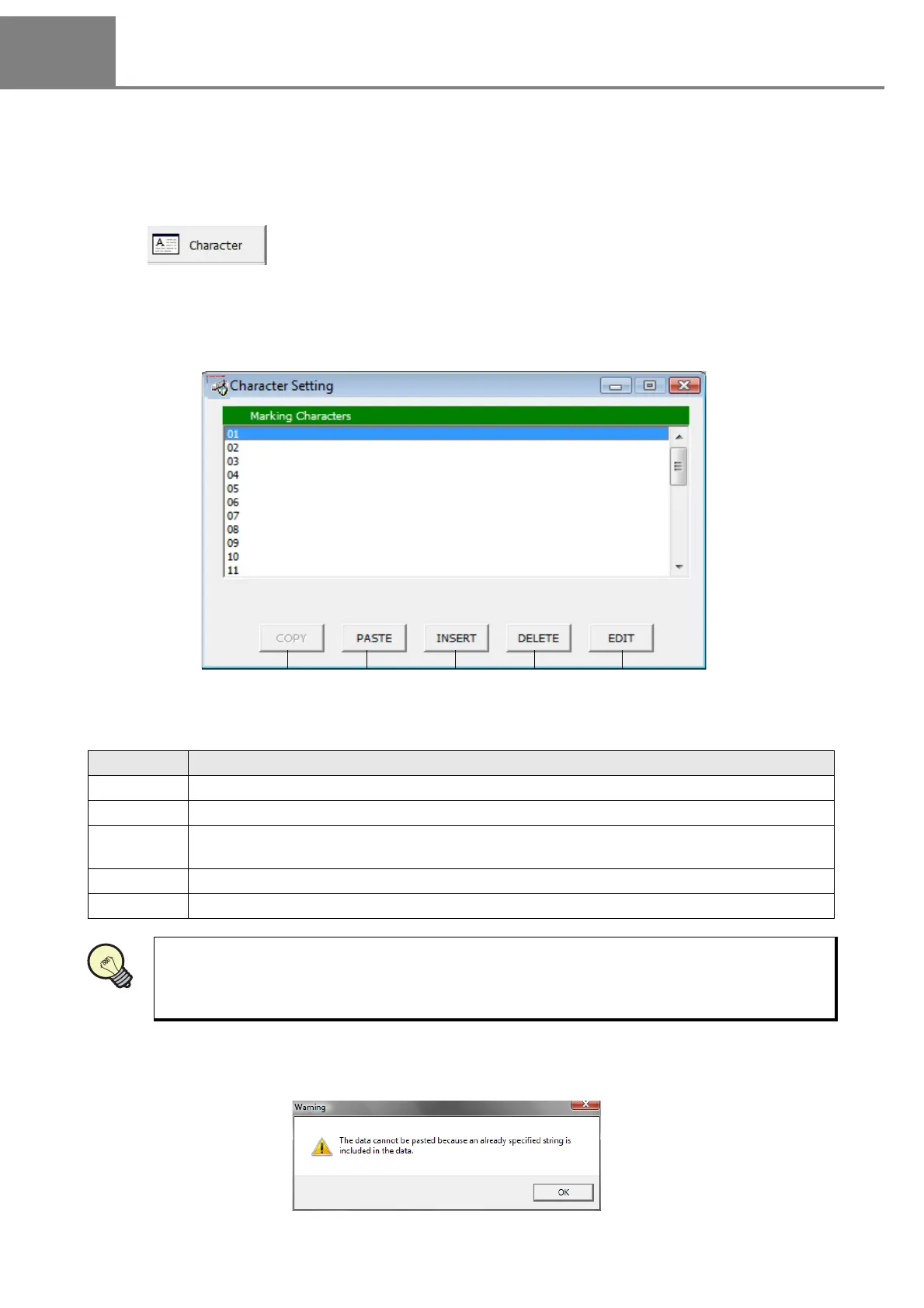
The character to be marked is set by inputting from “Character Setting” screen.
The “Character Setting” dialog box is appeared by either selecting “1” method or clicking “2” button described
above.
The marking character has 30 lines, and max. 30 letters per line are available for input.
The buttons in the “Character Setting” dialog box are used for editing character string by line.
The following warning is appeared after copying the line including the optional character string. If this warning
is appeared, the paste is invalid. Refer to “3-3-3 Input of Function Character” - “(5) Input optional character
string” (P.100) for details.
1 “View” - “Character”
2
Click .
Item Description
1. COPY Copies the selected line.
2. PASTE Pastes the selected line just copied.
3. INSERT
Inserts one line just before selected line. Note that if inserting one line just on the 30th line,
the character string in the existing 30th line is deleted.
4. DELETE Deletes the selected line.
5. EDIT Edits the selected line. The dialog box for inputting the marking character string is appeared.
It is useful for setting the character checking the image on the image display. Refer to “3-7 Image
Display” (P.130) for details.



 To Next Page