Hunter-Pro Series & Captain 8 Installation Guide
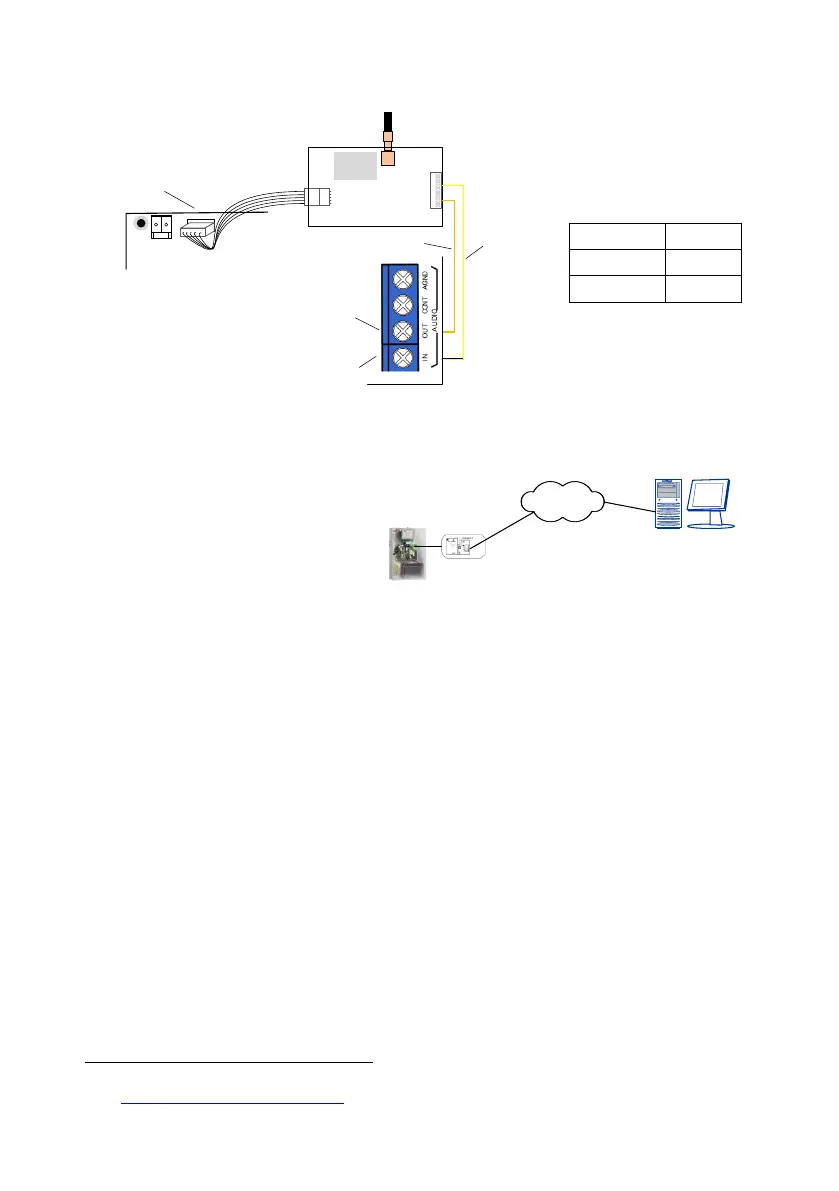
Diagram 28. GSM-200 wiring diagram
3.11 VKD4net
The VKD4net is a software/
hardware solution that enables the
end user to remotely connect and
fully control his/her alarm system
from a computer/laptop.
It is made of PIMA’s net4pro-i
network card and a syncing
Diagram 29. VKD4net connection diagram
component on the control panel side, and a virtual keypad application that is installed on a
remote computer.
The use of the VKD4net requires either a static (fixed) IP address on both the control panel
and the remote PC, or a URL supplied by a DDNS service
1
. In both ways, the router on the
end user side must be set to enable Port Forwarding.
3.12 TRV-100/TRU-100
The TRV/TRU-100 are long range VHF/UHF radio transmitters with 2 optional frequencies.
See the mounting guidelines in section 8.6, on page 83.
3.12.1 Installing the transmitters
1. Mount the control panel's metal box on a stable surface or wall.
2. Fasten the transmitter’s base screws to the control panel's box, in the designated holes;
see the next diagram. Make sure the screws are tightened, or the transmission range
might be reduced.
1
See en.wikipedia.org/wiki/Dynamic_DNS
Orange
Yellow
AUDIO OUT
AUDIO IN
GSM-200
TRANSMITTER
Control panel
TRANSMITTER
BATT
VKD4net
Internet
Virtual keypad
application
Hunter-Pro


 To Next Page