Hunter-Pro Series & Captain 8 Installation Guide
Example C: variable options
1
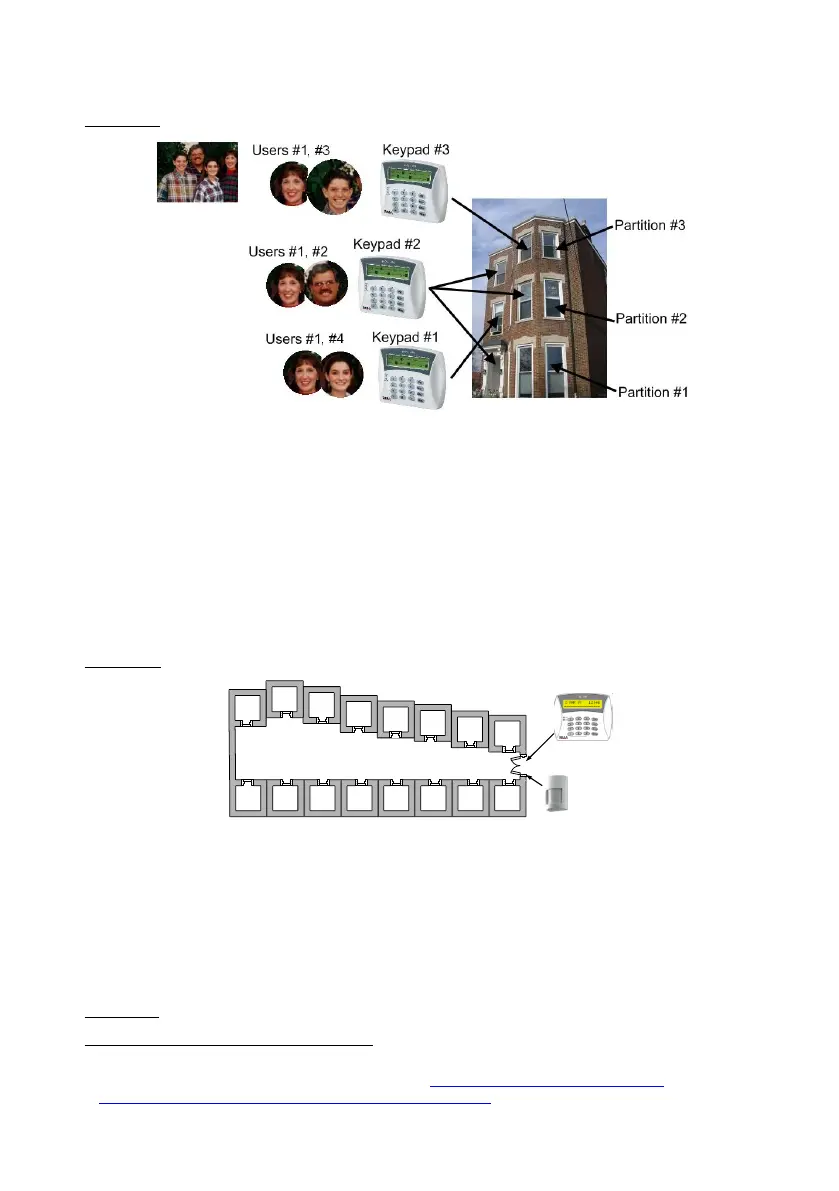
Diagram 49. Implementing partitions - Example C
In a 3 floors building, the first floor is defined as Partition #1, the second as Partition #2 and
the third as Partition #3. There are 3 users and 3 keypads, with different authorization levels:
User #2 is authorized to use all three keypads;
User #4 is authorized to use only keypad #1, which controls and displays partition
#2 only;
Users #1 & #2 are authorized to use only Keypad #2 which controls and displays all
3 partitions;
User #3 is authorized to use only keypad #3 which controls and displays partition
#3 only;
Example D: office/shop compound
Diagram 50. Implementing partitions - Example D
A compound is made of 16 offices; each is located in a separate room. Each room is assigned
as a partition and can be controlled by different users, remote controls, key switches and
RFID tags. The single keypad in this example will display the status of all partitions, though
the users will only be able to control their authorized partition/s.
A detector located at the entrance and allocated to all partitions protects the entrance, as
soon as all partitions are armed. This detector will be disarmed as soon as the first partition
is disarmed.
Example E: office building
1
Published under ‘Creative Commons’ license (source: http://awkwardfamilyphotos.com/wp-
content/uploads/2009/07/shari-awkward-plaid-family-photo.jpg)
1
2
3
4
5
6
7
8
11 12 13 14 15 16109



 To Next Page
 Loading...