RealPresence Collaboration Server (RMX) 1500/1800/2000/4000 Getting Started Guide
Polycom®, Inc. 92
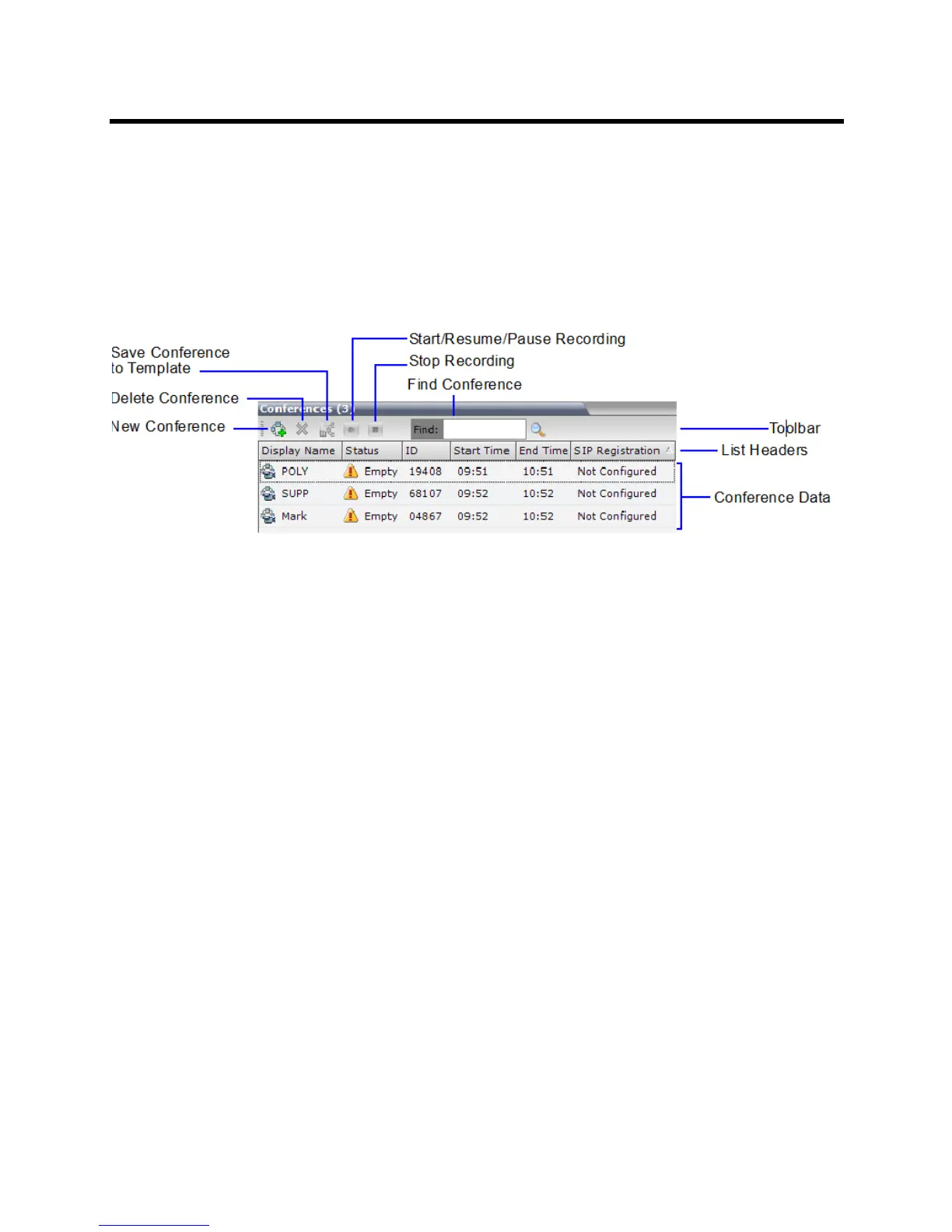
Conferences List
If you are logged in as a User with Operator or Administrator permissions:
The Conferences pane lists all the conferences currently running on the MCU along with their Status,
Conference ID, Start Time and End Time data. The number of ongoing conferences is displayed in the
pane’s title.
The Conferences list toolbar contains the following buttons:
● New Conference – to start a new ongoing conference.
● Delete Conference – delete the selected conference(s).
● Save Conference to Template - to save the conference with its participants to a template for future
use.
● If Conference Recording is enabled for AVC Only conferences, the following buttons are displayed in
color:
Start/Resume Recording – start/resume recording.
A Recording Indication is displayed to all conference participants informing them that the
conference is being recorded.
Stop Recording – stop recording.
Pause – toggles with the Start/Resume button.
A Paused Indication is displayed to all conference participants informing them that conference
recording has been paused.
If you are logged in as a User with Chairperson permissions:
● You can list and monitor conferences you have started or for which you have entered the password
or that don’t have a Chairperson Password assigned.
● A Chairperson Password field and a Refresh button are displayed.
The Refresh button does not change the Chairperson Password; it refreshes the Conferences list to
display all ongoing conferences with the requested password.
For more information Using the Chairperson Password for Filtering.














 To Next Page