RealPresence Collaboration Server (RMX) 1500/1800/2000/4000 Getting Started Guide
Polycom®, Inc. 97
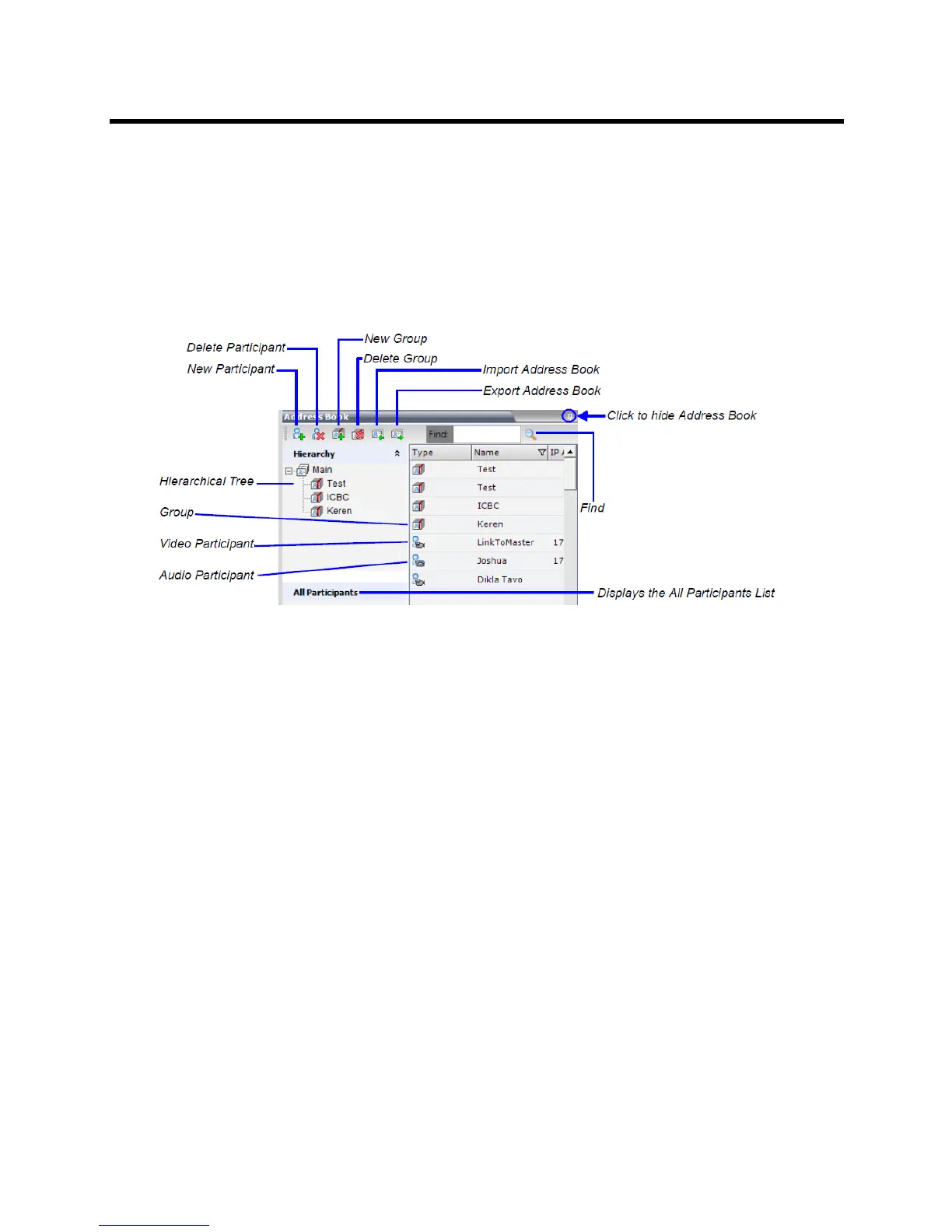
The Address Book toolbar contains a Quick Search field and the following six buttons:
● New Participant
● New Group
● Delete Participant
● Delete Group
● Import Address Book
● Export Address Book
The Navigation pane of the Address Book contains the following types of lists:
● Hierarchical — displays a multi-level hierarchical tree of groups and participants. Double-clicking a
group on the navigation pane displays the group participants and sub-groups in the List pane.
● All Participants — when clicked, displays the single unique entity of all the participants in a single
level as in previous versions. When adding a participant to a group, the system adds a link to the
participant’s unique entity that is stored in the All Participants list.
The Participants List in the Address Book lists entries according to:
● Type – whether an individual Participant or a Group of participants
● Name – name of the participant or group
● Dialing Direction – Dial-in or Dial-out
● IP Address/Phone – IP Address/Phone of the participant
● Encryption - whether the participant is encrypted, not encrypted or the system automatically selects
the encryption according to the conference settings
Displaying and Hiding the Address Book
The first time you access the Collaboration Server Web Client, the Address Book pane is displayed. You
can hide it by clicking the anchor pin button.














 To Next Page