SECTION 12: INLET HOOD
49 of 147
Step 12.2.6
For inlet hoods with permanent aluminum mesh filters, continue to step 12.2.8.
For inlet hoods with birdscreen, no filters, continue to step 12.2.7.
For inlet hoods with moisture limiter, continue to step 12.2.9.
Step 12.2.7
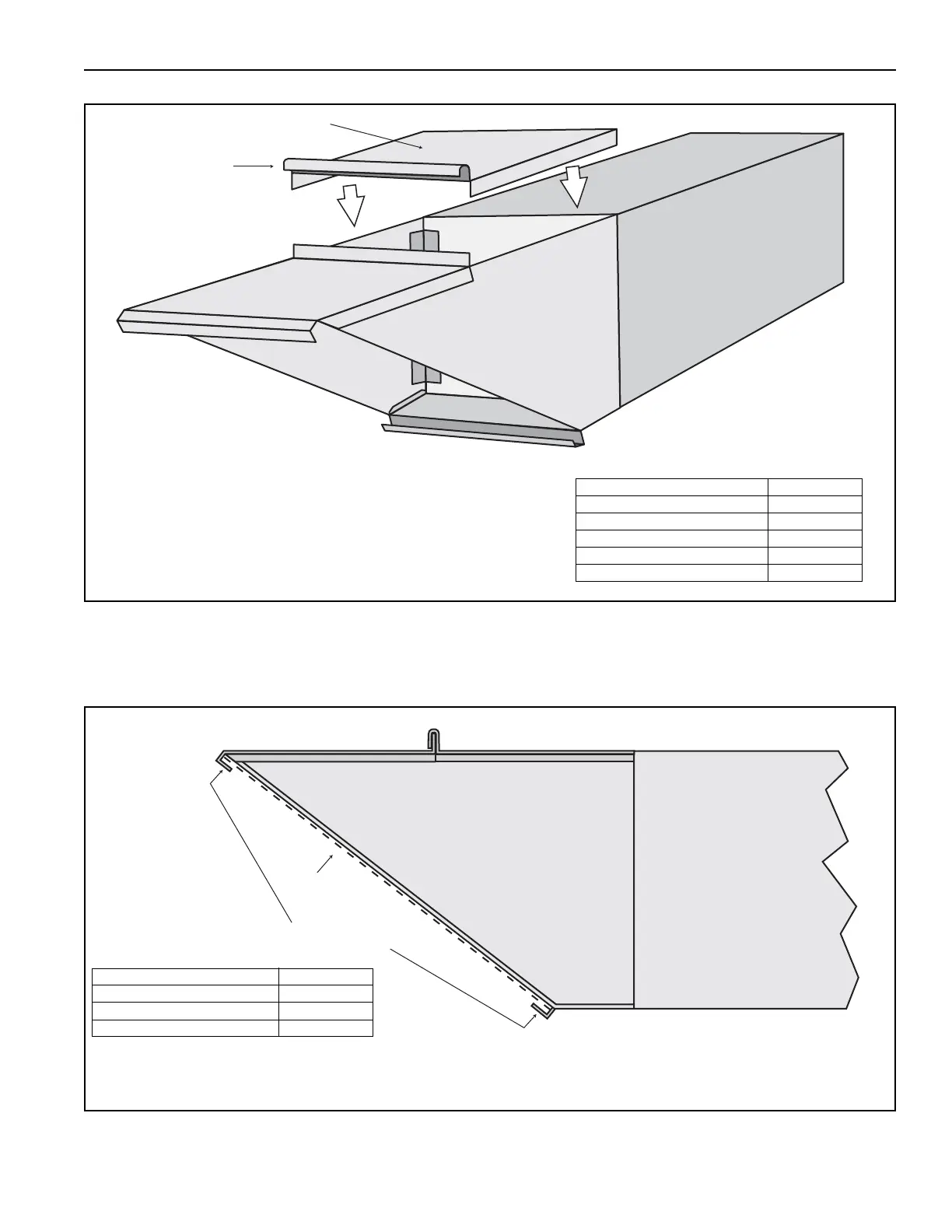
Attach top back panel with fou r TEK self-
tapping screws on each side, with five TEK self-tapping
screws to the top attaching flange and with five 5/16-18 x 1
hex head cap screws, 5/16 washers and 5/16 flange nuts at
the J-bend joint. Ensure that the side tabs of the roof panel
are to the outside of the side panels and that the J-bend
interlocks with the front roof panel.
Description Part Number
Top Back Panel 13505075
TEK Screw 13404
5/16-18 x 1 Hex Head Cap Screw 20507
5/16 Washer 95211600
5/16 Flange Nut 20509
SIDE VIEW
Birdscreen
Horizontal Mount
Install horizontal mounting brackets for birdscreen on to face of inlet hood. Mount birdscreen with brackets
and secure with self tapping screws and washers.
Description Part Number
Horizontal mount for birdscreen 13505087
Screen 90740051
TEK Screw 13404



 To Next Page