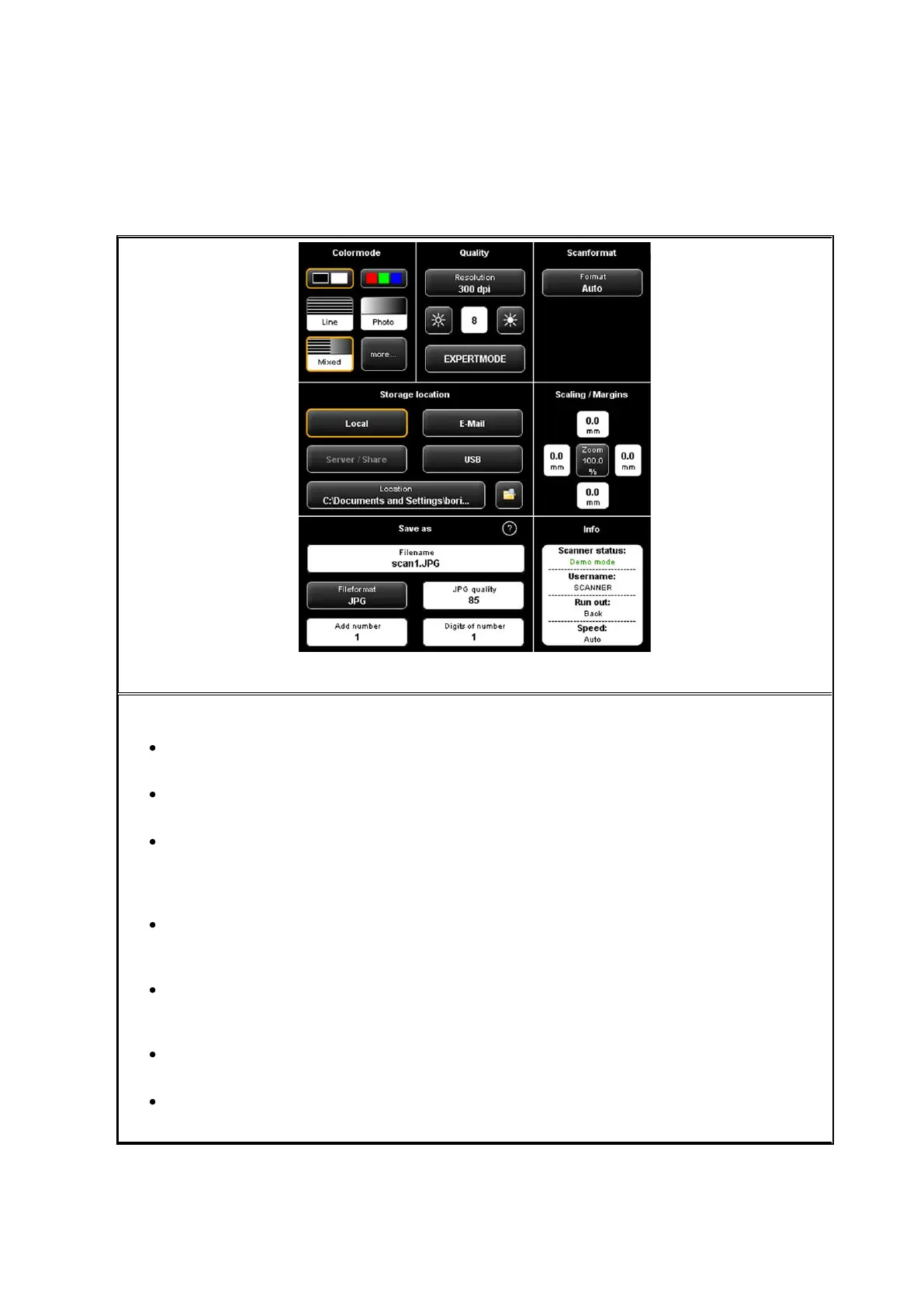
When you are in the "Scan" function, the settings are as follows:
Color mode: Select the color mode for the next scan. This setting is also applied
to a displayed image if any (see 5.11.3.1 )
Quality: Here, you can set resolution and brightness for subsequent scans and
select other image settings (Expert mode). For detailed information see 5.11.3.2 .
Scan format: Here, you can select whether the document width is to be detected
automatically in subsequent scans or if you want to define a standard format. As
an option, you can also define the dimensions (User-defined). For detailed
information see 5.11.3.3 .
Storage location: Here you define where to save the scanned documents. Here,
you can also define to send documents as attachment to an email. For detailed
information see 5.11.1.1 .
Scaling / margins: Here, you can define whether to add margins to the four sides
of the document to be scanned or to cut them off. Moreover, you can set
comprehensive scaling options (see 5.11.3.4 ).
Save as: Define the file format of your scanned document. Depending on the
selected file format, further options are available (see 5.11.1.1 ).
Info: In this area, special status information is given. The contents can be defined
(see 5.11.3.5 ).



 To Next Page