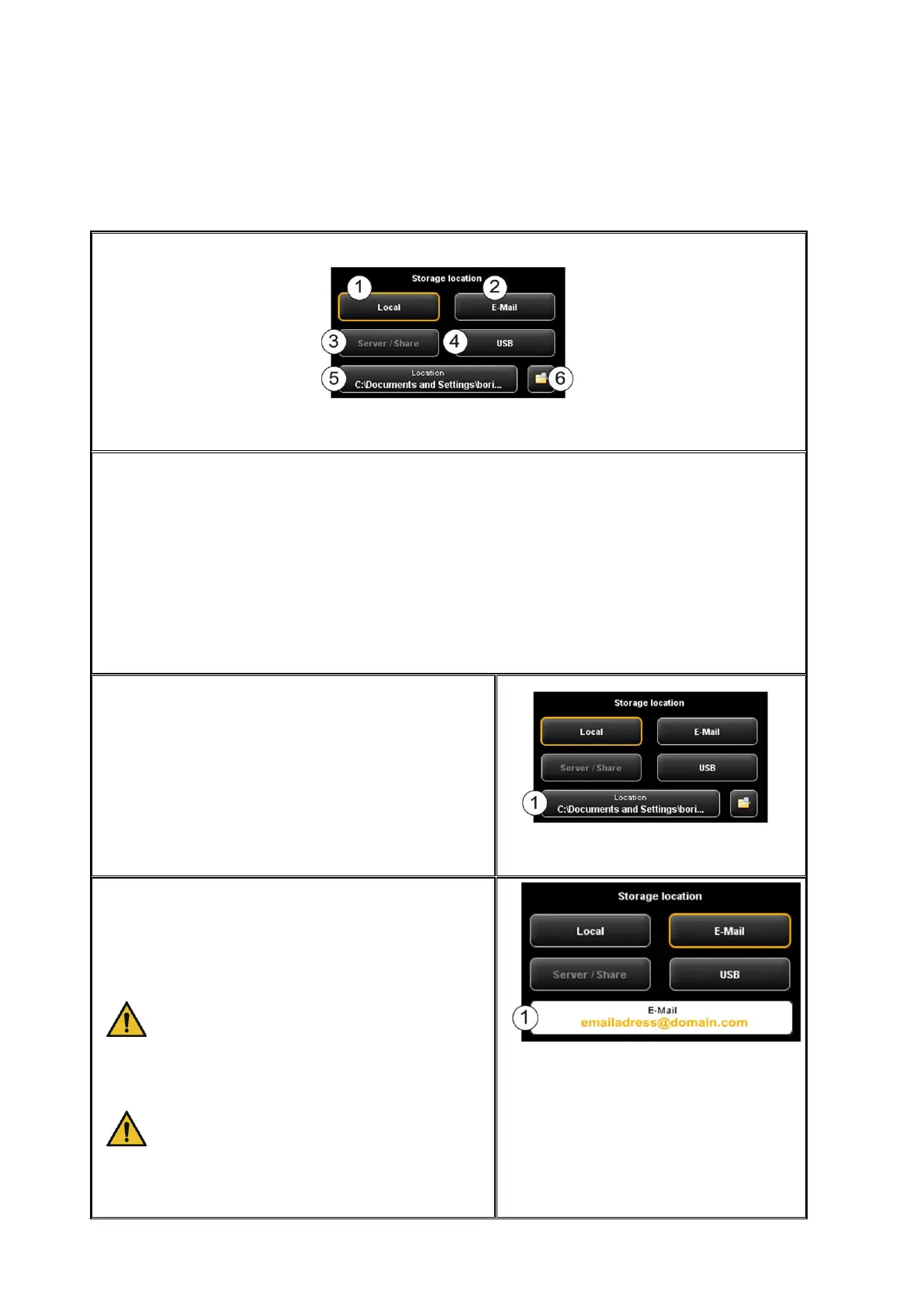
5.11.1.1 Storage Location
Figure 5.12: Settings Storage location
1. Local: Save on local computer (drive, folder)
2. E-mail: Send as attachment to an e-mail.
3. Server/Share: This button is not yet active in the present version and has been
provided for future updates.
4. USB: Save on USB data carrier
5. Location: Select folder
6. Open folder in Windows Explorer: The selected folder is opened directly in
Windows Explorer for you to be able to call the file(s) quickly.
Local: Press this button if you want to save the
file on your local PC in a particular folder.
Press button (1) to select and / or change the
folder.
Figure 5.13: Target folder
E-Mail: Press this button if you want to attach a
file to an e-mail and send it. After scanning or
when actuating the Send key (allocation of
Prescan key changes) your standard e-mail
program pops up.
Depending on your PC configuration, the
operating system may ask for your
standard e-mail program. Make sure that
an e-mail program is installed on your
computer and select it if required.
For large-sized files sending by e-mail
may not be possible.
Enter the e-mail address into text box (1). The
address is accepted by pressing Enter.
Figure 5.14: "Scan to Mail" - E-mail address



 To Next Page