Chapter 1. Introduction 1 – 13
1.2.2.2. Touch Screen
The touch screen is an operating tool that can be touched by the user to input data. The functio
ns that are available in the current mode are shown in the form of buttons or a dial-button.
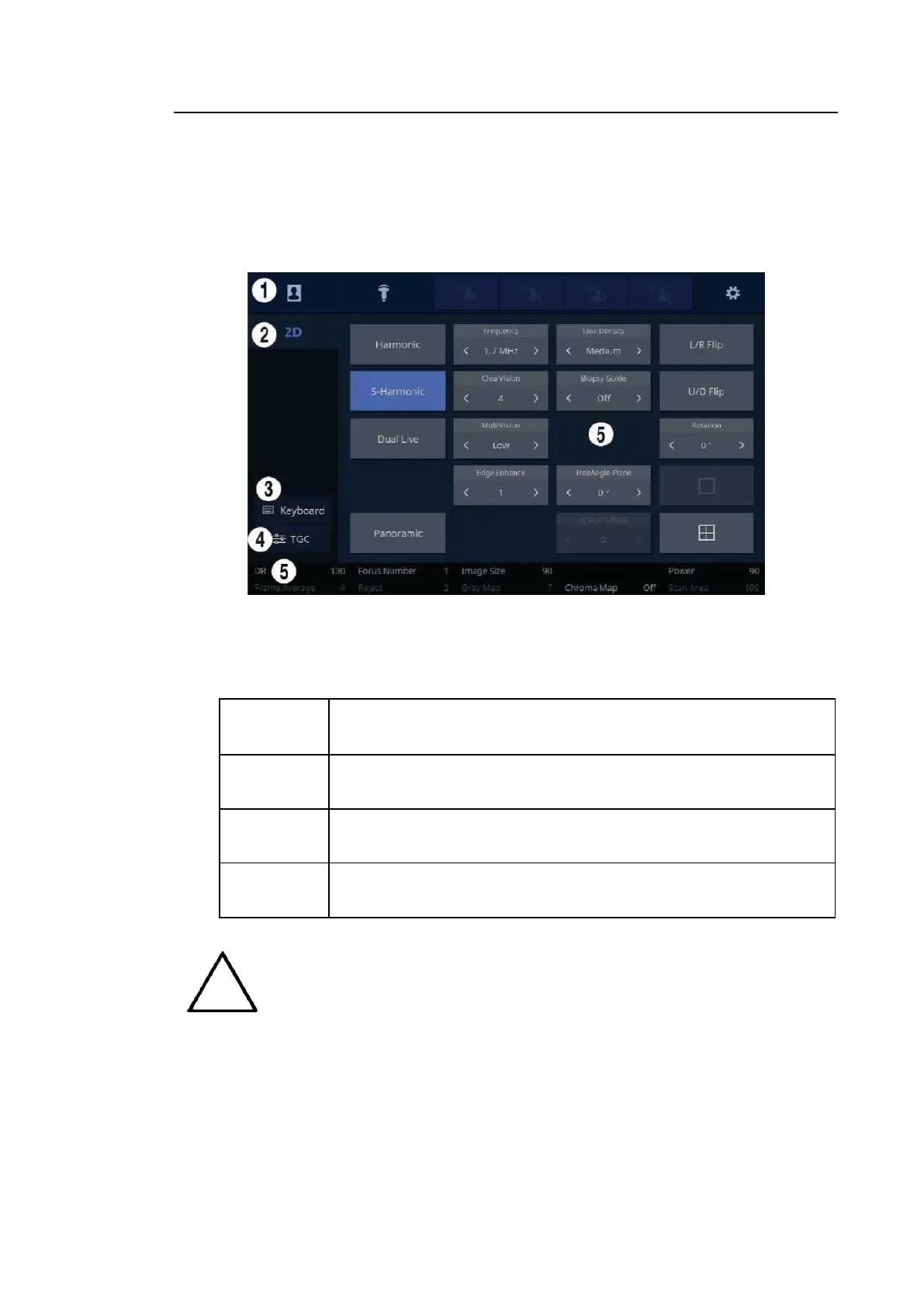
■ Touch Screen Layout
[Figure 1.5 Touch Screen Display]
①
These buttons are always displayed on the touch screen. Buttons that are in use are
shown in blue and buttons that cannot be used are deactivated.
Patient
The Patient Information screen will appear, where you can select a
Patient ID in the list or enter new patient information.
Probe
It displays the Probe Selection screen where you can select and
modify the probe and application.
Quick Preset
1–4
It shows up to 4 Preset buttons configured at Setup.
Setup
The general system settings that do not have a direct bearing on
imaging are explained below.
NOTE
For further details about setting up Quick Preset, please refer to ‘Setup >
System > Quick Preset’ in ‘Chapter 3. Utilities’.



 To Next Page