Date Code 20001006 Installation 2-33
SEL-351 Instruction Manual
EIA-232 Serial Port Voltage Jumpers
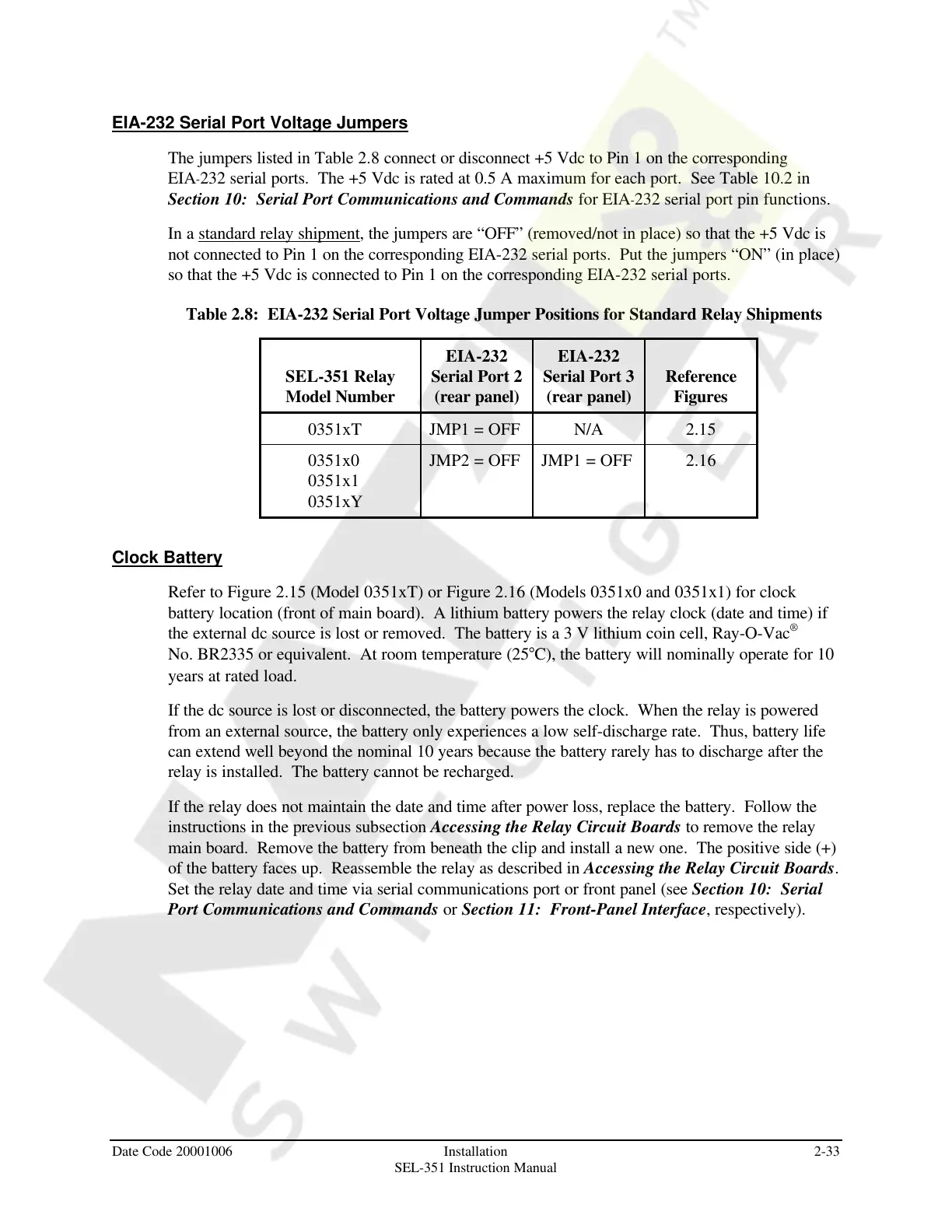
The jumpers listed in Table 2.8 connect or disconnect +5 Vdc to Pin 1 on the corresponding
EIA-232 serial ports. The +5 Vdc is rated at 0.5 A maximum for each port. See Table 10.2 in
Section 10: Serial Port Communications and Commands for EIA-232 serial port pin functions.
In a standard relay shipment, the jumpers are “OFF” (removed/not in place) so that the +5 Vdc is
not connected to Pin 1 on the corresponding EIA-232 serial ports. Put the jumpers “ON” (in place)
so that the +5 Vdc is connected to Pin 1 on the corresponding EIA-232 serial ports.
Table 2.8: EIA-232 Serial Port Voltage Jumper Positions for Standard Relay Shipments
SEL-351 Relay
Model Number
EIA-232
Serial Port 2
(rear panel)
EIA-232
Serial Port 3
(rear panel)
Reference
Figures
0351xT JMP1 = OFF N/A 2.15
0351x0
0351x1
0351xY
JMP2 = OFF JMP1 = OFF 2.16
Clock Battery
Refer to Figure 2.15 (Model 0351xT) or Figure 2.16 (Models 0351x0 and 0351x1) for clock
battery location (front of main board). A lithium battery powers the relay clock (date and time) if
the external dc source is lost or removed. The battery is a 3 V lithium coin cell, Ray-O-Vac
®
No. BR2335 or equivalent. At room temperature (25°C), the battery will nominally operate for 10
years at rated load.
If the dc source is lost or disconnected, the battery powers the clock. When the relay is powered
from an external source, the battery only experiences a low self-discharge rate. Thus, battery life
can extend well beyond the nominal 10 years because the battery rarely has to discharge after the
relay is installed. The battery cannot be recharged.
If the relay does not maintain the date and time after power loss, replace the battery. Follow the
instructions in the previous subsection Accessing the Relay Circuit Boards to remove the relay
main board. Remove the battery from beneath the clip and install a new one. The positive side (+)
of the battery faces up. Reassemble the relay as described in Accessing the Relay Circuit Boards.
Set the relay date and time via serial communications port or front panel (see Section 10: Serial
Port Communications and Commands or Section 11: Front-Panel Interface, respectively).
Courtesy of NationalSwitchgear.com



 To Next Page