2-32 Installation Date Code 20001006
SEL-351 Instruction Manual
output contact comes as a “b” type output contact and all the other output contacts (including the
“extra alarm”) come as “a” type output contacts.
The output contact type for any output contact can be changed (see preceding subsection Output
Contact Jumpers). Thus, the dedicated ALARM output contact and the “extra alarm” output
contact can be configured as the same output contact type if desired (e.g., both can be configured
as “b” type output contacts).
Password and Breaker Jumpers
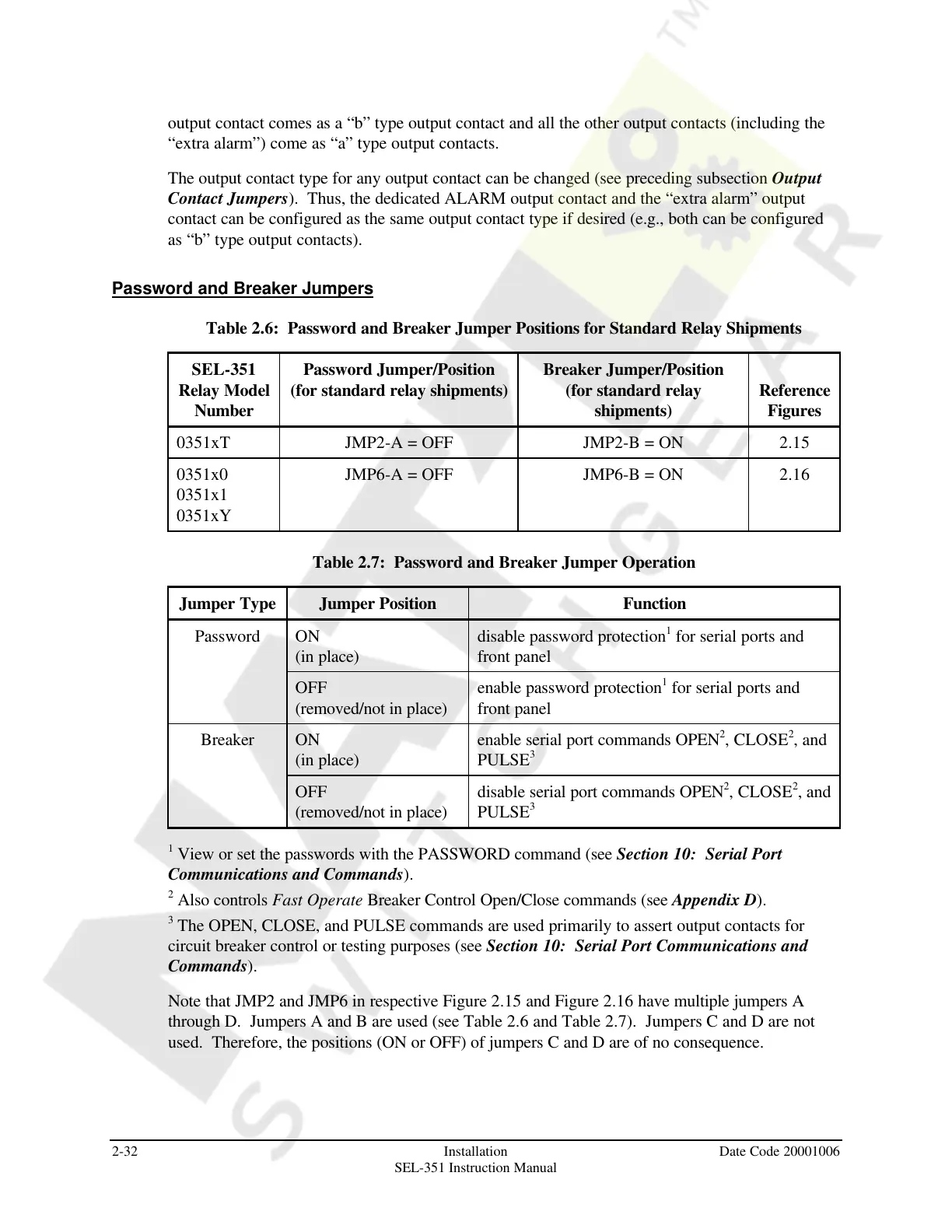
Table 2.6: Password and Breaker Jumper Positions for Standard Relay Shipments
SEL-351
Relay Model
Number
Password Jumper/Position
(for standard relay shipments)
Breaker Jumper/Position
(for standard relay
shipments)
Reference
Figures
0351xT JMP2-A = OFF JMP2-B = ON 2.15
0351x0
0351x1
0351xY
JMP6-A = OFF JMP6-B = ON 2.16
Table 2.7: Password and Breaker Jumper Operation
Jumper Type Jumper Position Function
Password ON
(in place)
disable password protection
1
for serial ports and
front panel
OFF
(removed/not in place)
enable password protection
1
for serial ports and
front panel
Breaker ON
(in place)
enable serial port commands OPEN
2
, CLOSE
2
, and
PULSE
3
OFF
(removed/not in place)
disable serial port commands OPEN
2
, CLOSE
2
, and
PULSE
3
1
View or set the passwords with the PASSWORD command (see Section 10: Serial Port
Communications and Commands).
2
Also controls Fast Operate Breaker Control Open/Close commands (see Appendix D).
3
The OPEN, CLOSE, and PULSE commands are used primarily to assert output contacts for
circuit breaker control or testing purposes (see Section 10: Serial Port Communications and
Commands).
Note that JMP2 and JMP6 in respective Figure 2.15 and Figure 2.16 have multiple jumpers A
through D. Jumpers A and B are used (see Table 2.6 and Table 2.7). Jumpers C and D are not
used. Therefore, the positions (ON or OFF) of jumpers C and D are of no consequence.
Courtesy of NationalSwitchgear.com



 To Next Page