4.40
SEL-749M Relay Instruction Manual Date Code 20080918
Protection and Logic Functions
Global Settings (SET G Command)
Global Settings (SET G Command)
General Settings
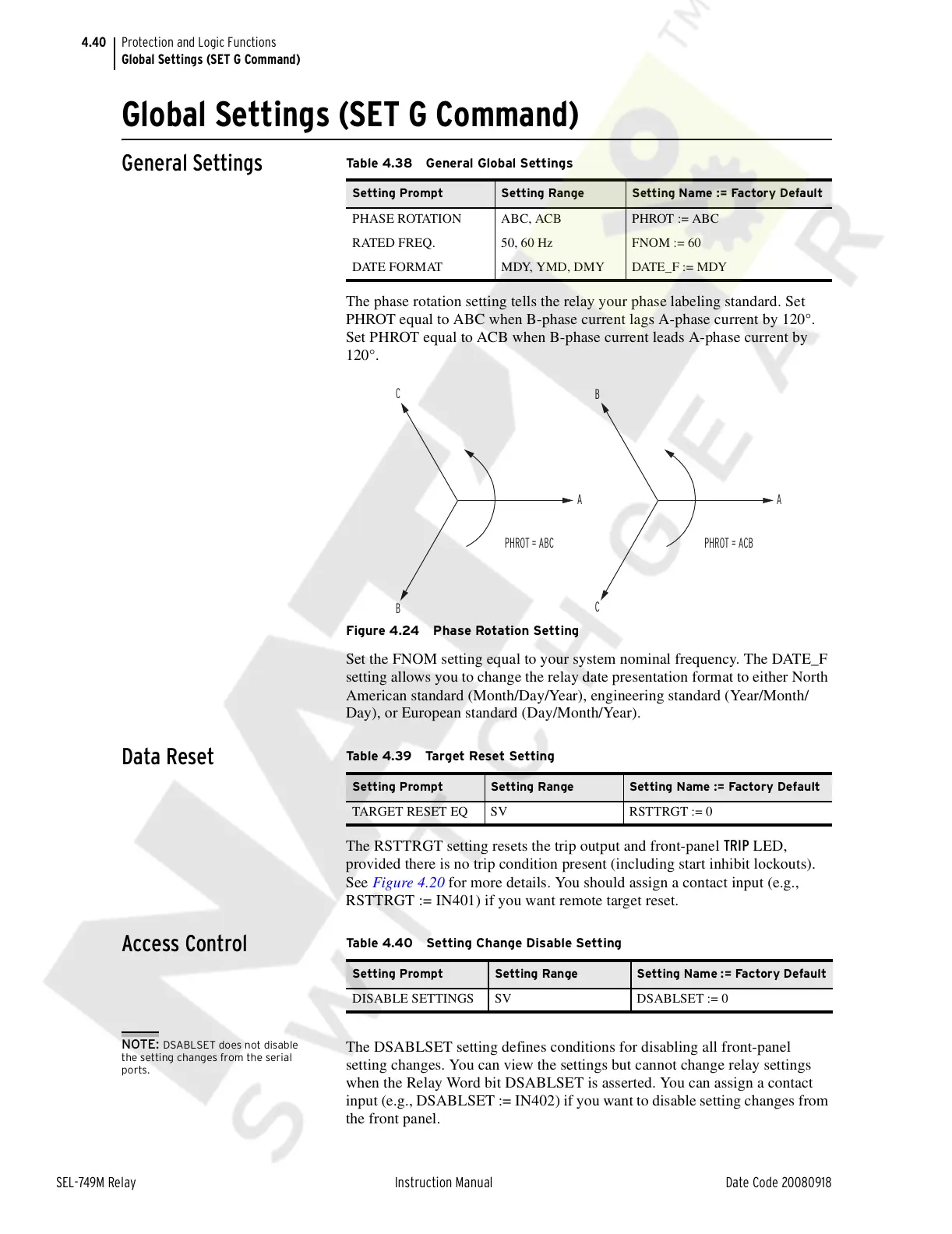
The phase rotation setting tells the relay your phase labeling standard. Set
PHROT equal to ABC when B-phase current lags A-phase current by 120°.
Set PHROT equal to ACB when B-phase current leads A-phase current by
120°.
Figure 4.24 Phase Rotation Setting
Set the FNOM setting equal to your system nominal frequency. The DATE_F
setting allows you to change the relay date presentation format to either North
American standard (Month/Day/Year), engineering standard (Year/Month/
Day), or European standard (Day/Month/Year).
Data Reset
The RSTTRGT setting resets the trip output and front-panel TRIP LED,
provided there is no trip condition present (including start inhibit lockouts).
See Figure 4.20 for more details. You should assign a contact input (e.g.,
RSTTRGT := IN401) if you want remote target reset.
Access Control
NOTE: DSABLSET does not disable
the setting changes from the serial
ports.
The DSABLSET setting defines conditions for disabling all front-panel
setting changes. You can view the settings but cannot change relay settings
when the Relay Word bit DSABLSET is asserted. You can assign a contact
input (e.g., DSABLSET := IN402) if you want to disable setting changes from
the front panel.
Table 4.38 General Global Settings
Setting Prompt Setting Range Setting Name := Factory Default
PHASE ROTATION ABC, ACB PHROT := ABC
RATED FREQ. 50, 60 Hz FNOM := 60
DATE FORMAT MDY, YMD, DMY DATE_F := MDY
B
C
A
C
PHROT = ABC
A
PHROT = ACB
B
Table 4.39 Target Reset Setting
Setting Prompt Setting Range Setting Name := Factory Default
TARGET RESET EQ SV RSTTRGT := 0
Table 4.40 Setting Change Disable Setting
Setting Prompt Setting Range Setting Name := Factory Default
DISABLE SETTINGS SV DSABLSET := 0
Courtesy of NationalSwitchgear.com



 To Next Page