7.5
Date Code 20080918 Instruction Manual SEL-749M Relay
Communications
Communications Protocol
EIA-485 Two-Wire
Communications
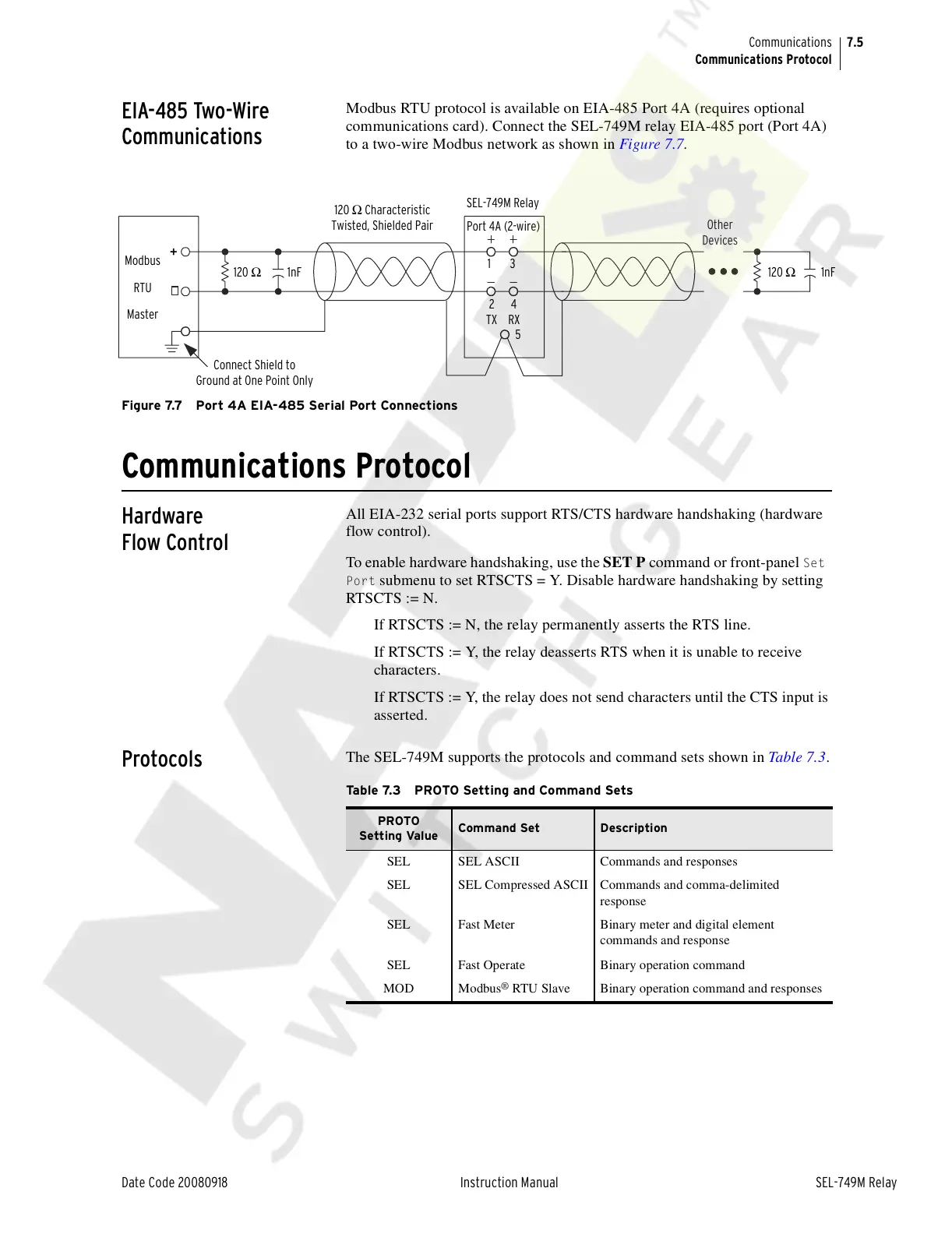
Modbus RTU protocol is available on EIA-485 Port 4A (requires optional
communications card). Connect the SEL-749M relay EIA-485 port (Port 4A)
to a two-wire Modbus network as shown in Figure 7.7.
Figure 7.7 Port 4A EIA-485 Serial Port Connections
Communications Protocol
Hardware
Flow Control
All EIA-232 serial ports support RTS/CTS hardware handshaking (hardware
flow control).
To enable hardware handshaking, use the SET P command or front-panel
Set
Port
submenu to set RTSCTS = Y. Disable hardware handshaking by setting
RTSCTS := N.
If RTSCTS := N, the relay permanently asserts the RTS line.
If RTSCTS := Y, the relay deasserts RTS when it is unable to receive
characters.
If RTSCTS := Y, the relay does not send characters until the CTS input is
asserted.
Protocols
The SEL-749M supports the protocols and command sets shown in Table 7.3.
.
Other
Devices
120 Ω
1nF
120 Ω Characteristic
Twisted, Shielded Pair
Connect Shield to
Ground at One Point Only
SEL-749M Relay
1 3
2 4
TX RX
5
Modbus
RTU
Master
+
120 Ω
1nF
Port 4A (2-wire)
Table 7.3 PROTO Setting and Command Sets
PROTO
Setting Value
Command Set Description
SEL SEL ASCII Commands and responses
SEL SEL Compressed ASCII Commands and comma-delimited
response
SEL Fast Meter Binary meter and digital element
commands and response
SEL Fast Operate Binary operation command
MOD Modbus
®
RTU Slave Binary operation command and responses
Courtesy of NationalSwitchgear.com



 To Next Page