8.5
Date Code 20080918 Instruction Manual SEL-749M Relay
Front-Panel Operations
Human-Machine Interface
The SEL-749M automatically scrolls information that requires more space
than provided by a 16-character LCD line. Use the {Left Arrow} and {Right
Arrow} pushbuttons to suspend automatic scrolling and enable manual
scrolling of this information.
SEL-749M Menu Structure
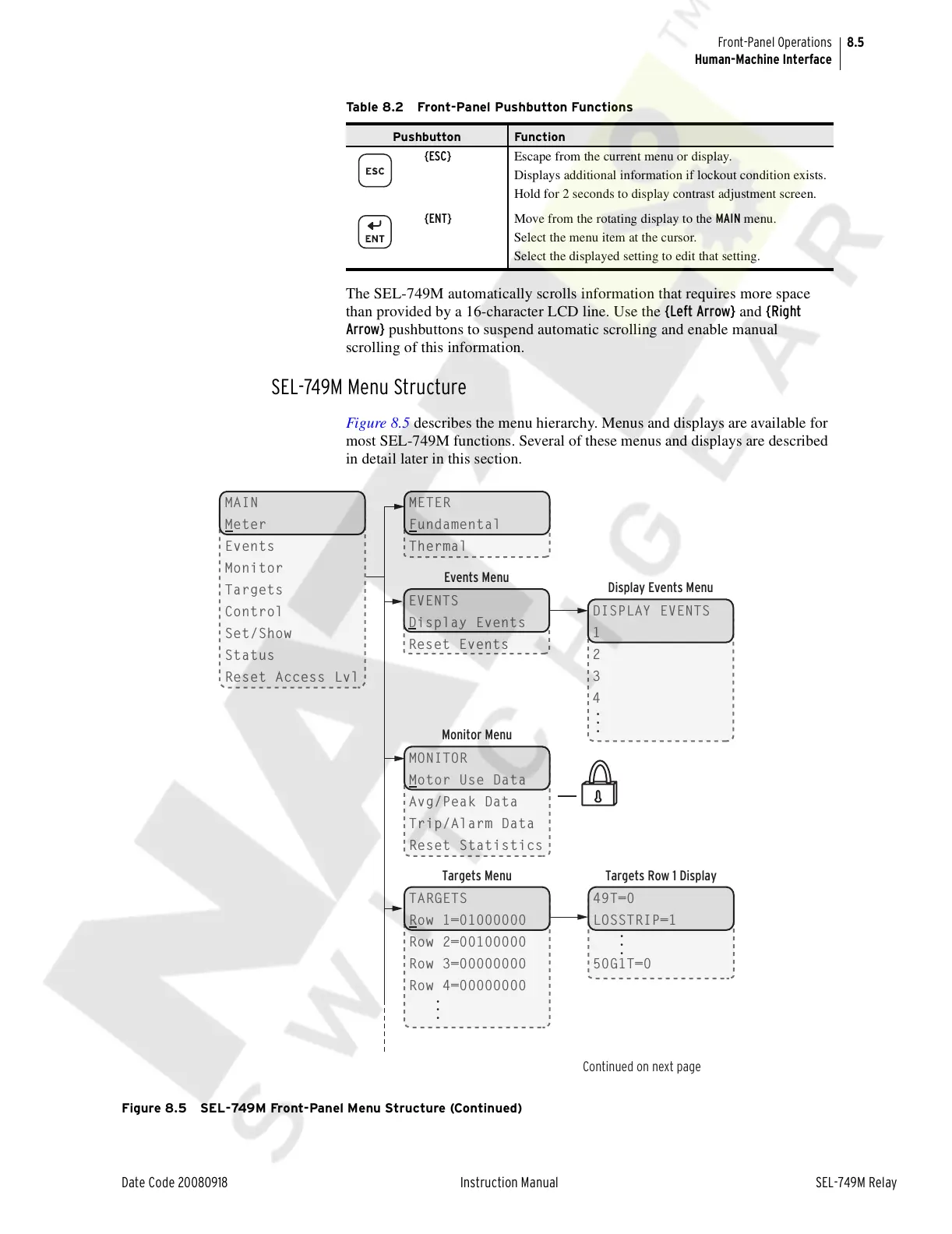
Figure 8.5 describes the menu hierarchy. Menus and displays are available for
most SEL-749M functions. Several of these menus and displays are described
in detail later in this section.
Figure 8.5 SEL-749M Front-Panel Menu Structure (Continued)
{ESC} Escape from the current menu or display.
Displays additional information if lockout condition exists.
Hold for 2 seconds to display contrast adjustment screen.
{ENT} Move from the rotating display to the MAIN menu.
Select the menu item at the cursor.
Select the displayed setting to edit that setting.
Table 8.2 Front-Panel Pushbutton Functions
Pushbutton Function
Continued on next page
Display Events Menu
DISPLAY EVENTS
1
2
3
4
Targets Row 1 Display
49T=0
LOSSTRIP=1
50G1T=0
METER
Fundamental
Thermal
Events Menu
EVENTS
Display Events
Reset Events
Targets Menu
TARGETS
Row 1=01000000
Row 2=00100000
Row 3=00000000
Row 4=00000000
Monitor Menu
MONITOR
Motor Use Data
Avg/Peak Data
Trip/Alarm Data
Reset Statistics
MAIN
Meter
Events
Monitor
Targets
Control
Set/Show
Status
Reset Access Lvl
...
...
...
Courtesy of NationalSwitchgear.com



 To Next Page