4.42
SEL-749M Relay Instruction Manual Date Code 20080918
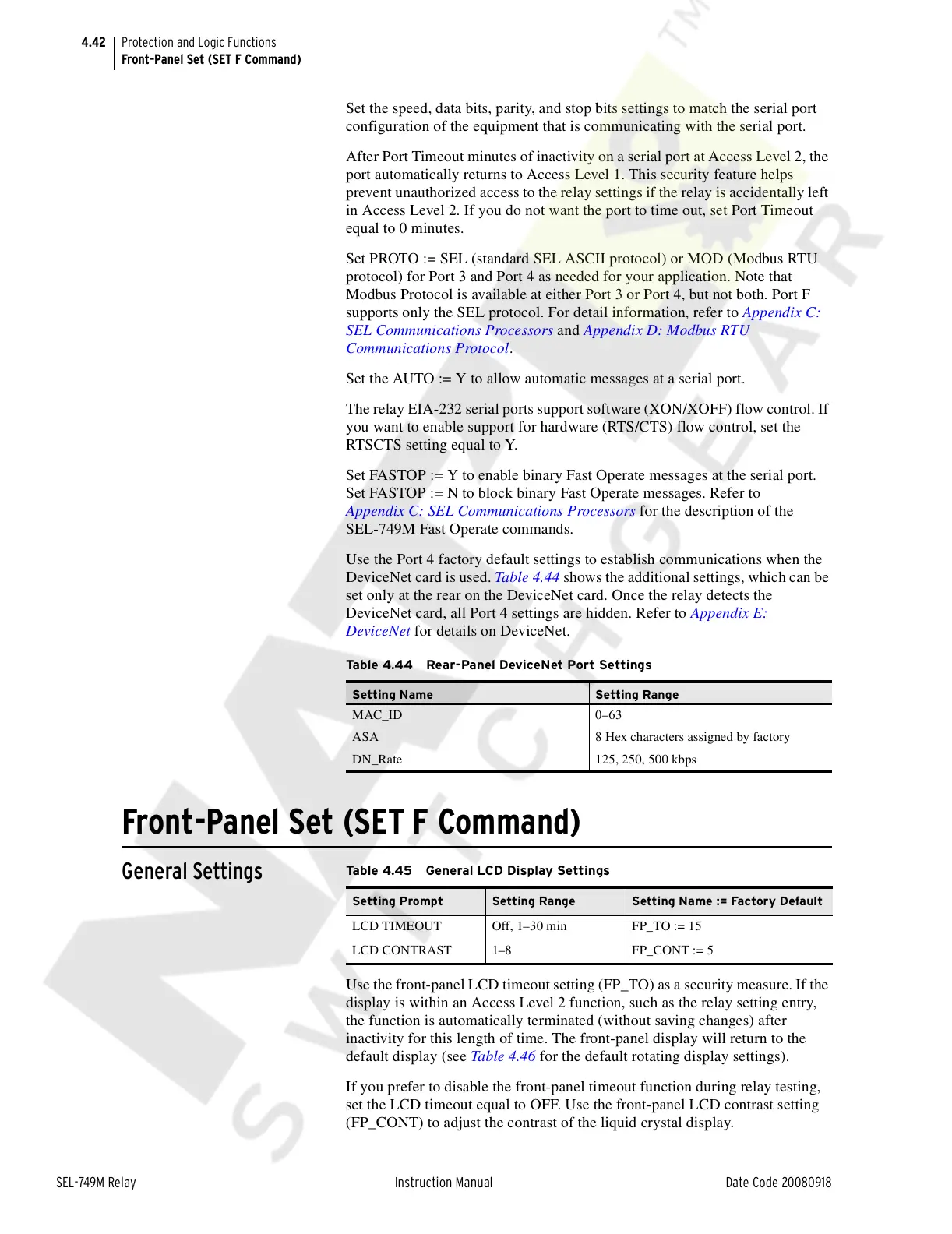
Protection and Logic Functions
Front-Panel Set (SET F Command)
Set the speed, data bits, parity, and stop bits settings to match the serial port
configuration of the equipment that is communicating with the serial port.
After Port Timeout minutes of inactivity on a serial port at Access Level 2, the
port automatically returns to Access Level 1. This security feature helps
prevent unauthorized access to the relay settings if the relay is accidentally left
in Access Level 2. If you do not want the port to time out, set Port Timeout
equal to 0 minutes.
Set PROTO := SEL (standard SEL ASCII protocol) or MOD (Modbus RTU
protocol) for Port 3 and Port 4 as needed for your application. Note that
Modbus Protocol is available at either Port 3 or Port 4, but not both. Port F
supports only the SEL protocol. For detail information, refer to Appendix C:
SEL Communications Processors and Appendix D: Modbus RTU
Communications Protocol.
Set the AUTO := Y to allow automatic messages at a serial port.
The relay EIA-232 serial ports support software (XON/XOFF) flow control. If
you want to enable support for hardware (RTS/CTS) flow control, set the
RTSCTS setting equal to Y.
Set FASTOP := Y to enable binary Fast Operate messages at the serial port.
Set FASTOP := N to block binary Fast Operate messages. Refer to
Appendix C: SEL Communications Processors for the description of the
SEL-749M Fast Operate commands.
Use the Port 4 factory default settings to establish communications when the
DeviceNet card is used. Table 4.44 shows the additional settings, which can be
set only at the rear on the DeviceNet card. Once the relay detects the
DeviceNet card, all Port 4 settings are hidden. Refer to Appendix E:
DeviceNet for details on DeviceNet.
Front-Panel Set (SET F Command)
General Settings
Use the front-panel LCD timeout setting (FP_TO) as a security measure. If the
display is within an Access Level 2 function, such as the relay setting entry,
the function is automatically terminated (without saving changes) after
inactivity for this length of time. The front-panel display will return to the
default display (see Table 4.46 for the default rotating display settings).
If you prefer to disable the front-panel timeout function during relay testing,
set the LCD timeout equal to OFF. Use the front-panel LCD contrast setting
(FP_CONT) to adjust the contrast of the liquid crystal display.
Table 4.44 Rear-Panel DeviceNet Port Settings
Setting Name Setting Range
MAC_ID 0–63
ASA 8 Hex characters assigned by factory
DN_Rate 125, 250, 500 kbps
Table 4.45 General LCD Display Settings
Setting Prompt Setting Range Setting Name := Factory Default
LCD TIMEOUT Off, 1–30 min FP_TO := 15
LCD CONTRAST 1–8 FP_CONT := 5
Courtesy of NationalSwitchgear.com


 To Next Page