9.6
SEL-749M Relay Instruction Manual Date Code 20080918
Analyzing Events
Event Reporting
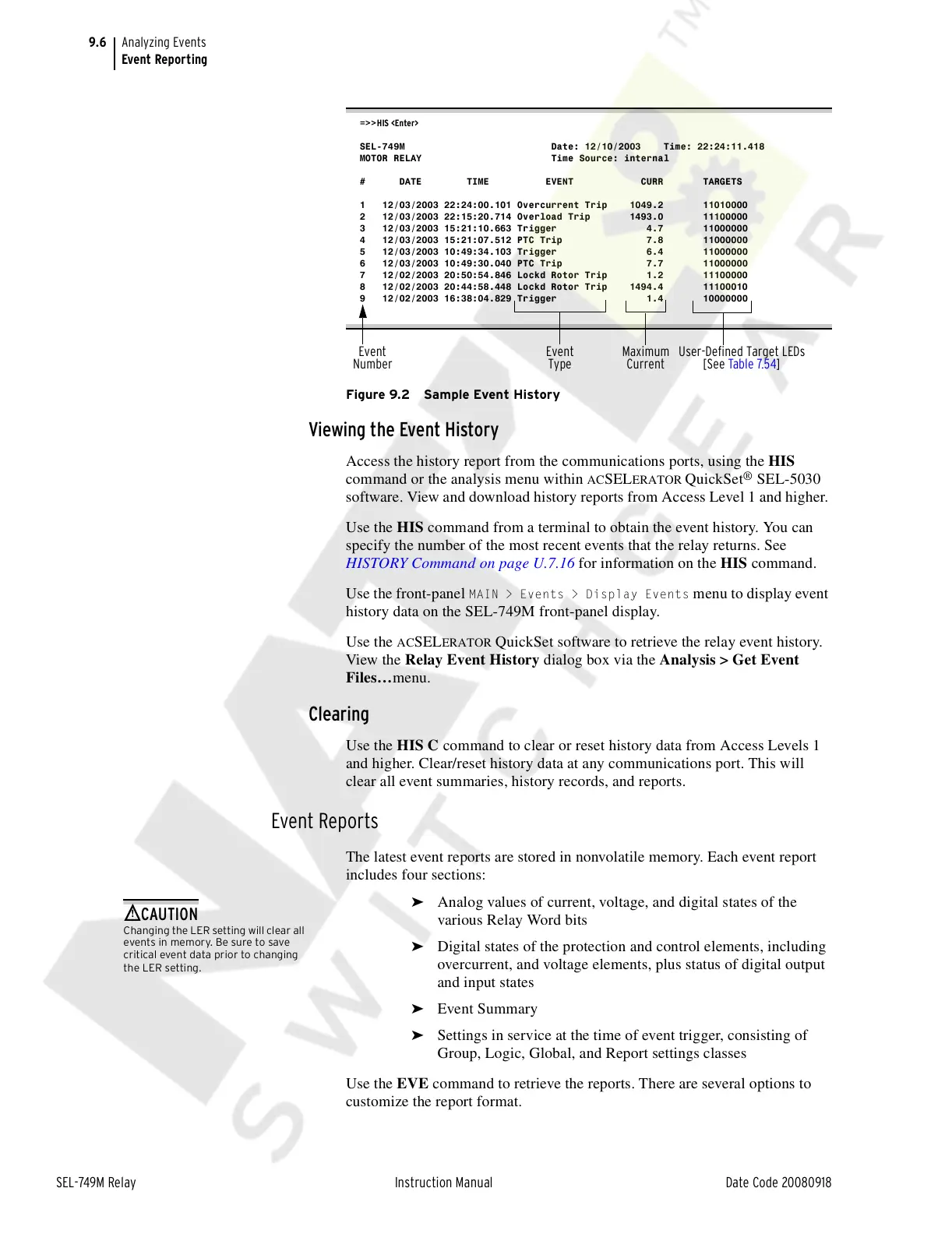
Figure 9.2 Sample Event History
Viewing the Event History
Access the history report from the communications ports, using the HIS
command or the analysis menu within
ACSELERATOR
QuickSet
®
SEL-5030
software. View and download history reports from Access Level 1 and higher.
Use the HIS command from a terminal to obtain the event history. You can
specify the number of the most recent events that the relay returns. See
HISTORY Command on page U.7.16 for information on the HIS command.
Use the front-panel
MAIN > Events > Display Events menu to display event
history data on the SEL-749M front-panel display.
Use the
ACSELERATOR QuickSet software to retrieve the relay event history.
View the Relay Event History dialog box via the Analysis > Get Event
Files…menu.
Clearing
Use the HIS C command to clear or reset history data from Access Levels 1
and higher. Clear/reset history data at any communications port. This will
clear all event summaries, history records, and reports.
Event Reports
The latest event reports are stored in nonvolatile memory. Each event report
includes four sections:
➤ Analog values of current, voltage, and digital states of the
various Relay Word bits
➤ Digital states of the protection and control elements, including
overcurrent, and voltage elements, plus status of digital output
and input states
➤ Event Summary
➤ Settings in service at the time of event trigger, consisting of
Group, Logic, Global, and Report settings classes
Use the EVE command to retrieve the reports. There are several options to
customize the report format.
=>>HIS <Enter>
SEL-749M Date: 12/10/2003 Time: 22:24:11.418
MOTOR RELAY Time Source: internal
# DATE TIME EVENT CURR TARGETS
1 12/03/2003 22:24:00.101 Overcurrent Trip 1049.2 11010000
2 12/03/2003 22:15:20.714 Overload Trip 1493.0 11100000
3 12/03/2003 15:21:10.663 Trigger 4.7 11000000
4 12/03/2003 15:21:07.512 PTC Trip 7.8 11000000
5 12/03/2003 10:49:34.103 Trigger 6.4 11000000
6 12/03/2003 10:49:30.040 PTC Trip 7.7 11000000
7 12/02/2003 20:50:54.846 Lockd Rotor Trip 1.2 11100000
8 12/02/2003 20:44:58.448 Lockd Rotor Trip 1494.4 11100010
9 12/02/2003 16:38:04.829 Trigger 1.4 10000000
Maximum
Current
Event
Type
User-Defined Target LEDs
[See Table 7.54]
Event
Number
!
CAUTION
Changing the LER setting will clear all
events in memory. Be sure to save
critical event data prior to changing
the LER setting.
Courtesy of NationalSwitchgear.com



 To Next Page