8.11
Date Code 20080918 Instruction Manual SEL-749M Relay
Front-Panel Operations
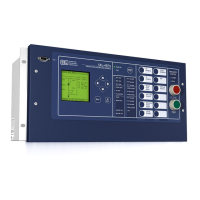
Operation and Target LEDs
Lamp Test
The {TARGET RESET} pushbutton also provides a front-panel lamp test. Pressing
and holding {TARGET RESET} illuminates all the front-panel LEDs, and these
LEDs remain illuminated for as long as {TARGET RESET} is pressed. The target
LEDs return to a normal operational state after release of the {TARGET RESET}
pushbutton.
Other Target Reset Options
Use the ASCII command TAR R to reset the target LEDs; see TARGET
Command (Display Relay Word Bit Status) on page U.7.27 for more
information. Programming specific conditions in the SEL
OGIC control
equation RSTTRGT is another method for resetting target LEDs. Access
RSTTRGT in the Global settings (Data Reset Control). See Table 4.39 for
further information.
Courtesy of NationalSwitchgear.com



 To Next Page