SEEDMASTER 2023
87
12. Set the application type for each product by touching the drop-down and selecting Granular
RPM Maintained for granular products, and Liquid for liquid products. Do this for each product
and touch next.
13. The Machine WILL NOT share all the section drivers. Choose NO and then touch next.
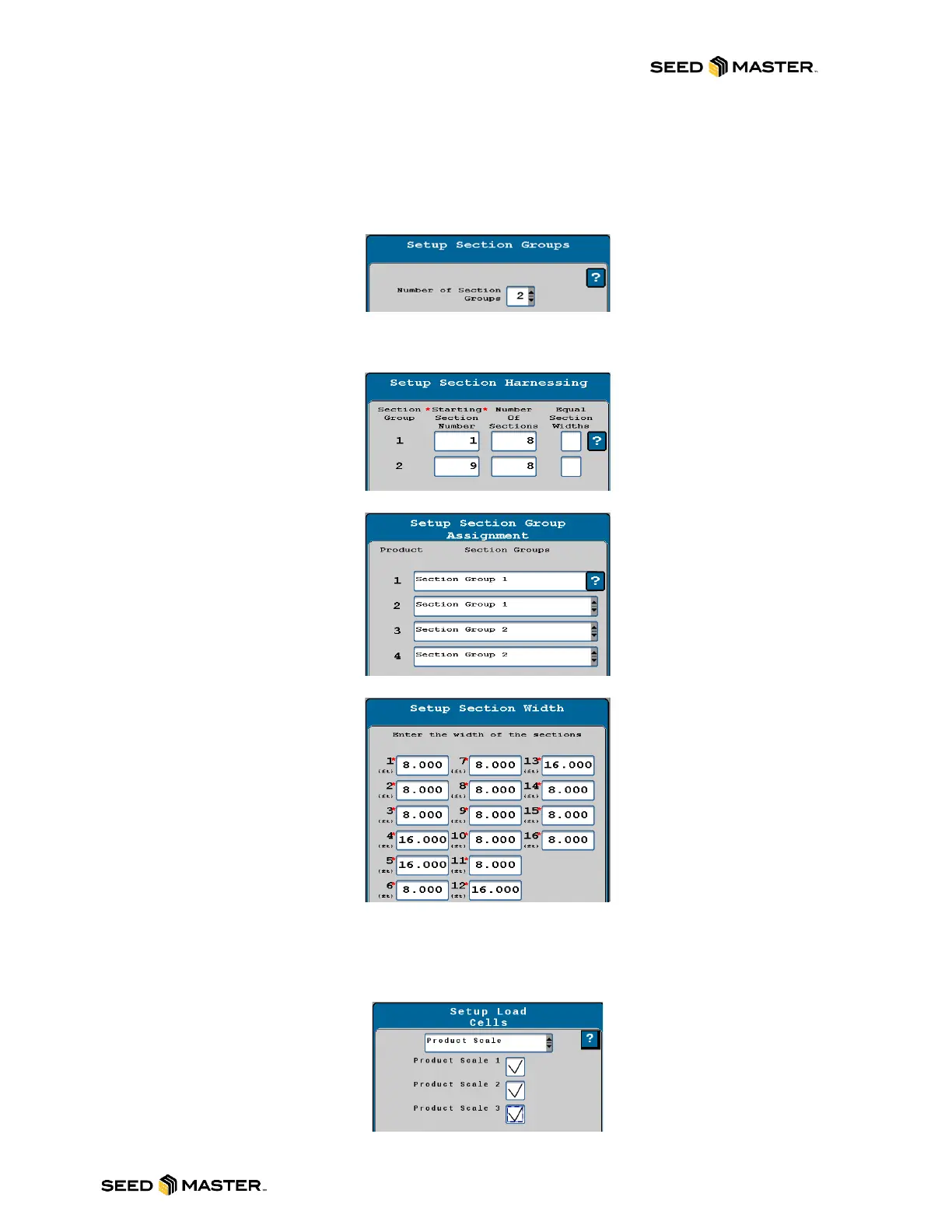
14. Enter the number of Section Groups. The Master Clutch and Power to Apply will remain with
NO check marks. Touch next.
15. An example of the section group mapping will be displayed. Review the guide then touch next.
16. Enter the Starting Section Number and Number of Sections associated with the starting
number. If the sections are equal width, leave the check mark on for this setting. Touch next.
17. Select the section group that is associated to the corresponding product.
18. Review the widths of each section then touch next.
19. There are NO Auxiliary Drivers installed. Touch next.
20. Section Summary will display the products and sections and the assigned driver and switch
review. Touch next. Note: You may have two pages for the summary.
21. Touch the drop-down box for the Load Cells Setup and then select Product Scale. Place a
check mark beside each Product Scale. After all checks are entered, touch next.



 To Next Page