Using the EM 6000
62
Operating elements on the front of the device
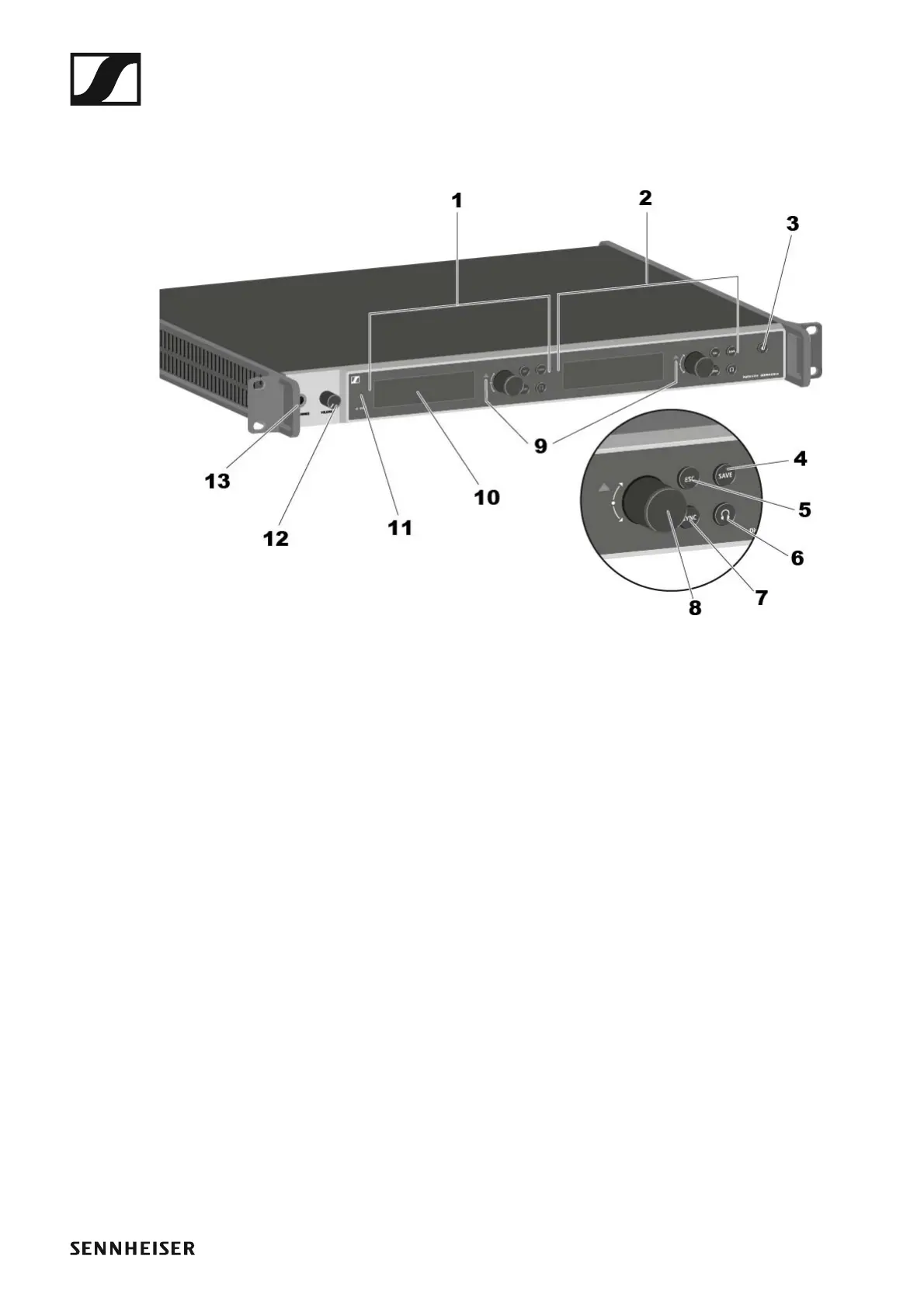
Product overview for the front of the EM 6000
►
1 Displaying and using channel 1 (CH 1)
• See “Displays on the EM 6000 display panel”
• See “Buttons for navigating through the menu”
2 Displaying and using channel 2 (CH 2)
• See “Displays on the EM 6000 display panel”
• See “Buttons for navigating through the menu”
3 On/Off button
• See “Switching the EM 6000 on and off”
4 SAVE button for saving settings in the menu (separate for CH 1 and CH
2)
• See “Buttons for navigating through the menu”
5 ESC button for canceling an action in the menu (separate for CH 1 and
CH 2)
• See “Buttons for navigating through the menu”
6 Headphone button for listening in the particular channel via the HEAD-
PHONES socket (13) (separate for CH 1 and CH 2)
• See “Using the headphone output”
7 SYNC button for synchronizing the channel settings to a transmitter
(separate for CH 1 and CH 2)
• See “Synchronizing devices”
8 Jog dial for navigating through the menu (separate for CH 1 and CH 2)
• See “Buttons for navigating through the menu”














 To Next Page