6
To stop operation, press [PUMP], and then [ENTER].
[PUMP] on the display stops being highlighted and the pump stops operation.
Close the drain valve when not draining through the drain path.
If the drain valve is left opened, a pressure difference may cause the mobile
phase solvent to flow out of the drain outlet.
3.2.3
Operation in Constant Pressure Delivery Mode
This function is available only for LC-40D XR CL.
1
Turn the drain valve knob clockwise as far as possible to close the drain valve.
2
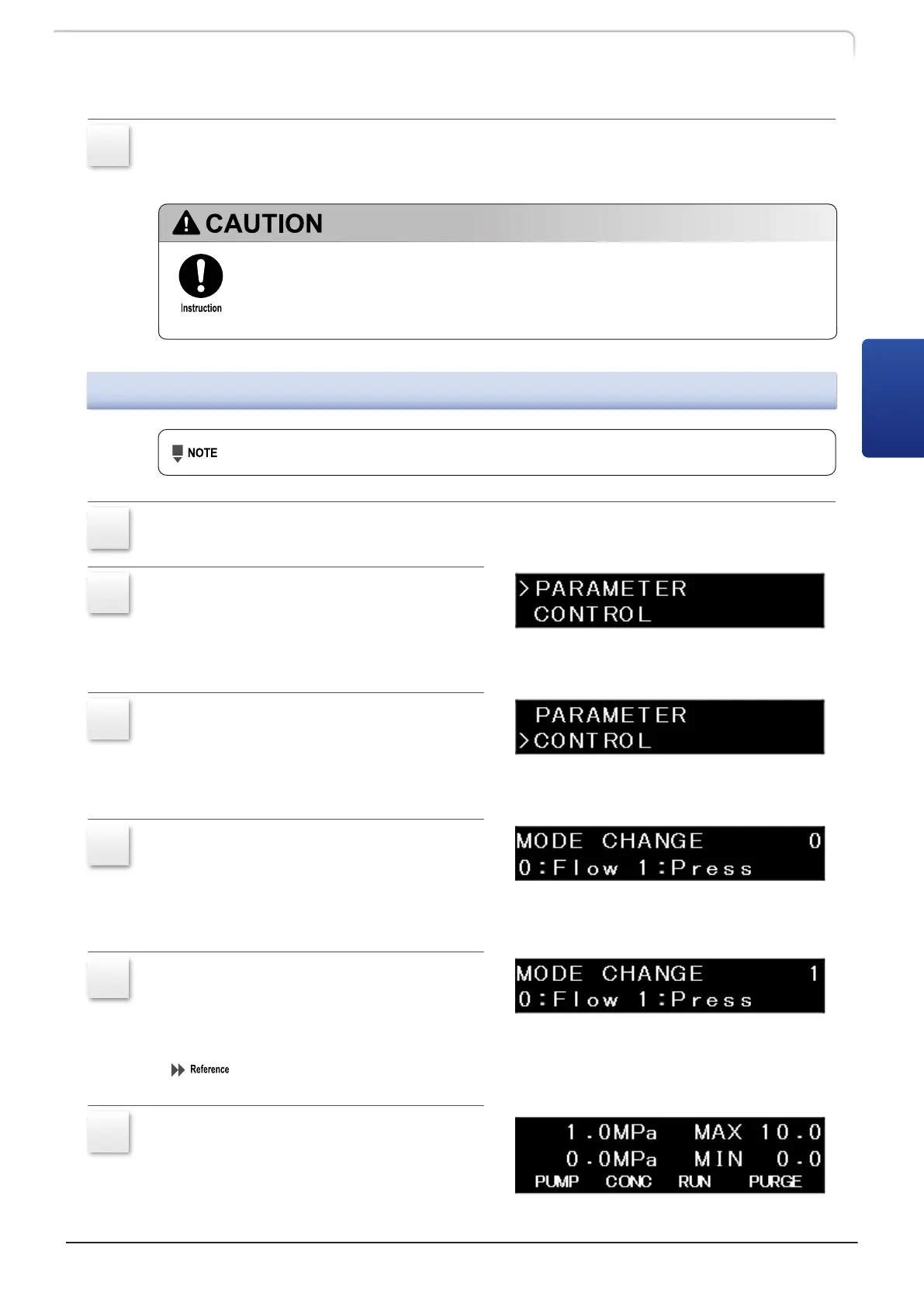
Press [→] twice on the initial screen.
The FUNCTION setting group is displayed.
3
Press [↓] once, move the cursor to
[CONTROL] and press [→].
The CONTROL setting group is displayed.
4
Press [↓] twice and on the [MODE
CHANGE] screen, press [Enter].
The numeric keypad becomes active
allowing the user to input numbers.
5
Press [1] and [Enter].
The delivery mode changes from the
constant flow delivery mode to the
constant pressure delivery mode.
"Switching the delivery mode《MODE CHANGE》(Only for LC-40D XR CL)" P.38
6
After changing the mode, press [CE]
once.
The initial screen of the constant pressure
delivery mode is displayed.
LC-40D X3 CL LC-40D XR CL
21
3.2 Operation
3



 To Next Page
 Loading...