60 FLOWSIC200 · Operating Instructions · 8013271/1CJ9/V 2-0/2022-01 · © SICK Engineering GmbH
Commissioning and parameterization
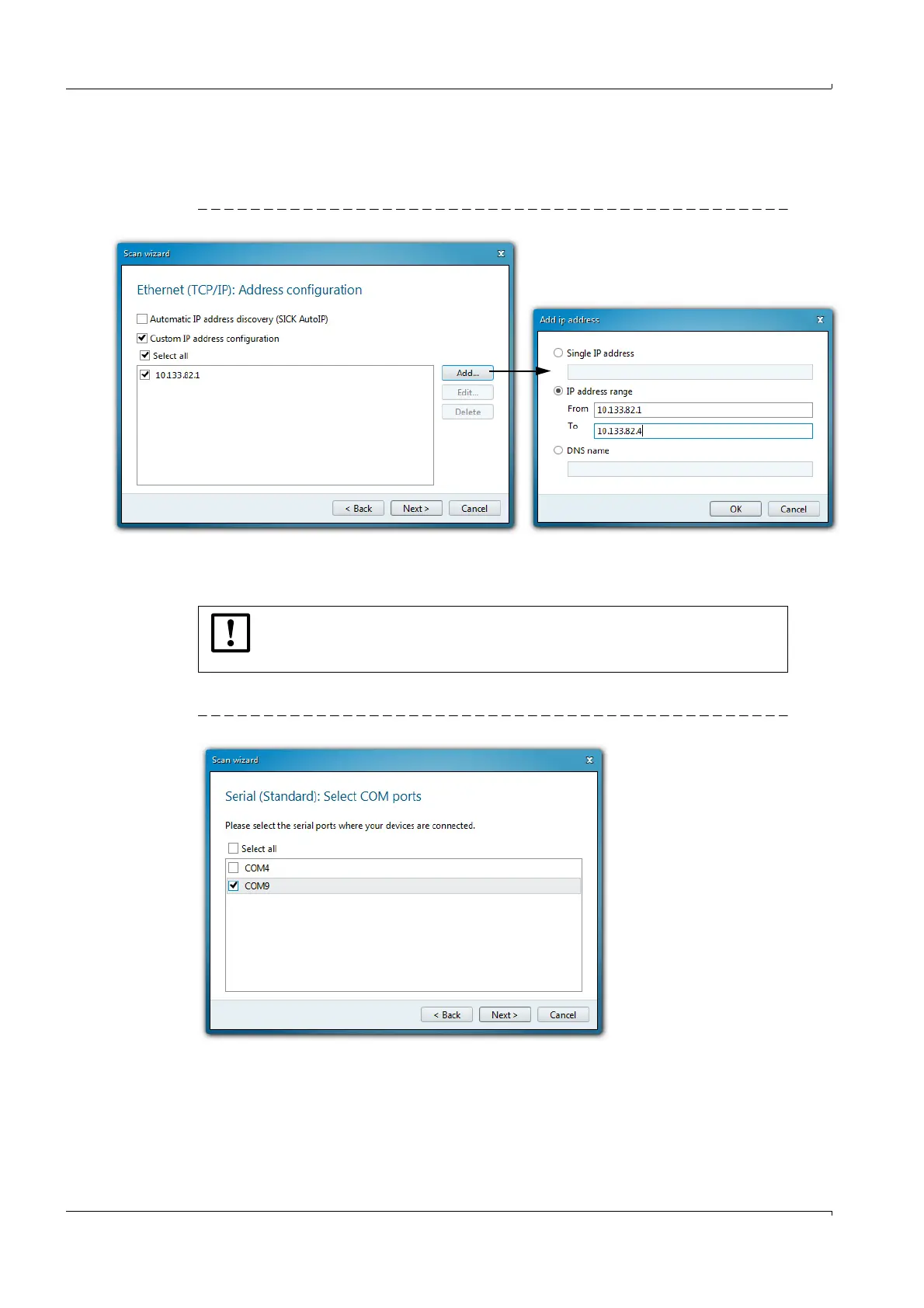
Enter the IP address of the device or the IP address range when several devices are
used (
p. 60, Fig. 42). The IP addresses shown are exemplary.
Click “OK”.
Fig. 42 Connection settings for connection via Ethernet
5 Click “Next”.
6 When devices are connected via serial connections (COM ports), select the COM ports
used and click “Next”.
If you are not sure which COM ports are used, select all COM ports.
Fig. 43 Selecting COM ports
7 To save the search settings, enter a name and click “Finish”.
SOPAS ET starts the device search.
The devices found are displayed in the “Device search” area when the device search is
finished (
p. 64, Fig. 50).
NOTICE:
The MCU(P) is connected via USB to the laptop/PC.
A serial interface (COM port) is simulated via which the connection is made.













 To Next Page